A Shopify Product give access to Kartra Membership
Status: Open · Asked by Alisha on · 0 views
Hey there
I want to set up a flow so that when a customer purchases a specific Shopify product (an online course), they will receive access to a membership inside Kartra (where the online course is housed). However, I can't figure out how to create a flow for when an order is fulfilled in Shopify for only one specific product. Also is there an option to assign a product in Kartra? Any insight or workaround into this would be super helpful! Thanks!
Hello @Alisha,
Currently, we do not have any actions available to assign a course in Kartra. However, you can either submit an action request on our request board or use the API by Pabbly to achieve this functionality.
Add your request here - https://pabbly.hellonext.co/b/Update-Existing-Application
Hello @Alisha,Currently, we do not have any actions available to assign a course in Kartra. However, you can either submit an action request on our request board or use the API by Pabbly to achieve this functionality.
Add your request here - https://pabbly.hellonext.co/b/Update-Existing-Application
Thanks for the feedback Preeti. I can certainly submit a request. In the meantime, would I set up a workflow that captures only orders for that product and puts the data in a Google Spreadsheet. Then another workflow that takes the customer data in the spreadsheet and adds them Kartra to the necessary product? Am I on the right track. :P
Hello @Alisha,
Yes, this can be done.
However, after discussing the action possibility in Kartra, our team found that there is no documented endpoint for product assignment. We recommend reaching out to the Kartra team to check if they have updated documentation on how a product can be assigned to a lead.
Hello @Alisha,Yes, this can be done.
However, after discussing the action possibility in Kartra, our team found that there is no documented endpoint for product assignment. We recommend reaching out to the Kartra team to check if they have updated documentation on how a product can be assigned to a lead.
Thanks Preeti. My plan was to create a lead in Kartra with a tag which then triggers an automation set up in Kartra. Only thing is I am having an issue creating a spreadsheet with ONLY customers who purchase a course. This is the filter I put in... suggestions?
I assume you want to execute the next step of the workflow only for the product named "Transform Your Maths Lessons | Online Mini Course | K - Grade 6 Teachers." If so, please enter the product name manually in the Value field instead of mapping it from above, as shown here.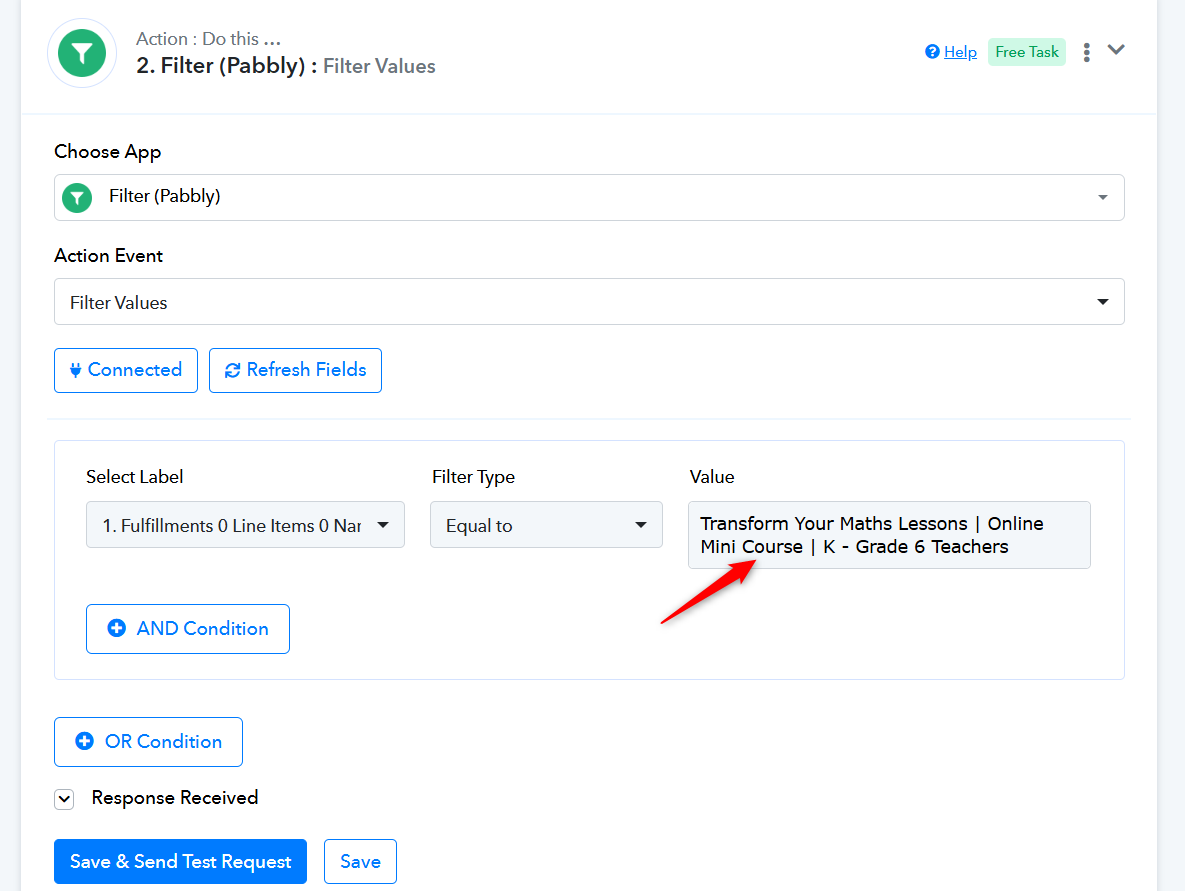
Thank you! I forgot I could type in the text. That has solved this issue. Part 1/2 done!
Next question. I've set up a second flow using the Google Sheet with the Shopify purchase to trigger a tag being added in Kartra or creating a new lead. Then within Kartra I have an automation that triggers the course being added. This flow is working; however, when I test purchasing a course, this second flow does not start immediately. Under the extension on Google Sheets, I've chosen - Send on Event and Auto Send on Schedule. Does this mean the spreadsheet will only update on the hour with the current set-up? If that is the case, what is an alternative since I need customers to get instant access to the course in Kartra upon purchase in Shopify. Thanks for your problem solving skills!!
Hello @Alisha,
You can add the one-minute script to your Google Sheets to reduce the trigger time from 1 hour to 1 minute. It will help you trigger the workflow faster: https://forum.pabbly.com/threads/google-sheets-1-minute-trigger.12927/.
Hello @Alisha,You can add the one-minute script to your Google Sheets to reduce the trigger time from 1 hour to 1 minute. It will help you trigger the workflow faster: https://forum.pabbly.com/threads/google-sheets-1-minute-trigger.12927/.
That's super helpful! Thanks!
I managed to put it all into one workflow.
Shopify Order> Filter by product name>Kartra add tag [ triggers automation in Kartra for membership] > Filter if tag success=error> Create lead> Add Tag.
Got there in the end. I appreciate your help problem solving this one. Thanks again!
Hello @Alisha,
Thanks for the update, we'd love to hear your thoughts! If you have a moment, please rate us on Google. Your feedback helps us improve.
If you face any further issues please feel free to reach out to us.