about the time to update
Status: Closed · Asked by Danny yoon on · 0 views
but still now working. can check please?^^
thank you^^
Danny yoon:
i set a time trigger in 10 minbut still NOT working. can check please?^^thank you^^
Hello Danny,
Thanks for contacting us.
Could you please elaborate on your concern so we can help you accordingly?
Thanks & Regards,
Adeel Akhtar
🌐 Pabbly.com
Subject: Ecwid New Order Advanced trigger is not running automatically
Hello Adeel,
Thank you for your reply.
I am using the following Pabbly Connect workflow:
Ecwid – New Order Advanced
Iterator – items
Router / Filter
JSON Extractor for products with options
Google Sheets – Add New Row
The workflow is switched ON.
When I manually use Save & Send Test Request, the Ecwid order data is received correctly, and the order is successfully added to Google Sheets.
However, when I place a new test order on my Ecwid store while the workflow is ON, the workflow does not run automatically. I waited more than 10 minutes, but:
No new row was added to Google Sheets.
No automatic execution appeared in the Pabbly task history.
The order was only processed when I manually tested the steps.
One example test order is:
Ecwid order ID: KS.O3IAY
Internal order ID: 649202451
Created date: 2026-07-21 16:59 UTC
Payment status: AWAITING_PAYMENT
Fulfillment status: AWAITING_PROCESSING
I intentionally need orders with AWAITING_PAYMENT status to be processed immediately because unpaid bank-transfer orders must reserve inventory.
Could you please check why the Ecwid – New Order Advanced trigger is not detecting new orders automatically while the workflow is ON?
Please also confirm:
Whether this trigger checks for new orders every 10 minutes.
Whether orders with
AWAITING_PAYMENTstatus are supported.Whether there is any issue with the Ecwid connection or trigger polling for my workflow.
Thank you.
Best regards,
Danny
Hello Danny,
Could you please share the Workflow URL so that we can look into it and provide information accordingly?
Please be aware that to assist you effectively, we may need to access your Pabbly Connect account. If you're comfortable with this, please grant us permission by stating in your next email: "You have my permission to log into my Pabbly Connect account, and edit workflow {If required}. Here is the registered email address associated with it."
Thanks & Regards,
Adeel Akhtar
🌐 Pabbly.com
Hello Danny,
Could you please share the Workflow URL so that we can look into it and provide information accordingly?
Please be aware that to assist you effectively, we may need to access your Pabbly Connect account. If you're comfortable with this, please grant us permission by stating in your next email: "You have my permission to log into my Pabbly Connect account, and edit workflow {If required}. Here is the registered email address associated with it."
Thanks & Regards,
Adeel Akhtar
🌐 Pabbly.com
As I understand, this is a polling trigger and does not require a separate webhook setup.
The trigger says “This trigger will check the new data in 10 min.”
As I understand, this is a polling trigger and does not require a separate webhook setup.
Could you please confirm whether the Ecwid New Order Advanced polling trigger is active for my workflow and why it is not retrieving newly created orders?
[email hidden]
https://connect.pabbly.com/v2/app/workflow/mapping/IjU3NjcwNTZlMDYzZTA0M2M1MjZlNTUzMTUxM2Ii_pc
and i made the ver2
https://connect.pabbly.com/v2/app/workflow/mapping/IjU3NjcwNTY5MDYzMTA0MzA1MjZmNTUzNjUxMzYi_pcOn Wed, Jul 22, 2026 at 8:29 AM Danny yoon <[email hidden]> wrote:On Wed, Jul 22, 2026 at 7:39 AM Pabbly Support <[email hidden]> wrote:Hello Danny,
Could you please share the Workflow URL so that we can look into it and provide information accordingly?
Please be aware that to assist you effectively, we may need to access your Pabbly Connect account. If you're comfortable with this, please grant us permission by stating in your next email: "You have my permission to log into my Pabbly Connect account, and edit workflow {If required}. Here is the registered email address associated with it."
Thanks & Regards,
Adeel Akhtar
🌐 Pabbly.com
Hello Danny,
We checked the task history of the first workflow, and the workflow has been triggering successfully. Kindly activate the workflow and then monitor.
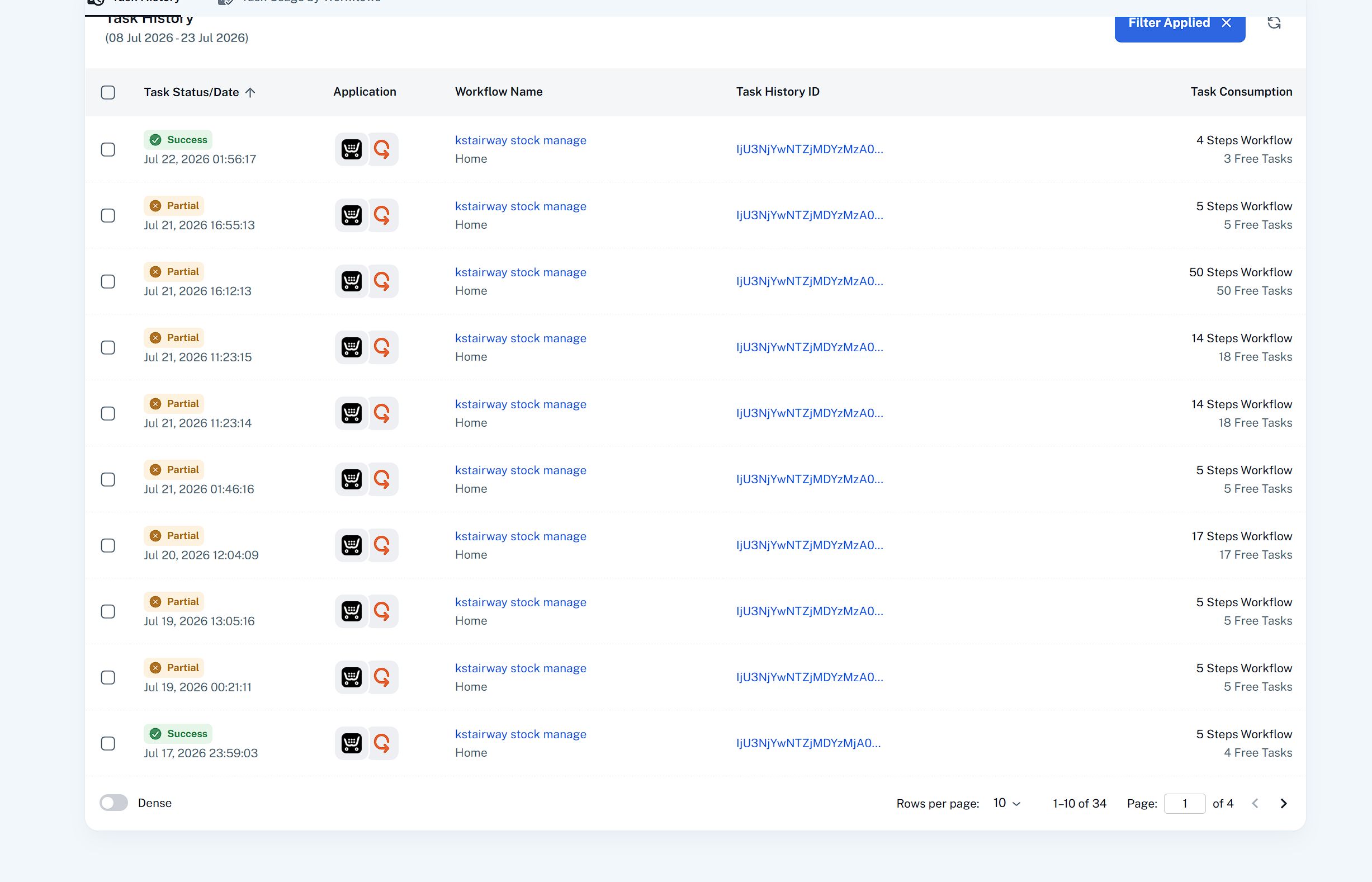 Both workflows are set up to trigger on the same New Order event. I recommend keeping one workflow for one event. You can clone either of the workflows and then hit the Save and Send Test Request button of the trigger once and capture the response and then monitor the workflow task history.
Thanks & Regards,
Adeel Akhtar
🌐 Pabbly.com