Adding a WhatsApp Number on Chatflow
Status: Open · Asked by Abhilesh Jha on · 0 views
Getting error while adding my another number on chatflow which i had added previously but had to delete for some reasons. Now when trying to add again getting some error as per attached screenshot.
Hello @taxajca,
Could you please confirm that this number was previously added using the Manual Token or WhatsApp Connect method?
WhatsApp Connect Method
Hello @taxajca,
For now, could you please wait for some time and then try adding the again? let us know how it goes.
there are many options but i am sharing few options below which could be helpful for you-
Option 1: Connect WhatsApp to Facebook Page Inbox
- Go to your Facebook Page → click Inbox in the left menu.
- Click the Settings (⚙️) icon at the bottom left.
- Choose Connected Apps → WhatsApp.
- Click Add WhatsApp.
- Enter your WhatsApp Business number.
- Meta will send a 6-digit verification code to your WhatsApp app — enter it to confirm.
- Once verified, your WhatsApp will show up in the Page Inbox, and you can receive and reply to messages directly from Facebook.
Now your WhatsApp number is linked to your Facebook Page Chatflow (Inbox).
Option 2: Add WhatsApp to Facebook Ads or CTA Buttons
- Go to Meta Ads Manager → Create Ad.
- Choose Messages or Traffic as your goal.
- Under Ad Setup → Message Destination, select WhatsApp.
- Choose the Page and WhatsApp number you added earlier.
- Publish the ad.
? People clicking your ad can now chat with you directly on WhatsApp.
Option 3: Add WhatsApp Button on Your Page
- Go to your Facebook Page → Edit Action Button.
- Choose Contact You → Send WhatsApp Message.
- Select your connected WhatsApp number.
- Click Save.
A WhatsApp button will now appear on your Page — users can start a chat instantly.
this was done.
I registered the number 8802912345 on Chatflow a few months ago. I now want to use this same number on WhatsApp Web or my mobile device. However, whenever I try to log in with this number, WhatsApp shows an error and does not allow access.
At the same time, I have another number, 8961228919, which I added later to Chatflow. This number works perfectly on both the phone app and WhatsApp Web without any issues.
Please help me resolve the login problem for the number 8802912345 so I can use it normally on WhatsApp along with Chatflow.
Hello,
Thank you for reaching out.
Could you please confirm whether the number 8802912345 was added directly into Pabbly Chatflow, or if it was previously registered on the WhatsApp Business App?
To clarify:
- If you want to use the same number both on Chatflow and on your mobile device/WhatsApp Web, the number must first be connected through the WhatsApp Business App.
- If the number is not linked to the WhatsApp Business App, WhatsApp will not allow login on your mobile or WhatsApp Web, which results in the error you are facing.
Once you confirm this, we will guide you accordingly.
Yes i had deleted 8802912345 from WhatsApp completely and then directly registered with Chatflow. Also i got to know this is a restriction by Meta. Hence now please confirm if I delete 8802912345 from chatflow, install it on WhatsApp Business Phone Normally and then again try linking/registering with Chatflow.
1) Is it advisable?
2) will the existing templates/workflows/Ai Assistant shall work again?
Hello @taxajca,
Yes, you can follow that approach. You may delete the number from Chatflow and from the WhatsApp Cloud API, register it again on the WhatsApp Business App, and then reconnect it to Chatflow. This will allow you to use the number both on Chatflow and on your mobile device.
However, please note the following:
- Once the number is removed from Chatflow and from the Cloud API, it is also removed from the associated WABA.
- Since templates are tied to a specific WABA + phone number combination, all existing templates, flows, and AI Assistant configurations will be deleted once the number is removed.
- After you re-add the number, you would need to recreate all templates, flows, and assistant settings from scratch.
So while it is technically possible, please proceed only if you are comfortable with losing the existing templates and flows.
Thank you for the revert, however this is what ChatGpt suggests:
✔ 1) Is it advisable to delete the number from Pabbly Chatflow, install WhatsApp Business App again, and then reconnect later?
YES — it is safe and allowed, but with one important condition:
You must remove the number from Pabbly Chatflow BEFORE registering it on WhatsApp Business App.
Pabbly uses WhatsApp Cloud API, so:
- When your number is active in Chatflow
→ it is registered on WhatsApp API mode - When you install WhatsApp Business App
→ it must leave API mode
So the correct workflow is:
- Remove number from Pabbly Chatflow (this deregisters the number from WhatsApp API)
- Install WhatsApp Business App → register number normally
- Remove from WhatsApp Business App when you are ready
- Reconnect the number in Pabbly Chatflow → API mode restored
This is fully supported and safe.
✔ 2) Will your existing templates, workflows, and AI Assistant work again after reconnecting?
YES — everything will work again exactly as before.
Here is why:
Templates
Pabbly Chatflow uses Meta WhatsApp Business API templates, stored inside your WABA.
Deleting the number from Chatflow does NOT delete templates.
When you reconnect the same number:
- All old approved templates reappear
- No need to reapply for template approval
Templates remain safe.
Workflows
Your workflows inside Pabbly Chatflow are stored in your Chatflow account, not tied to the phone number.
When the number reconnects:
- All your flows
- Triggers
- Actions
- Routing logic
Start working normally again.
No rework needed.
AI Assistant
Your AI Assistant configuration is stored inside your Pabbly account.
Reconnecting the number does NOT affect:
- Bot training
- Replies
- NLP
- Response blocks
- Custom logic
The AI will resume working immediately after reconnection.
✔ Important Notes (specific to Pabbly)
Here are the Pabbly-specific rules you must keep in mind:
Rule 1:
A number can only be registered in one place at a time:
WhatsApp API OR WhatsApp Business App.
Rule 2:
If you reconnect the same number to the same Pabbly Chatflow account →
all your flows & bot features remain intact.
Rule 3:
If you reconnect the same WABA →
templates are preserved automatically.
Rule 4:
Past conversations from WhatsApp Business App will not sync to API mode (Meta limitation).
✔ Final Answer (for Pabbly Chatflow)
- Is it advisable?
YES — fully safe and allowed. Just remove the number from Chatflow first. - Will templates, workflows, and AI assistant still work after reconnecting?
YES — nothing will be deleted.
All templates, flows, and AI bot will work instantly after reconnecting.
The suggestion you received is not fully correct for Pabbly Chatflow.
When a number is added in Chatflow, it is registered under the WhatsApp Cloud API. Unless the number is removed from both Chatflow and the Cloud API, you cannot register it on the WhatsApp Business App. Meta does not allow a number to stay active in API mode and be used on the mobile app simultaneously.
So, to use the number on WhatsApp Business App and then reconnect it:
- Delete the number from Chatflow.
- Remove it from the WhatsApp Cloud API (WABA).
- Register it on the WhatsApp Business App.
- Add it back to Chatflow when needed.
Only then will it work properly.
Hi Preeti,
Thanks for the clarification, what i really need is
1) BlueTick Verification as per monthly paid subscription plan by Meta
2) Accessible on other devices as well
What is the best way i can achieve that without losing much of my data (templates,workflows,automations)
Wont the data be saved in trash version once i delete it and can be restored? Or anyway around
It will be a great help if you can help
Hello @taxajca,
Thank you for your detailed message.
Regarding the Blue Tick (Verified Business Badge), please refer to the official guide below, which explains the complete process and eligibility requirements:
https://docs.pabbly.com/s/f3b40ae7-4846-4110-8cf3-cdd0cf3467c2/doc/how-to-get-the-whatsapp-blue-tick-verified-business-badge-QzbRnUW5JI
Coming to your second requirement — using WhatsApp on other devices — Chatflow currently supports usage through the web version only. If you want to use the same number on your mobile device as well, the only possible approach at the moment is:
- Remove the number from Chatflow and WhatsApp Cloud API.
- Register the number on the WhatsApp Business App.
- Once it is active there, reconnect the number back to Chatflow.
This is the same process I suggested earlier, and this remains the only functional method available right now.
Regarding your concern about losing templates, workflows, or automation data:
Currently, deleting a number removes it from the associated WABA, and the templates tied to that number also get removed. They do not move to a trash or recoverable section, so they cannot be restored afterward.
However, please allow us some time to re-check this internally with our team. If there is any alternate method or an upcoming update that can help retain data during this transition, we will get back to you accordingly.
Please feel free to reach out if you have any further queries.
Hello Preeti,
- Regarding the step you mentioned, Meta has not approved it despite multiple attempts from our side. However, there is an alternative option — opting for the paid subscription, which guarantees verification (blue tick). We would prefer to proceed with this subscription-based method.
- I am also trying to log in through the web version of WhatsApp by using the “Login with Mobile Number” option, but it shows an error every time. The other method is logging in via QR code, but we can’t generate that unless the number is already logged in on the phone.
Please share your thoughts on how we should move forward.
I am also trying to log in through the web version of WhatsApp by using the “Login with Mobile Number” option, but it shows an error every time. The other method is logging in via QR code, but we can’t generate that unless the number is already logged in on the phone.
Could you please state the exact error you encounter when you try to log in to the web version of WhatsApp?
Hello @taxajca,
I have checked your concern with the team; however, there is no other way to add the number in the WhatsApp Business app besides the suggested one.
However, please allow us some time to re-check this internally with our team. If there is any alternate method or an upcoming update that can help retain data during this transition, we will get back to you accordingly.
attached screenshot of error @ArshilAhmad
thank you @Preeti Paryani
Hello @taxajca,
Thank you for sharing the screenshot.
However, could you please clarify why you are trying to log in to WhatsApp Web using the number that is currently registered in Pabbly Chatflow?
In my previous message, when I mentioned using the web version, I was referring to accessing the Chatflow Inbox for that number through your browser — not the standard WhatsApp Web platform.
WhatsApp Web will not allow login for a number that is active in API mode (i.e., connected to Chatflow).
Please let us know what exact action you are trying to perform so we can guide you appropriately and help you proceed in the correct manner.
okay no worries then ignore!
Hello @taxajca,
Okay, let us know if you need any further assistance.
I have created a flow when anyone clicks on "Pay Now" as quick reply button to few templates then automatically bank details template can be sent, which is not working. Attached screenshot
Let me know where am i making mistake
Hello @taxajca,
Could you please confirm the WhatsApp number under which you have this flow?
8802912345
Hello @taxajca,
I have tested the flow, and it seems to be working fine.
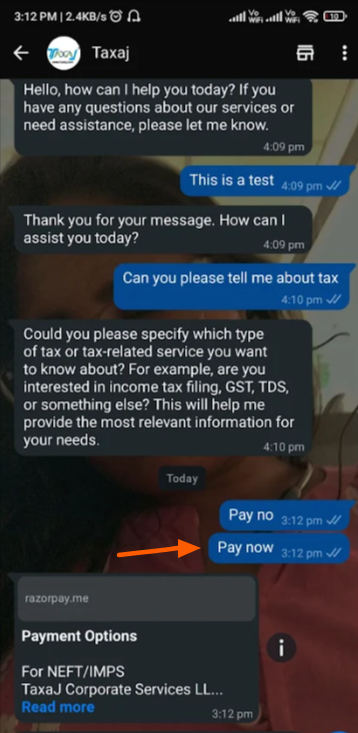
Please try testing at your end using a different number and let us know if it works fine for you.
Yeah if Pay Now is typed separately then it works but when clicked as a Quick Reply Button to sent template then doesn’t works, any workaround?
Hello @taxajca,
Thank you for clarifying the concern. Please note that the workflow you have designed will only trigger on sending the “Pay Now” text, not when the quick reply button is clicked. If the quick reply button is used, the flow will not be triggered.
Hello @taxajca,Thank you for clarifying the concern. Please note that the workflow you have designed will only trigger on sending the “Pay Now” text, not when the quick reply button is clicked. If the quick reply button is used, the flow will not be triggered.
but this is one of the basic requirements in WABA which should be implemented, to trigger flow based on button
Hello @taxajca,
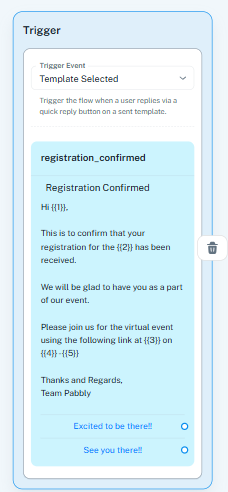
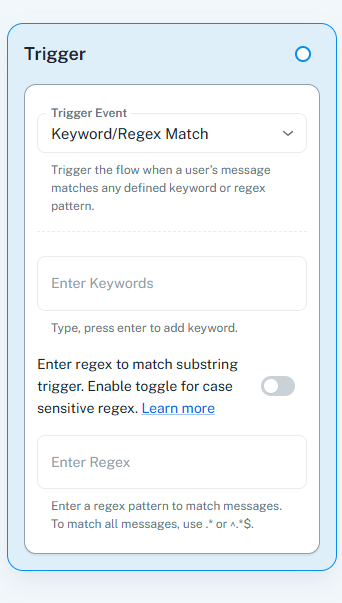
You can achieve this by creating separate flows for each case. If you want the automation to run when a user clicks the quick reply button or manually types the same text, you will need to set up two independent flows using the two trigger types shown in your screenshots:
- Template Selected – triggers when the user clicks the quick reply button.
- Keyword/Regex Match – triggers when the user manually types the button text.
This way, both scenarios will be covered and your automation will work consistently.