AI Agent in Pabbly Chatflow
Status: Open · Asked by SouravG on · 0 views
Pabbly Chatflow supports AI agents only for saved contacts in the contact list. Is it possible to create a general Chatflow and integrate AI Agent replying from the knowledge base to anyone who is not in the contacts list?
Hi @SouravG,
As soon as you receive a message from a person, their contact is automatically added to your Pabbly Chatflow account. So even if the contact isn’t already in your contact list, they can still receive a reply from the AI agent.
youtube.com/watch?v=ij0-H2qaa04
youtube.com/watch?v=hgYrNw1aUv8
Thanks & Regards,
Arshil Ahmad
Customer Support Associate
? Pabbly.com
?Rate your support
Hi @SouravG,As soon as you receive a message from a person, their contact is automatically added to your Pabbly Chatflow account. So even if the contact isn’t already in your contact list, they can still receive a reply from the AI agent.
youtube.com/watch?v=ij0-H2qaa04
youtube.com/watch?v=hgYrNw1aUv8
Thanks & Regards,
Arshil Ahmad
Customer Support Associate
? Pabbly.com
?Rate your support
Hi Arshil,
Thank you for your response. My objective is to create a Pabbly Chatflow open to any new user which will have an AI agent with a knowledge base linked to it that all users, whether in my contact list or not in my contact list, can access according to the query.
Thanks
Hi @SouravG,
As highlighted in the image, to ensure the AI replies to all incoming chats (including new users), please follow these steps:
- Go to Settings.
- Open Inbox Settings.
- Under AI Auto-Reply Settings, enable the toggle for Enable AI Auto Replies.
- Click Save.
Once this is enabled, the AI Assistant will automatically respond to new incoming chats based on the configured knowledge base and rules.
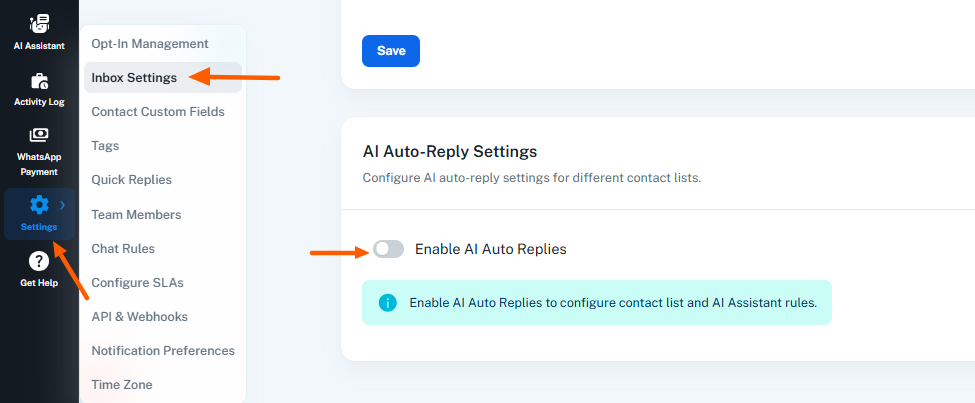
Please let us know if you need any further assistance with this setup.
Hi @SouravG,As highlighted in the image, to ensure the AI replies to all incoming chats (including new users), please follow these steps:
- Go to Settings.
- Open Inbox Settings.
- Under AI Auto-Reply Settings, enable the toggle for Enable AI Auto Replies.
- Click Save.
Once this is enabled, the AI Assistant will automatically respond to new incoming chats based on the configured knowledge base and rules.
Please let us know if you need any further assistance with this setup.
Thank you so much, Preeti. I'll now try a new personal project for my confidence. Wish me luck.
Hi @SouravG,
You’re most welcome!!
Wishing you the very best of luck with your new personal project.
Hi @SouravG,You’re most welcome!!
Wishing you the very best of luck with your new personal project.
Hi Preeti
Do I need a paid ChatGPT to create the API, or can I still generate the API from my free ChatGPT account? I guess I am doing something wrong. When I am setting up everything and starting to chat, I am getting only the fallback message
Hi @SouravG,
Yes, you would need a paid ChatGPT plan in order to use the AI Assistant with Pabbly Chatflow. The free ChatGPT account does not support generating or using API access, which is why you are only seeing the fallback message during chats.
Once you upgrade to a paid plan and configure the API key correctly, the AI Assistant should start responding as expected.
Please let us know if you need help with the setup or configuration.
Hi,
I am freshly creating a chatflow as guided in the Pabbly YouTube video, but the WhatsApp chat is not responding to the trigger Booking, Reservation, or Hotel Booking. Whereas I am getting a notification that I have received a message.
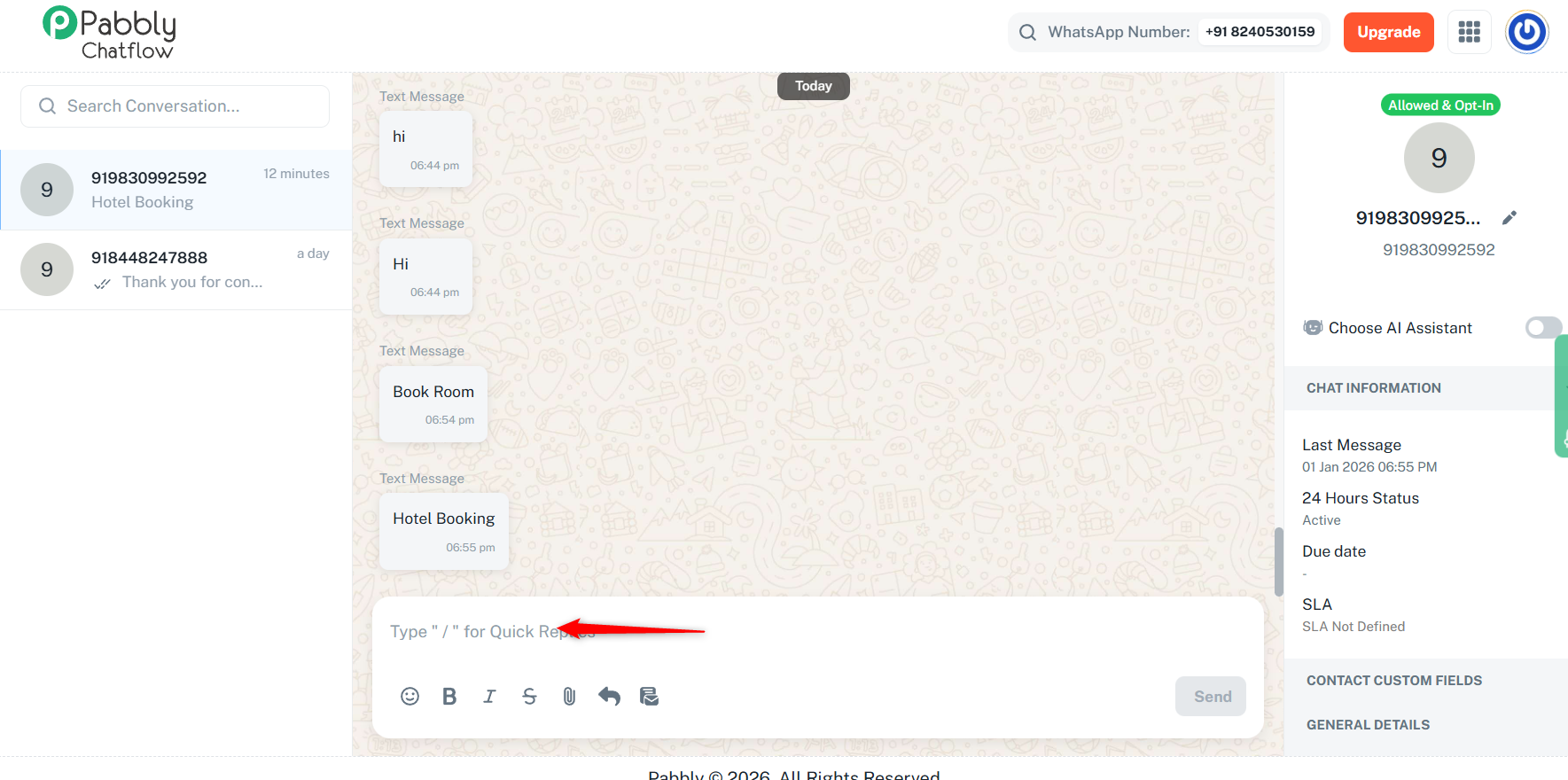
We can see that the Quick Reply section has appeared in your chat, which suggests that you have intervened in this conversation. Because of this, the flow is not being triggered.
https://chatflow.pabbly.com/app/inbox?id=6956632d6273abb5914f4c78
We recommend testing the flow by sending a message from a different phone number. This should allow the flow to trigger and work as expected.
.
Thanks & Regards,
Arshil Ahmad
Customer Support Associate
? Pabbly.com
?Rate your support
We can see that the Quick Reply section has appeared in your chat, which suggests that you have intervened in this conversation. Because of this, the flow is not being triggered.
https://chatflow.pabbly.com/app/inbox?id=6956632d6273abb5914f4c78We recommend testing the flow by sending a message from a different phone number. This should allow the flow to trigger and work as expected.
.Thanks & Regards,
Arshil Ahmad
Customer Support Associate
? Pabbly.com
?Rate your support
Okay. Thanks for the reply. Let me check.
There's something wrong. I have deactivated the previous flow and created a new flow with simple 'Test' as the trigger and 'Test message received' as the reply. But nothing can trigger the flow.
Hi @SouravG,
Upon checking the test chat we have noticed that the chat status was intervened. Please note that the flows only work where the status is open, refer to the attached image for a better understanding.
Test Chat done by You.
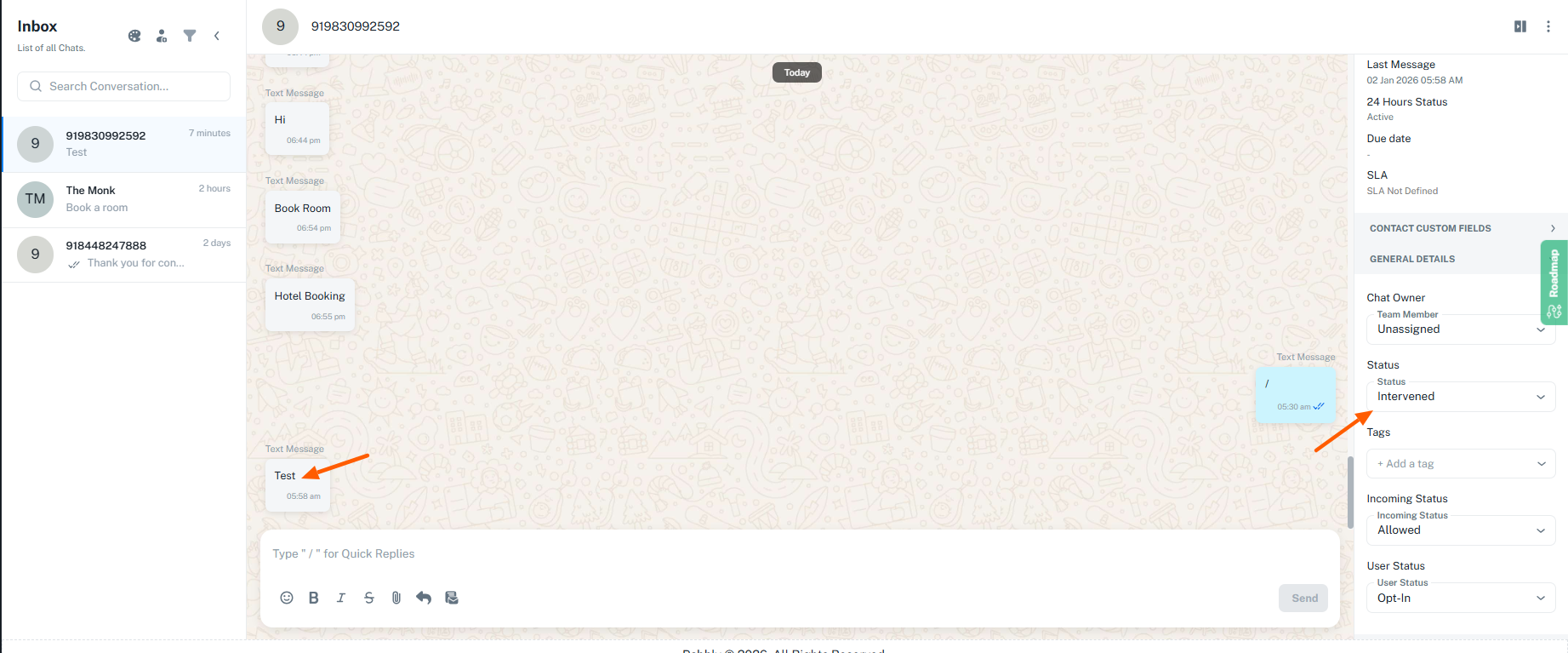
Test done by me
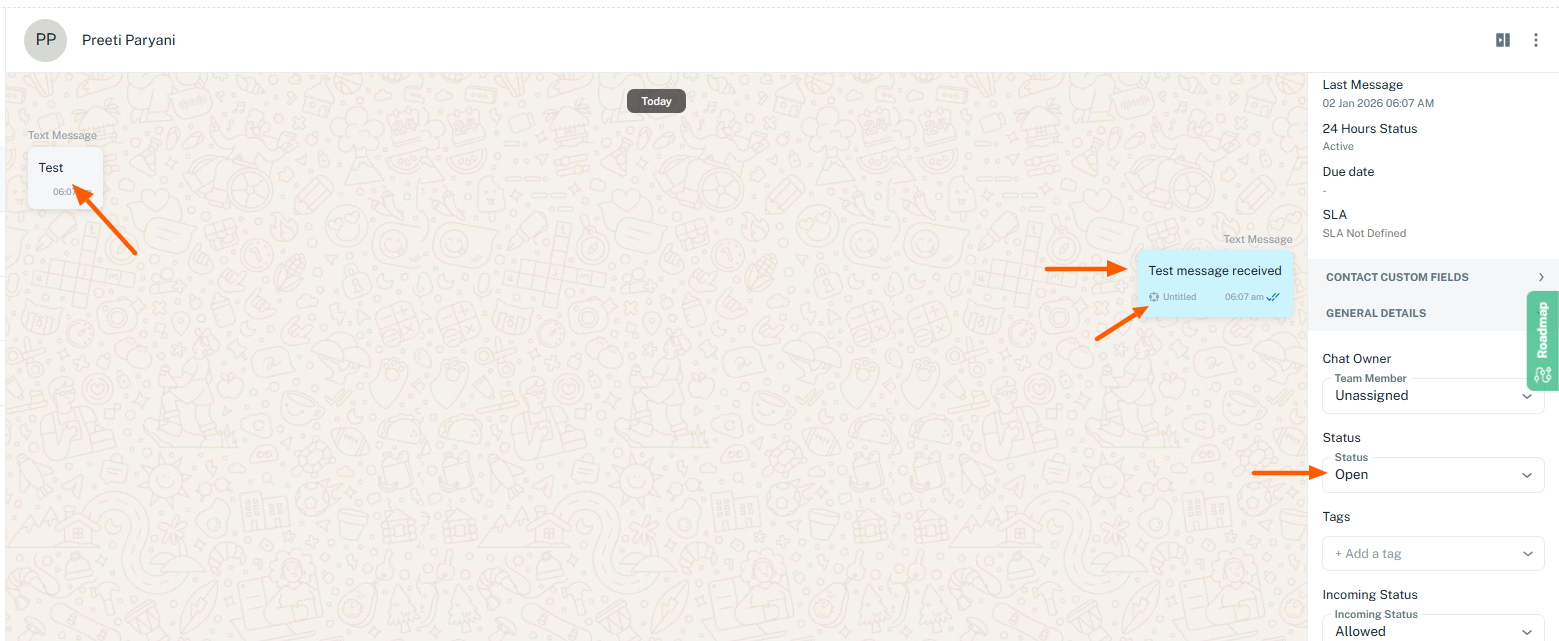
Now it seems working Preeti. But what could be the issue with my number 9830xxxx92?
Hello @SouravG,
The issue for the specific number is that the chat status was intervened. The chat status must be open to trigger a flow.