AiTable app not pushing all data fields
Status: Open · Asked by Fanny Opti-Biz on · 0 views
Hi, I am using AiTable app with action "create record", but for whatever reason, not all populated fields are pushed through. Success message is received though.
In the app config, certain fields are correctly populated (from previous steps), but when checking at workflow history, the "data in" does not even pick up those fields !
Can you please help ?
Hi @opti-biz,
Could you please share an example of the specific field in which the data is not being passed to the AiTable action application?
Thanks & Regards,
Arshil Ahmad
Customer Support Associate
? Pabbly.com
Hi @opti-biz,Could you please share an example of the specific field in which the data is not being passed to the AiTable action application?
Thanks & Regards,
Arshil Ahmad
Customer Support Associate
? Pabbly.com
Those fields (original label names from Aitable:
- Genre
- Prénom
- Nom
- Programme
- Email De L'inscrivant
- Tel
Hello @opti-biz,
Thank you for sharing the field names.
We noticed that the workflow is currently set to "I don't authorize Pabbly Support to log in to my account." Due to this restriction, we are unable to review the workflow configuration or task history from our end to investigate why those fields are not being passed to the AiTable action.
To help us troubleshoot this more efficiently, could you please provide consent to access your account and workflow? We will only review the configuration and task history to identify the issue and will not make any changes without your permission.
Once access is granted, we'll take a closer look and get back to you with our findings.
Hello @opti-biz,Thank you for sharing the field names.
We noticed that the workflow is currently set to "I don't authorize Pabbly Support to log in to my account." Due to this restriction, we are unable to review the workflow configuration or task history from our end to investigate why those fields are not being passed to the AiTable action.
To help us troubleshoot this more efficiently, could you please provide consent to access your account and workflow? We will only review the configuration and task history to identify the issue and will not make any changes without your permission.
Once access is granted, we'll take a closer look and get back to you with our findings.
Ok, I agree that you access in view mode; thank you !
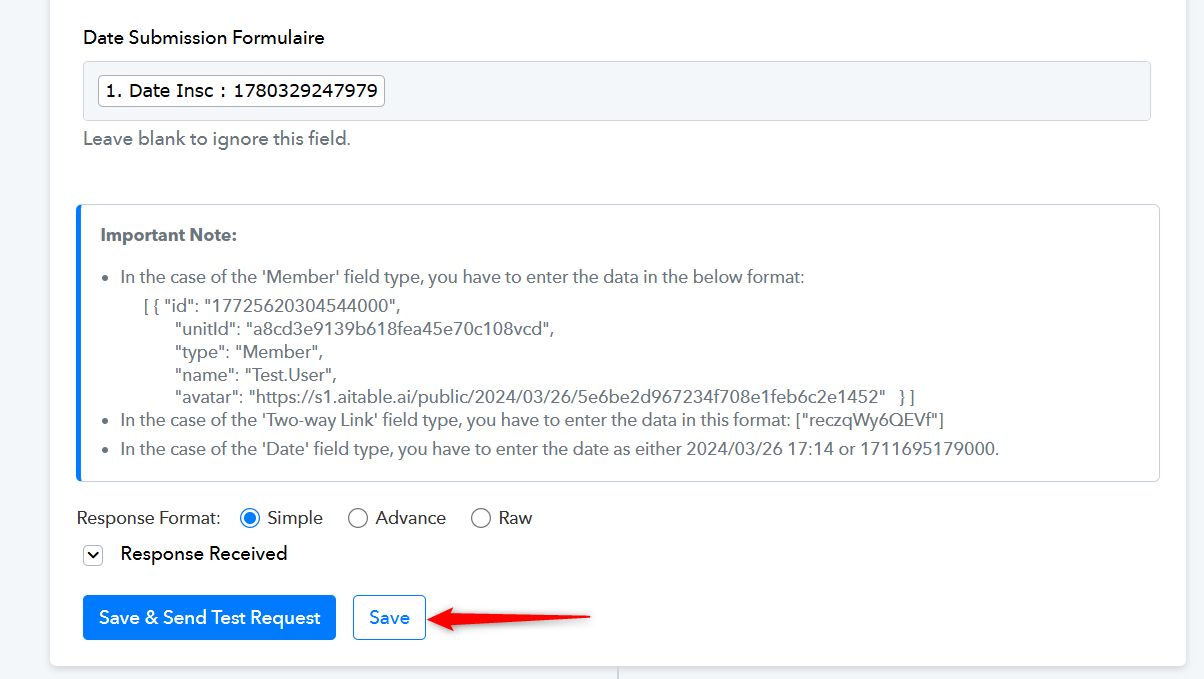
Please click on 'Refresh Fields' button, then remap the data to the specified fields if needed, 'Save' the step and see if that fixes your issue.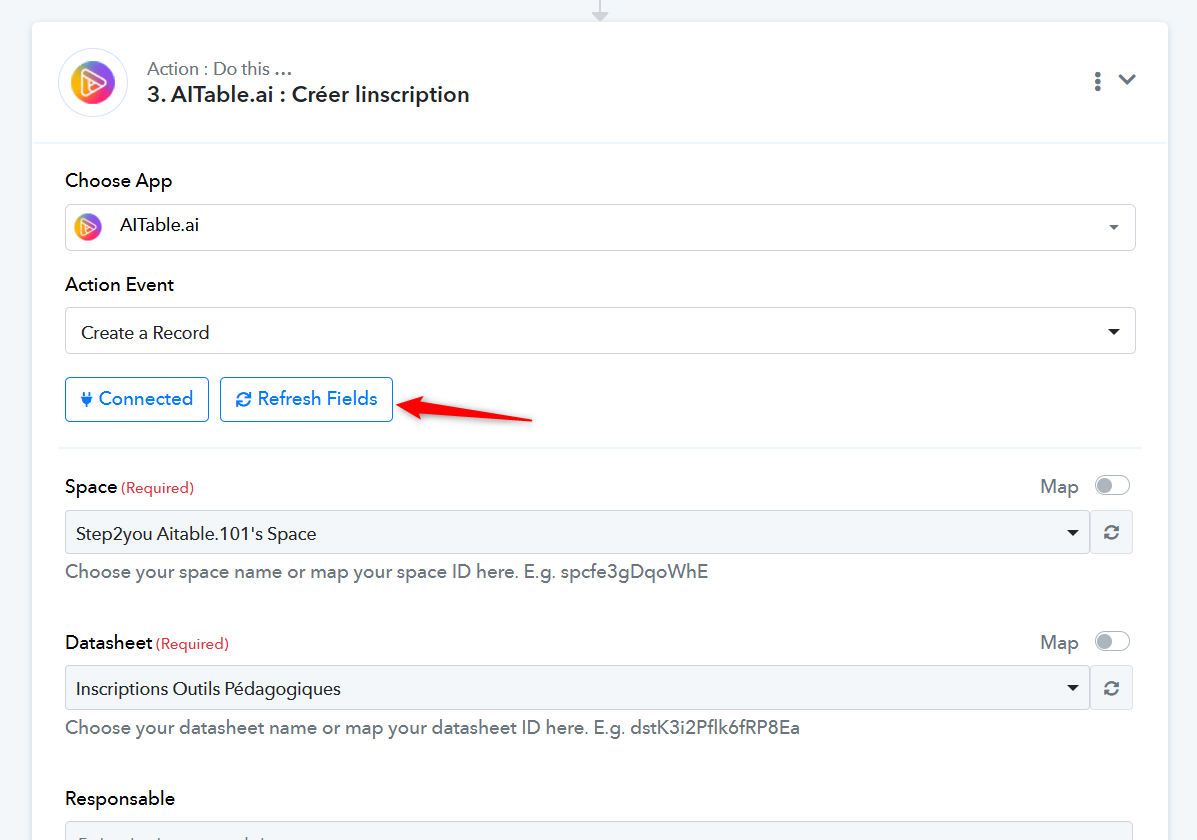
Thanks & Regards,
Arshil Ahmad
Customer Support Associate
? Pabbly.com
Please click on 'Refresh Fields' button, then remap the data to the specified fields if needed, 'Save' the step and see if that fixes your issue.
Thanks & Regards,
Arshil Ahmad
Customer Support Associate
? Pabbly.com
Hi, that's what I did even before posting here. I tried again today, but still same issue.
Hello @opti-biz,
Thank you for the update.
Since the issue still persists even after refreshing the fields and remapping the data, it would be best if we review the setup together over a Google Meet session.
Could you please book a convenient slot using the link below?
https://calendly.com/d/cvsh-prh-xv4
During the meeting, we will review the workflow configuration, field mappings, task history, and the AiTable setup in detail to identify the root cause of the missing field values.
Once the meeting is booked, we'll assist you further.
Hey @opti-biz,
As discussed during the meeting, we have escalated the reported issue to our technical team for further investigation.
Please allow us some time to review the matter. As soon as we receive an update from the team, we will get back to you with our findings.
We appreciate your patience and cooperation
Hey @opti-biz,As discussed during the meeting, we have escalated the reported issue to our technical team for further investigation.
Please allow us some time to review the matter. As soon as we receive an update from the team, we will get back to you with our findings.
We appreciate your patience and cooperation
Hi @Preeti Paryani
Many thanks for the support session this morning.
In the meantime, I have recreated the step from scratch and tried to populate data by adding each field one by one. It was successful.
I have cloned the workflow with failing step (I retested the step which still fails in the clone: https://connect.pabbly.com/workflow/mapping/IjU3NjcwNTZlMDYzZjA0MzM1MjY1NTUzMzUxMzIi_pc).
Not sure if your team want to further analyze the problem or not ?
In the meantime, I have recreated the step from scratch and tried to populate data by adding each field one by one. It was successful.
Is this a different workflow in which you recreated the step from scratch and it is working correctly? If so, could you please share the URL of that workflow as well?
Thanks & Regards,
Arshil Ahmad
Customer Support Associate
? Pabbly.com
Is this a different workflow in which you recreated the step from scratch and it is working correctly? If so, could you please share the URL of that workflow as well?Thanks & Regards,
Arshil Ahmad
Customer Support Associate
? Pabbly.com
Hi, I recreated the step from scratch in the original flow (active in production mode) and deleted old non working step:
https://connect.pabbly.com/workflow/mapping/IjU3NjUwNTZhMDYzNjA0M2Q1MjZiNTUzMjUxMzYi_pc
Before deleting the step, I have cloned the automation flow in a new workflow, which thus contains the failing step: https://connect.pabbly.com/workflow/mapping/IjU3NjcwNTZlMDYzZjA0MzM1MjY1NTUzMzUxMzIi_pc
Hi, I recreated the step from scratch in the original flow (active in production mode) and deleted old non working step:
https://connect.pabbly.com/workflow/mapping/IjU3NjUwNTZhMDYzNjA0M2Q1MjZiNTUzMjUxMzYi_pcBefore deleting the step, I have cloned the automation flow in a new workflow, which thus contains the failing step: https://connect.pabbly.com/workflow/mapping/IjU3NjcwNTZlMDYzZjA0MzM1MjY1NTUzMzUxMzIi_pc
Thank you for the insight. This indicates that the issue is resolved when the step is created from scratch, but not when the workflow is cloned. We have shared this information with our technical team for further investigation.
Thanks & Regards,
Arshil Ahmad
Customer Support Associate
? Pabbly.com
Hello @opti-biz,
Thank you for your patience.
We have identified and resolved the issue. The problem occurred when the Phone field contained a value with a leading "+" sign (for example, +32472894246). Due to this, the fields appearing before the Phone field in the AiTable request payload were being excluded, even though the workflow execution was showing as successful.
Our team has implemented and deployed a fix.
Could you please test the AI Table Create Record action again from your end and let us know if all the mapped fields (Genre, Prénom, Nom, Programme, Email De L'inscrivant, and Tel) are now being passed correctly?
We look forward to your confirmation.