All day event in Outlook/Exchange calendar
Status: Open · Asked by Feather01 on · 0 views
Hi there,
I am trying to create an all day event in the calendar. Is there a way to get the Exchange module to do this? Currently time setting is mandatory.
Thanks
Hi @Feather01,
In the current setup, the Start Date and End Date fields require a date-time format (date + time) to create an event.
To create an all-day event, you can:
- Provide the same start and end date
- Add appropriate time values (e.g., start at 00:00 and end at 23:59)
Once both date and time are included, the event will effectively behave as an all-day event.
Please try this and let us know how it goes.
Hi,
Setting start time at 00:00 and end time at 23:59 only creates the event with those time blocks. The time of meeting would still show up at 00:00 instead of timeless.
Example of what I'm looking to do... Below screenshot has 2 calendar meetings. Green has "all-day" turned on and so there's no time timestamp. Purple has even starting at 12:00am and ending at 11:59pm and show timestamp.
I'm looking to have my events set as "all-day" to avoid the time stamp. Is this possible?
Hi @Feather01,
Thanks for sharing the update on the behavior you observed.
We have escalated this to our team to add support for the isAllDay parameter in the "Microsoft Exchange : Create Event" action so that your use case can be achieved properly. Once this parameter is added, you will be able to create true all-day events without the time stamp appearing on the calendar.
Hi @Feather01,
Our team has now added the IsAllDay field in the "Exchange Online : Create Event" action.
You can set this field to True to create an all-day event without the time stamp appearing on the calendar.
Please try it from your end and let us know how it goes.
Hi,
Thanks so much for making the update to module!
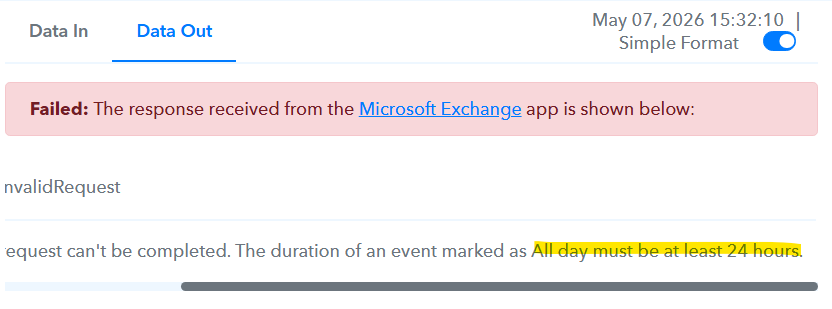
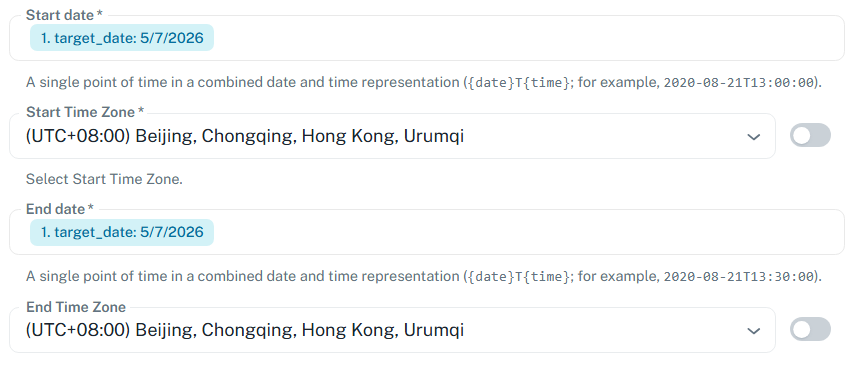
I got an error when I set dates are the same already. How to fix?
Hi @Feather01,
Since you are trying to create an all-day event, the Start Date and End Date cannot be the same.
If both dates are identical, Microsoft Exchange considers the event duration as 0 hours, which is why the error occurs.
To avoid this issue:
- In the Start Date field, add the actual event date.
- In the End Date field, add the next date.
Example:
- Start Date: 2026-03-07
- End Date: 2026-03-08
This will create a proper all-day event without showing a time stamp in the calendar.
Please try this once and let us know how it goes.
Works like a charm, thanks team!
Glad we were able to help.
We’d really appreciate it if you could share some quick feedback on the support you received:
Google Search
Thank you for your time.
Thanks & Regards,
Arshil Ahmad
Customer Support Associate
? Pabbly.com