Alternative to Google Drive and One Drive
Status: Open · Asked by Tony Passwater on · 0 views
We have worked with Google Drive and One Drive to set up a Folder structure our clients and their vendors can upload invoices, bills, etc ...
Both Google Drive and One Drive have issues that I have been looking for an alternative.
I like Mega Drive and it looks just like Dropbox so I am leaning toward it to switch to.
We have email addresses that the vendor use to send month end statements that we use Pabbly Connect to strip out the attached statement(pdf) and
put it into the proper client's folders. It works fine,
Is it possible to do the same with Mega Drive ?
Combo Question: Is it possible to filter out the other attachments that come often with these pdf attachments such as their company logo ?
Hi @AEIILLC,
We have worked with Google Drive and One Drive to set up a Folder structure our clients and their vendors can upload invoices, bills, etc ...
Both Google Drive and One Drive have issues that I have been looking for an alternative.
I like Mega Drive and it looks just like Dropbox so I am leaning toward it to switch to.We have email addresses that the vendor use to send month end statements that we use Pabbly Connect to strip out the attached statement(pdf) and
put it into the proper client's folders. It works fine,Is it possible to do the same with Mega Drive ?
Currently, we do not have a direct integration with the MEGA application, so we would first need to test this use case at our end.
Could you please share the workflow URL where you are extracting the attachments? This will allow us to test the use case further.
Combo Question: Is it possible to filter out the other attachments that come often with these pdf attachments such as their company logo ?
If the file you are attempting to upload has some differences compared to the files you are trying to filter out, then filtering should be possible.
Please share the workflow URL where you are extracting the attachments, so we can look into it further.
Thanks & Regards,
Arshil Ahmad
Customer Support Associate
? Pabbly.com
I have 4 currently active workflows connected to Google Drive. Each is client specific that I use your email trigger for a forwarding email we set up for clients and vendors. All are the same workflow going to the client's specific folder in Google Drive.
I can give you the URL in Mega to the folder if that is what you need ?
Is this what you want ?
https://connect.pabbly.com/workflow/mapping/IjU3NjcwNTZlMDYzMjA0Mzc1MjY4NTUzYzUxM2Ii_pc
Is this what you want ?
https://connect.pabbly.com/workflow/mapping/IjU3NjcwNTZlMDYzMjA0Mzc1MjY4NTUzYzUxM2Ii_pc
Yes, that is exactly what we needed. Since MEGA is not natively integrated with Pabbly Connect and does not appear to have a publicly accessible REST API, we attempted to set up an endpoint but were unable to do so.
We have forwarded your request to our integrations team to check whether MEGA can be natively integrated with Pabbly Connect. We will get back to you as soon as we receive any updates from their end.
===============================================================================
As for your concern regarding filtering out unnecessary PDF attachments, could you please share 2–3 task history IDs where you received the company logo in your Email Parser trigger step? This will allow us to differentiate between a regular attachment and an attachment related to the company logo, so we can set up the filter step accordingly.
Your workflow has a single link, so we are unable to determine the exact difference between the two links. Once we have the task history IDs, we will be able to check for any differences and set up the filter conditions accordingly.
Thanks & Regards,
Arshil Ahmad
Customer Support Associate
? Pabbly.com
We have forwarded your request to our integrations team to check whether MEGA can be natively integrated with Pabbly Connect. We will get back to you as soon as we receive any updates from their end.
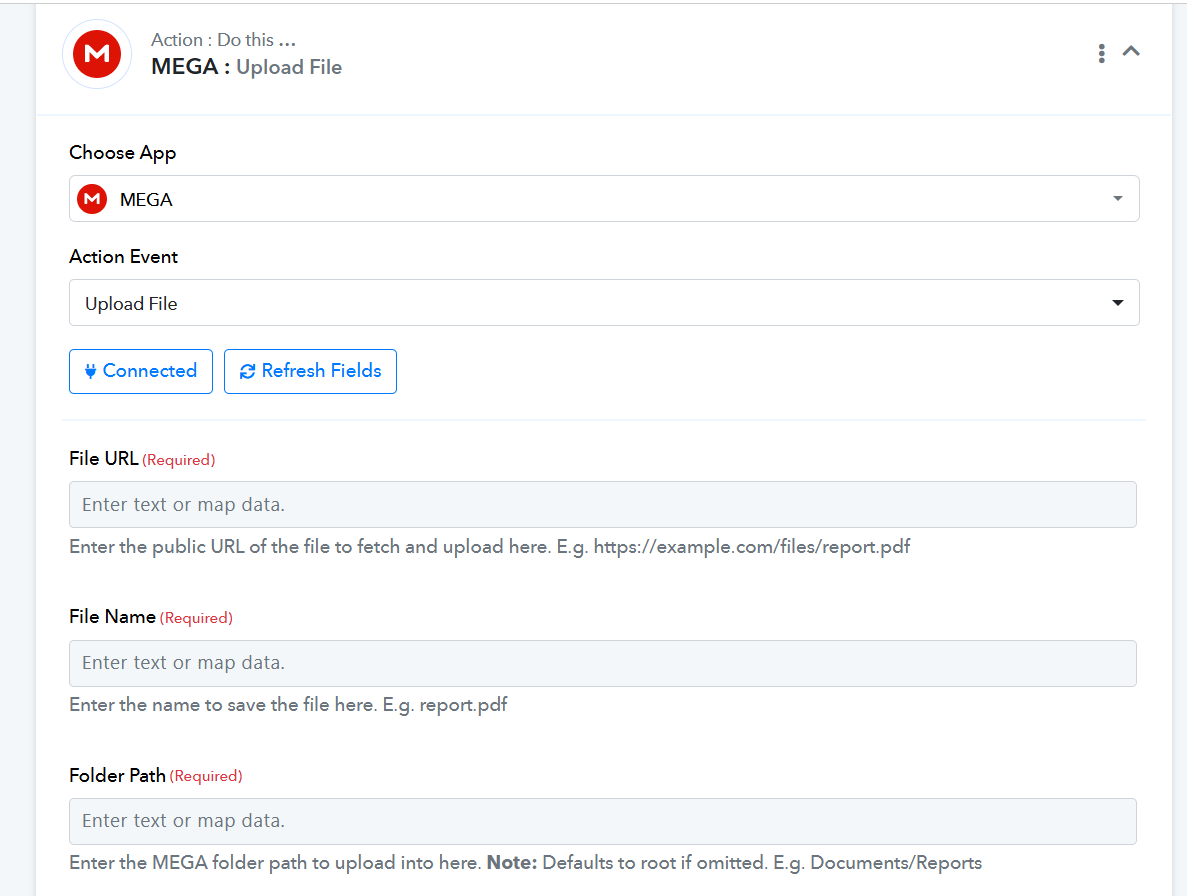
We are pleased to inform you that our team has integrated the MEGA action application with Pabbly Connect. You can use the MEGA: Upload File action event to upload files to your MEGA drive.
Thanks & Regards,
Arshil Ahmad
Customer Support Associate
? Pabbly.com
That is great !!! Thank you ...
Here is the last workflow that saves the images attached to the vendor emails as well as the pdf files.
The name of the file is often "image" but I am not 100% sure it is all the time ...
The image type that I have seen is "png" or "jpg"
The attachments we want are pdf, doc, xlsx, xls ... anything else does not need to be parsed.
https://connect.pabbly.com/workflow/mapping/IjU3NjYwNTZlMDYzNjA0M2M1MjZiNTUzMjUxMzci_pc
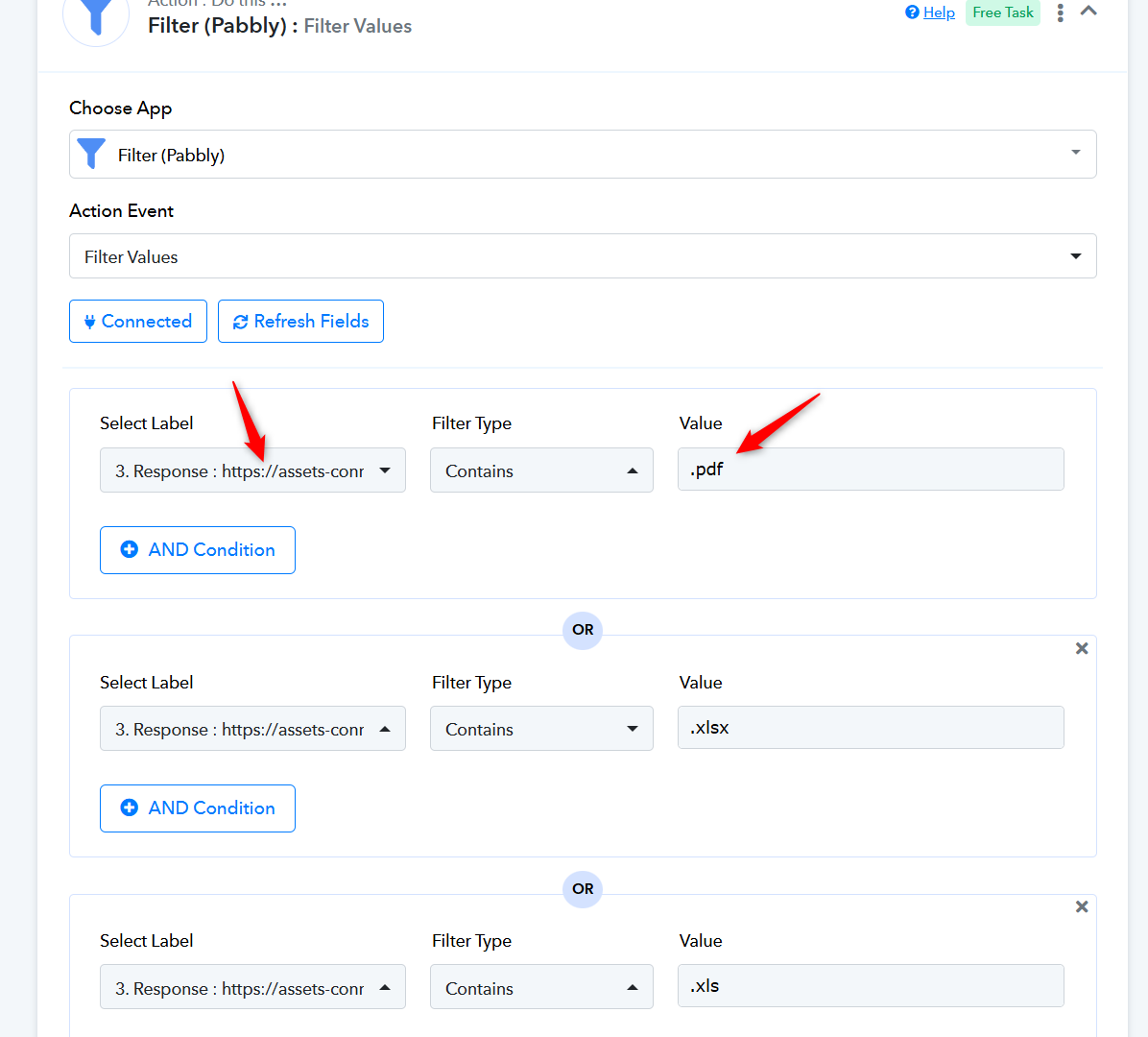
Thank you for the confirmation. You can add a Filter step after the Iterator with the OR Contains condition in the following manner. This will ensure that the next step (Upload File) is executed only if the file contains certain extensions at the end.
Thanks & Regards,
Arshil Ahmad
Customer Support Associate
? Pabbly.com
We are pleased to inform you that our team has integrated the MEGA action application with Pabbly Connect. You can use the MEGA: Upload File action event to upload files to your MEGA drive.Thanks & Regards,
Arshil Ahmad
Customer Support Associate
? Pabbly.com
Arshil,
Thank you for the new connection ... however I can't seem to get it to work ...
I am using workflow: https://connect.pabbly.com/v2/app/workflow/share/XBRUZlYBA2AFT1A6AmdQdwoeAgYCWwNmBx4CEFFeAnoAWlMGDUwIYgBMBCZRHgdmUBkJYwNfADkOGgAEVAJSIQMZADxcX10nWhdSKQVMWGtcAlR8Vjc#
I attached the latest try ... I have also tried the local folder structure as well ...
Hey @AEIILLC,
Thank you for your patience.
We would like to inform you that this issue has already been escalated to our technical team, and they are actively working on investigating and resolving it. We have also added your specific case to the ongoing investigation so that it is included in their review.
At the moment, our team is analyzing the root cause and working towards a resolution. As soon as we receive any updates or have more information to share, we will notify you promptly.
We appreciate your understanding and patience while our team works on this.
Hey @AEIILLC,
Thank you for your patience.
We would like to inform you that our team has fixed the issue.
Could you please test the action again from your end and let us know how it goes? If you are still experiencing any issues, kindly let us know, and we will be happy to investigate further.
We look forward to your confirmation.
Preeti
I have reviewed my workflow and it still is not working.
But I also noticed something else that does not seem correct as well ...
In the event that the email contains multiple attachments, we had addressed this way back and I thought it worked fine.
When I get to later steps in the process we have a filter to remove any unwanted attachments such as images and only allow pdf, xls, xlsx attachments ...
These seemed to work for Google Drive workflow I had before going to Mega Drive.
But now I look at the workflow and only the image file seems to be part of the response data, so nothing gets transferred to the Mega Drive
section ?
In any case, the Mega Drive step continues to error.
Your workflow setup looks fine. It appears that a .png attachment was captured while setting up the Email Parser trigger step, which is why it is showing up in the Iterator and other steps of your workflow. You can safely ignore it, as during actual automation only the files with the extensions specified in the Filter step will be passed to MEGA.
Regarding the error you are encountering in the MEGA step, could you please share a screenshot showing the folder path you have entered? This will help our team diagnose the issue more accurately and determine the cause of the error.

Thanks & Regards,
Arshil Ahmad
Customer Support Associate
? Pabbly.com