Amelia to google sheets integration
Status: Open · Asked by elinenispeling on · 0 views
I am trying to set up an integration between Amelia and Google Sheets. Here’s what I’m aiming to do:
- I want to create a workflow where every new appointment made in Amelia is automatically added to a specific column in a Google Sheets file, based on the customer’s name.
- Each column in the Google Sheet represents a different customer, and I want new appointments to be added to the next available row in that customer’s column.
So far, I have managed to connect Amelia and Google Sheets, but I’m having trouble with the following:
- Matching the customer’s name from Amelia to the correct column in Google Sheets.
- Automatically adding the new appointment to the next available row in that specific column.
Could anyone guide me through the exact steps I need to configure in Pabbly Connect to achieve this?
Here’s a quick summary of my setup:
- Google Sheet with customer names as column headers.
- Trigger: New Appointment in Amelia.
- Action: Add the appointment data (e.g., time, date) to the correct customer column in Google Sheets.
Hello @elinenispeling ,
After trigger add Lookup event from google sheet action to check the current record is availble or not and according to that add or update the column.
If you are still not able to solve this on your own feel free to DM me and we can do a free zoom call. FYI I'm not from Pabbly Connect team, just a freelancer who helps other Pabbly users.
Contact me - https://www.facebook.com/himeshsoni07
Email - [EMAIL][email hidden][/EMAIL]
Hello @elinenispeling
Thanks for reaching out. We are looking into the possibilities of the workflow to provide you with the updates soon.
Kindly allow us some time, so we can provide you with a tailored solution.
Hello @elinenispeling
We tried several workarounds to check if your use case is possible, but it seems it's not possible the way you want the data to be inserted in the Google Sheets.
But there is an alternative way if the Google Sheets structure would be changed, if the structure can be changed please let us know so we can assist you accordingly.
Thank you for your time and effort, I appreciate it!
I would love to know the alternative option
Hello @elinenispeling
In the alternative way, things will go like this:
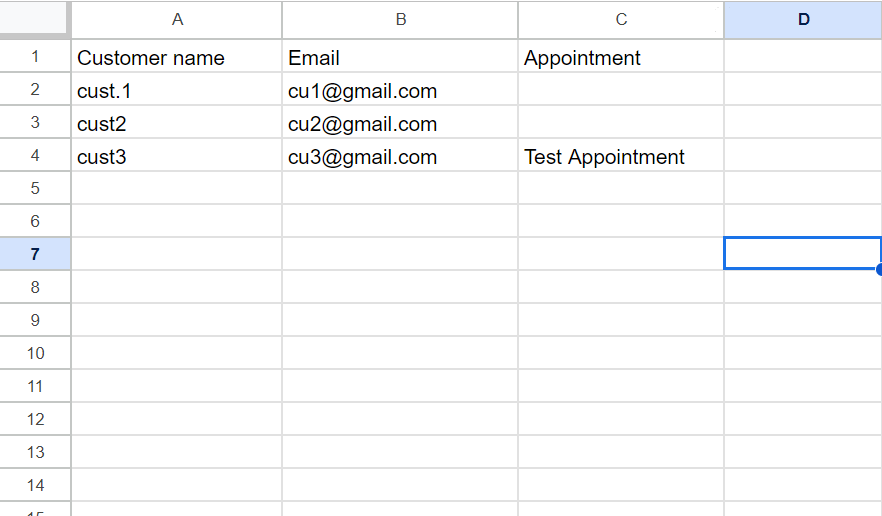
1. Customer names will be placed in rows, we would require to add the customer Email as well as we may have multiple Customers with the same name.
2. As an appointment is made in Amelia we would look at the Google sheet for the specific customer using the email received from the trigger step.
3. Then we would update the cell value on the basis of the Row Index received from the lookup step.
The only drawback of this workflow is that only the latest appointment of the specific customer will be recorded.
We have created a sample workflow for you, please refer to the shared workflow link, also attaching the Google Sheets screenshot.
Google Sheet Structure