API integration with Spoki
Status: Open · Asked by PPPC on · 0 views
Hello, I would need to integrate a Workflow with a tool called Spoki (it is needed to automatically send a message to WhatsApp).
I am not a developer, I'm trying to integrate the API Request but it doesn't work, please someone can help me to set it up?
Here there are the Spoki's API documentation: https://support.spoki.it/docs/integrazioni/integrare-spoki-con-qualsiasi-gestionale-attraverso-api/?_gl=1*1iw4ybs*_ga*OTcwMjE3NDQuMTY5NTc0MzYzMQ..*_ga_WZ465K4MC8*MTcwMTAzMDAyMC4yOC4xLjE3MDEwMzQ4MTMuNTguMC4w
Hi @PerformancePPC,
Could you please share a direct link to the endpoint you are trying to execute?
Hi @ArshilAhmad is this one: https://app.spoki.it/wh/ap/8b6fffc8-c8f4-4998-a2b0-f20e933d5574/
Hey @PerformancePPC
Regarding your concern about using the action step of Spoki, you can use the API by Pabbly action step and with the help of Spoki's API documentation you can use its API in your workflow.
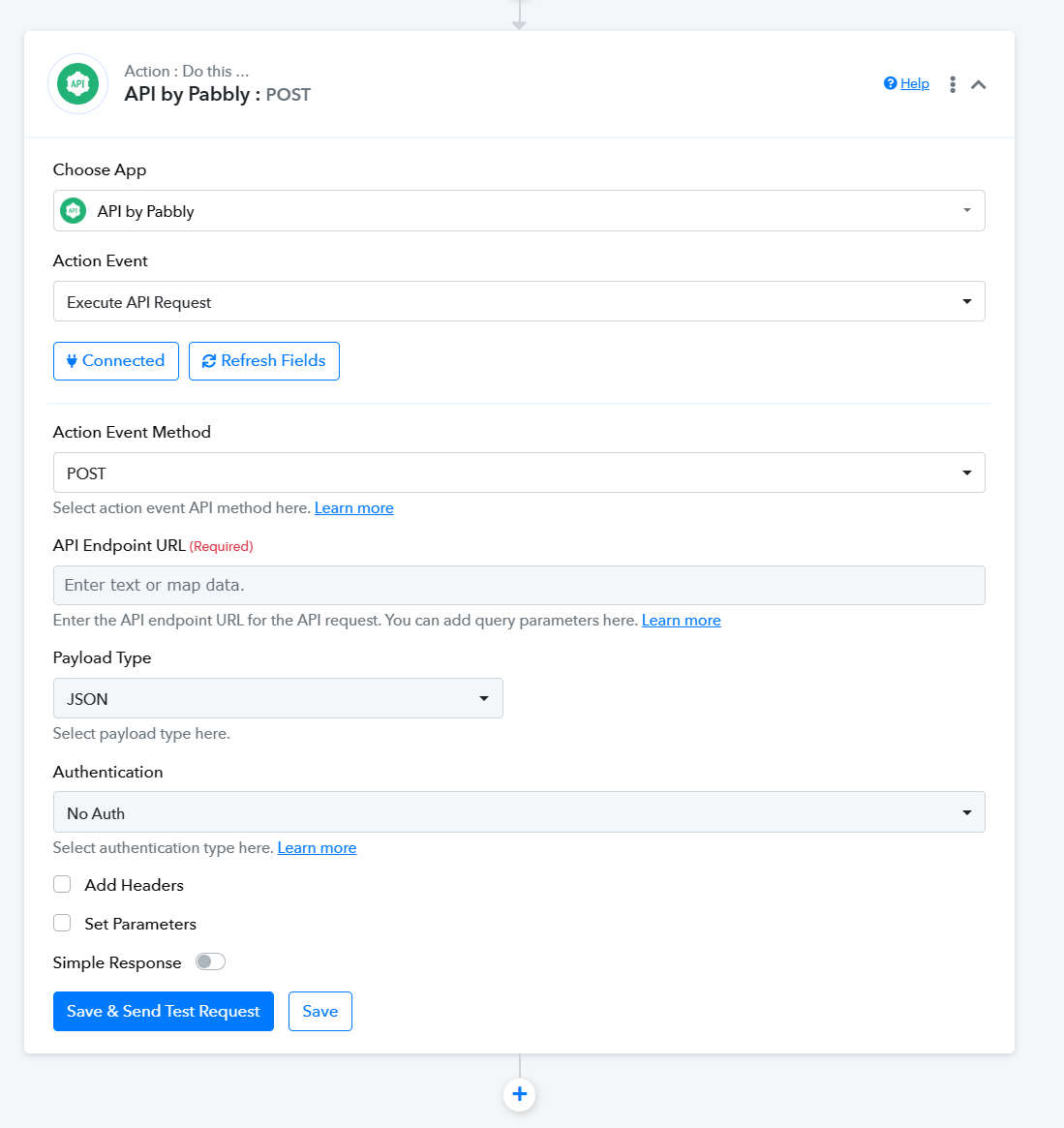
For a better understanding of the use of API by Pabbly, you can refer to the following video lesson.
youtube.com/watch?v=bmf4och_kTk
Additionally, you have the option to submit the form on our platform https://pabbly.featureos.app/b/Feature-Request. Our integration team will then review it and implement the necessary connections on the platform to accommodate your specific integration requirements.
Hi @Supreme I already tried it but it doesn't work, it produce an error:
I also tried adding the Secret key (I don't know if it's correct like this):
Kindly share the API documentation and the workflow URL in which you have tried the same.
Kindly share the API documentation and the workflow URL in which you have tried the same.
Workflow URL: https://connect.pabbly.com/workflow/mapping/IjU3NjUwNTZlMDYzZTA0M2Q1MjZiNTUzMzUxMzQi_pc
API documentation: https://support.spoki.it/en/docs/integrations/integrate-spoki-with-any-management-system-via-api/
Kindly share a screenshot of the endpoint you are trying to execute from this document.
https://documenter.getpostman.com/view/21611004/UzBqnPvF
The link you shared above, is not a direct link to the endpoint you are trying to execute.
Kindly share a screenshot of the endpoint you are trying to execute from this document.
https://documenter.getpostman.com/view/21611004/UzBqnPvFThe link you shared above, is not a direct link to the endpoint you are trying to execute.
Should be this: we need a POST in order to start a specific automation > https://documenter.getpostman.com/view/21611004/UzBqnPvF#083a9c63-d691-4ace-9c65-2cdc2d9a6ce0:~:text=POST-,Start%20Automation,-https%3A//app.spoki
Please try executing the endpoint this way using 'Custom POST Request' and see if it fixes your issue.
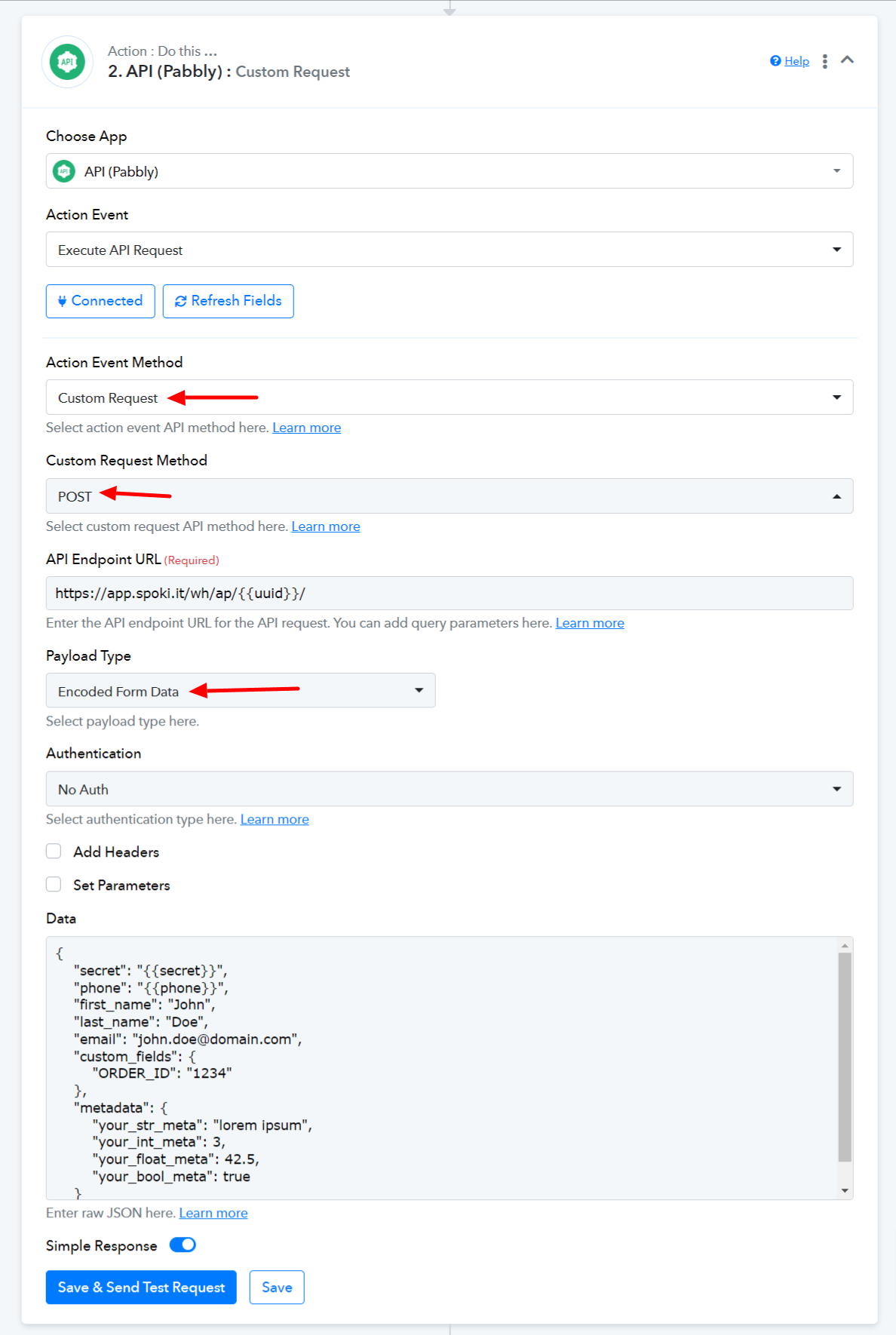
Seems working! I will update in other case. Tnks
Hi to all.
An update.
Now I'm trying to create an automation but I keep receiving an error that seems related to authentication when trying to send the template function of my service [docs https://documenter.getpostman.com/view/21611004/UzBqnPvF#22eb28b9-2ae1-435a-9364-0f32cf88b51c:~:text=collectionSpoki%20API-,POST,Send%20Template,-https%3A//app.spoki].
I wanted to understand if I might be setting some authentication fields incorrectly, which could be causing this error.
This the error:
<!DOCTYPE html>
<html lang="en">
<head>
<meta http-equiv="content-type" content="text/html; charset=utf-8">
<meta name="robots" content="NONE,NOARCHIVE">
<title>403 Forbidden</title>
<style type="text/css">
html * { padding:0; margin:0; }
body * { padding:10px 20px; }
body * * { padding:0; }
body { font:small sans-serif; background:#eee; color:#000; }
body>div { border-bottom:1px solid #ddd; }
h1 { font-weight:normal; margin-bottom:.4em; }
h1 span { font-size:60%; color:#666; font-weight:normal; }
#info { background:#f6f6f6; }
#info ul { margin: 0.5em 4em; }
#info p, #summary p { padding-top:10px; }
#summary { background: #ffc; }
#explanation { background:#eee; border-bottom: 0px none; }
</style>
</head>
<body>
<div id="summary">
<h1>Forbidden <span>(403)</span></h1>
<p>CSRF verification failed. Request aborted.</p><p>You are seeing this message because this HTTPS site requires a “Referer header” to be sent by your web browser, but none was sent. This header is required for security reasons, to ensure that your browser is not being hijacked by third parties.</p>
<p>If you have configured your browser to disable “Referer” headers, please re-enable them, at least for this site, or for HTTPS connections, or for “same-origin” requests.</p>
<p>If you are using the <meta name="referrer" content="no-referrer"> tag or including the “Referrer-Policy: no-referrer” header, please remove them. The CSRF protection requires the “Referer” header to do strict referer checking. If you’re concerned about privacy, use alternatives like <a rel="noreferrer" …> for links to third-party sites.</p></div>
<div id="explanation">
<p><small>More information is available with DEBUG=True.</small></p>
</div></body>
</html>
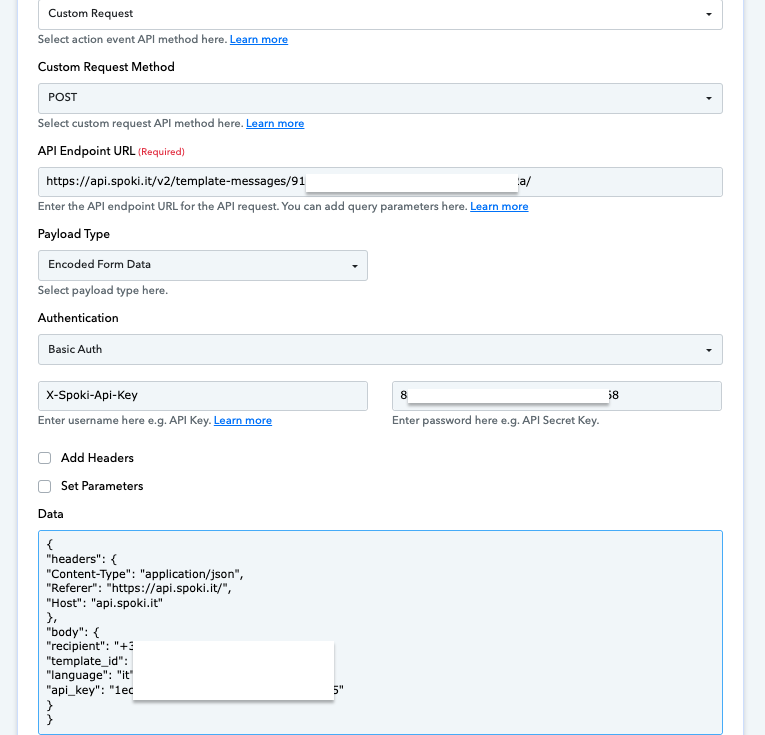
Please try setting up the endpoint in this manner and see if that fixes your issue.
https://connect.pabbly.com/workflow/share/CUECMAJVA2AASlM5D1AHIAsfCw8FXAVhUElURgQLBn5THQBrBkdaMFwQACIDUAloURgDaQ9QAmdYTFBUAlQJelJIUn5SUVIoBEkAe1MKCjkJVwIqAmM#