Applying conditional logic in workflow
Status: Closed · Asked by Daredevil on · 0 views
Hi, I would like to know if it is possible to apply simple conditional logic in workflow. For example, I have a basic workflow that sends webhook data to a google sheet and adds a line. The google sheet has 3 sub sheets. I would like the new line to be added to each sheet one at a time in numerical order and after the 3rd time workflow is run and a line is added within the 3rd sub work sheet, it should circle back to sheet one for the next run. Hope this makes sense. When I add a router between webhook trigger and google sheet I get an error message saying router needs to be at the end of the work flow? Any help would be appreciated, Thanks.
Hi @Daredevil,
https://connect.pabbly.com/workflow/mapping/IjU3NjYwNTZlMDYzMzA0Mzc1MjY4NTUzMzUxMzQi_pc
We assume that your concern is related to this workflow.
Do you want to pass the same data to all your sheets? If yes, simply add three 'Add New Row' action steps to your workflow in sequence. With each workflow execution, the data will be passed to all the sheets.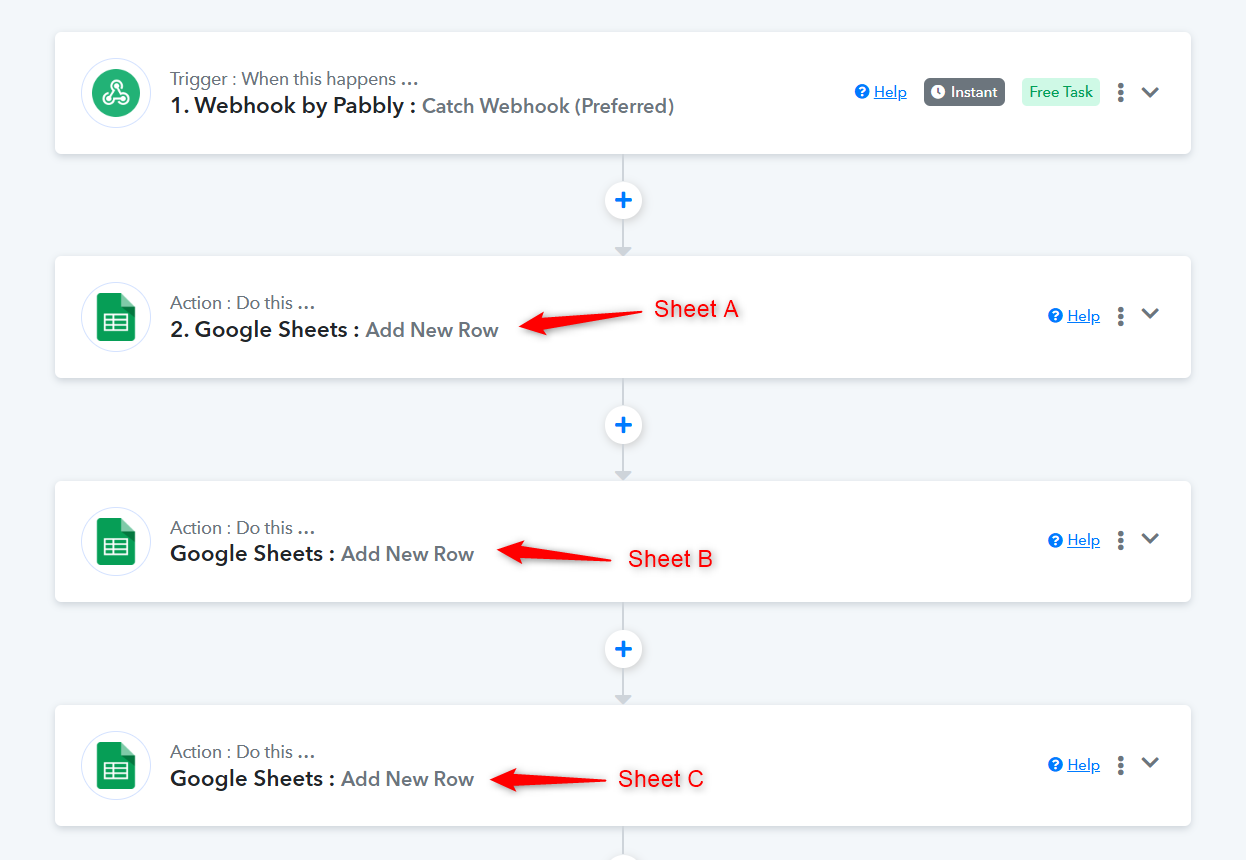
Or do you want to add data from the first workflow execution to Sheet A, the second to Sheet B, and the third to Sheet C in a round-robin manner? If so, check out the video shared below.
That's great! I was trying to get the data sent in a round robin manner. Works like a charm now. Thanks. Appreciate your help.
Thank you for the update! We’d love to hear your feedback, and it would mean a lot if you could leave us a quick review on Google.