Attach Created Google Doc to Gmail
Status: Open · Asked by hmasonn00 on · 0 views
I have an action to 'Google Docs: create document from text' - this works ok.
I want to then attach the created doc to gmail, however I'm not sure which field to map into the attachments.
Thank you,
Harry
Hey @hmasonn00,
Thanks for reaching out.
You can add a Google Drive – Share a File With Anyone action right after the Google Docs: Create Document From Text step.
In this action:
- Turn ON the Map button for the File ID field
- Map the File ID returned from the “Create Document From Text” step
Once executed, this action will provide you with export links in the response. You can use the Application/pdf URL from the response and map it in the Attachments field of your Gmail action.
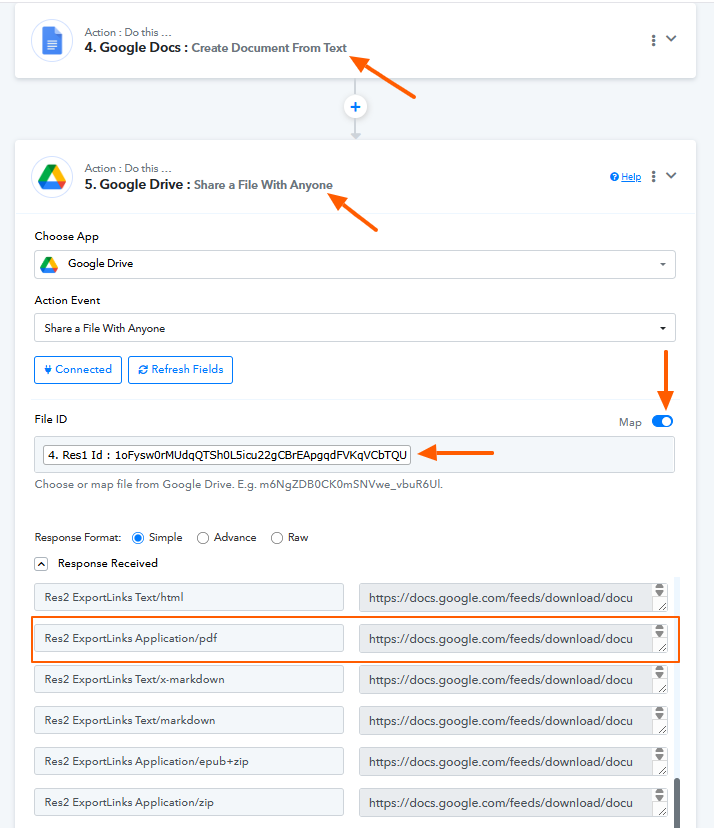
This will allow you to send the created document as a PDF attachment in your email.