Automatic phone number webhook response collection
Status: Closed · Asked by STEGE on · 0 views
USER: Presses button (which activates Pabbly Chatflow workflow)
CHATFLOW: triggers Pabbly Connect workflow
CHATFLOW: sends personalized information back to the same username that triggerred Chatflow.
Hi Stege,
Thank you for reaching out to us.
Yes, this is possible.
The workflow would look like this:
Send a WhatsApp template to the user that contains a Quick Reply button.
When the user clicks the Quick Reply button and sends a reply, you can pass the data to a Pabbly Connect workflow using a Webhook node.
You can create a Flow in Pabbly Chatflow and select "Template Selected" as the trigger event.
Connect the Quick Reply button to an API Request node and paste the webhook URL of your Pabbly Connect workflow there.
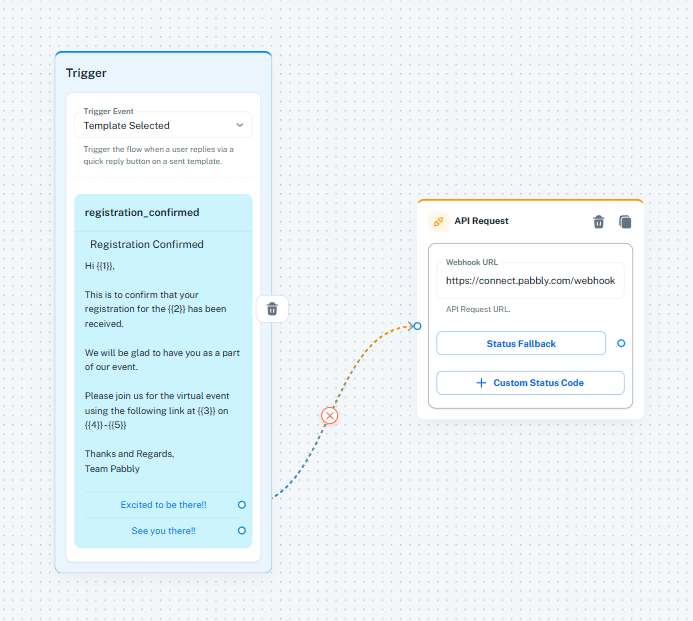
https://youtu.be/TMu35XAOK0A?t=573As soon as the user clicks the Quick Reply button, the user's data (including the sender's WhatsApp number) will be sent to Pabbly Connect automatically.
In Pabbly Connect, you can then search across multiple Google Sheets, perform any required data processing, or even use OpenAI to evaluate and personalize the response.
Once the required information is collected, you can send a personalized message back to the same WhatsApp number using a Pabbly Chatflow action.
Since the user has already interacted with your WhatsApp number by clicking the Quick Reply button, their phone number is available in the trigger data and they do not need to manually enter it at any stage of the process.
Thanks and Regards,Preeti Paryani
Customer Success Associate,
Pabbly.com