Automation Issue – Tasks Getting Partially Filled (Needs Urgent Investigation)
Status: Closed · Asked by Sannidhya Baweja on · 0 views
Hi Team,
I've been using this automation for a long time without any issues. However, over the last few months,
it has started causing problems. Around 99% of my tasks are getting partially filled, which is impacting my work significantly.
I'm not sure what has changed or why this is happening, but it seems to occur almost every time the automation runs.
Could you please look into this issue and help resolve it as soon as possible?
I'm sharing the relevant details/screenshots for reference.
Please let me know if you need any additional information from my side.
Thanks!
Hello,
Thank you for reaching out, and we're sorry to hear you're facing this issue.
We'll be happy to investigate it for you. To help us review the issue, could you please share the Workflow URL of the workflow where you're experiencing the partial task execution?
Once we have the workflow URL, we'll review the executions, identify why the tasks are getting partially filled, and assist you with the appropriate resolution.
We look forward to your response.
Thanks & Regards,Anushka Sahu
Customer Support Associate
🌐 Pabbly.com
Workflow URL is https://connect.pabbly.com/workflow/share/XxdYagBXVDdRG1A6A1AEI1hMUlYHXVNrUUgAEgAPXSUBTAR_AUAMZgpGBCZTBAVkB05SOAVaBGBdSQIGB1EAcwcJABJXVFYsVxoFflQBCjlfAVhwAGE#
Let me know if you need anything else.
Hello,
Thank you for reaching out, and we're sorry to hear you're facing this issue.
We'll be happy to investigate it for you. To help us review the issue, could you please share the Workflow URL of the workflow where you're experiencing the partial task execution?
Once we have the workflow URL, we'll review the executions, identify why the tasks are getting partially filled, and assist you with the appropriate resolution.
We look forward to your response.
Thanks & Regards,
Anushka Sahu
Customer Support Associate
🌐 Pabbly.com
Hello,
Thank you for reaching out.
We checked your workflow and found that the Contact ID (339393382) being passed to the "Add Tag to Contact" action does not exist in your Systeme.io account.
Since the contact could not be found, Systeme.io returned a 404 - Not Found response. As a result, the "Add Tag to Contact" step failed, which caused the partial error in that particular workflow execution.
To resolve this issue, we recommend the following:
Verify that the contact exists in your Systeme.io account.
Ensure that the correct Contact ID (that exists) is being mapped into the Add Tag to Contact action.
If the contact is expected to be created earlier in the workflow, please verify that the contact creation step is executing successfully before the tag is added.
If required, use a Search Contact step to fetch the correct Contact ID dynamically before the Add Tag to Contact action.
Anushka Sahu
Customer Support Associate
🌐 Pabbly.com
Hi Team,
I’m facing an issue while setting up the automation.
Currently, we can search for a contact using the email ID. However, in the Add Tag automation step, it requires selecting the Contact ID instead of allowing a search by email.
To proceed, I would need to create an automation for every possible combination just to select the correct Contact ID, since the Contact ID is not visible or searchable in the system. Simply saving the automation and trying afterward doesn't seem to help either.
Is there any workaround for this? Or is there another way to retrieve or use the Contact ID in the automation?
I’d really appreciate your guidance. Please let me know as soon as possible.
Thank you!
Hello,
Thank you for reaching out.
We checked your workflow and found that the Contact ID (
339393382) being passed to the "Add Tag to Contact" action does not exist in your Systeme.io account.Since the contact could not be found, Systeme.io returned a 404 - Not Found response. As a result, the "Add Tag to Contact" step failed, which caused the partial error in that particular workflow execution.
To resolve this issue, we recommend the following:
Thanks & Regards,
Verify that the contact exists in your Systeme.io account.
Ensure that the correct Contact ID (that exists) is being mapped into the Add Tag to Contact action.
If the contact is expected to be created earlier in the workflow, please verify that the contact creation step is executing successfully before the tag is added.
If required, use a Search Contact step to fetch the correct Contact ID dynamically before the Add Tag to Contact action.
Anushka Sahu
Customer Support Associate
🌐 Pabbly.com
Hello,
Thank you for reaching out.
Yes, there is a workaround for this.
You can use the "Get Contact by Contact ID" action available in the Systeme.io integration to retrieve the contact details first. Once the contact is found, you can map the returned Contact ID into the Add Tag to Contact action.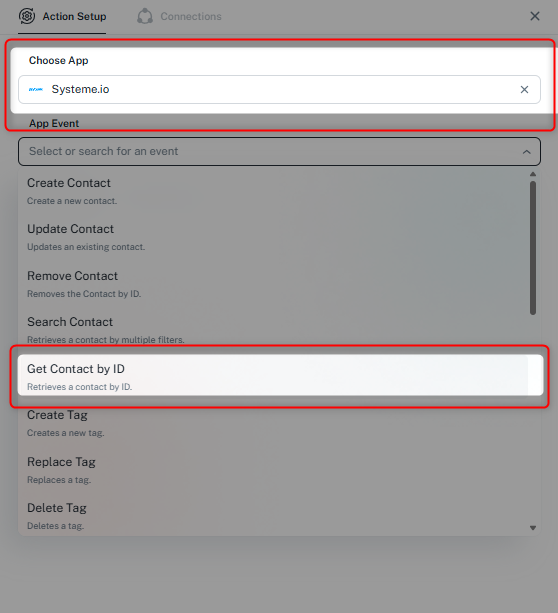
This way, you don't need to create separate automations or manually select the Contact ID for each contact.
Please give this approach a try, and if you face any difficulties while setting it up, let us know. We'll be happy to assist you further.
Thanks & Regards,Anushka Sahu
Customer Support Associate
🌐 Pabbly.com