Blue Not Showing Custom Field
Status: Open · Asked by Jonathan Green on · 0 views
I have my Blue integration working and I'm using the option Create Record (The Create ToDo shown in the support video doesn't appear in my options)
I only have the options of title, Start Date, End Date and List Position.
I don't see any custom field options.
What did I do wrong?
Hi @JonathanDragonDJ,
Could you please share a screenshot of the custom fields in your Blue account that are not being listed? Also, please share the Workflow URL where you encountered this issue.
Here is the link: https://connect.pabbly.com/workflow/mapping/IjU3NjUwNTZhMDYzNTA0Mzc1MjY0NTUzMzUxMzQi_pc
I've attached screenshots of the card in Blue with the custom fields that was created when I tested the integration.
The creation of records in the Blue custom field is currently unsupported, but your concern has been forwarded to our integration team for review, and they will consider adding this feature.
That's very strange because you show filling in the custom field in your demo video.
The creation of records in the Blue custom field is currently unsupported, but your concern has been forwarded to our integration team for review, and they will consider adding this feature.
Hello. Can you please let me know if the review team will be adding more custom fields please? it makes the Blue PM system useless or makes us use Zapier for Blue and want to use Pabbly connect all day please. Please see attachment. Even the 5 basisc - Firstname, Lastname, Email, Phone and Address would work
Hey @DocApply
I have forwarded your concern to the team, and they are working on it. Once they update the action step with the desired fields, we will let you know.
Hey @DocApply @JonathanDragonDJ
We already have the "Set todo custom field" action step, which you can use. Please note that only one custom field can be updated per action.
Hey @DocApply @JonathanDragonDJWe already have the "Set todo custom field" action step, which you can use. Please note that only one custom field can be updated per action.
Can you elaborate how we can use what you stated with my request please?
You need to use one "Set Todo Single Custom Field" action step to update a single custom field. So, if you need to update 5 custom fields, you will need to add 5 "Set Todo Single Custom Field" action steps to your workflow, each for updating a different custom field.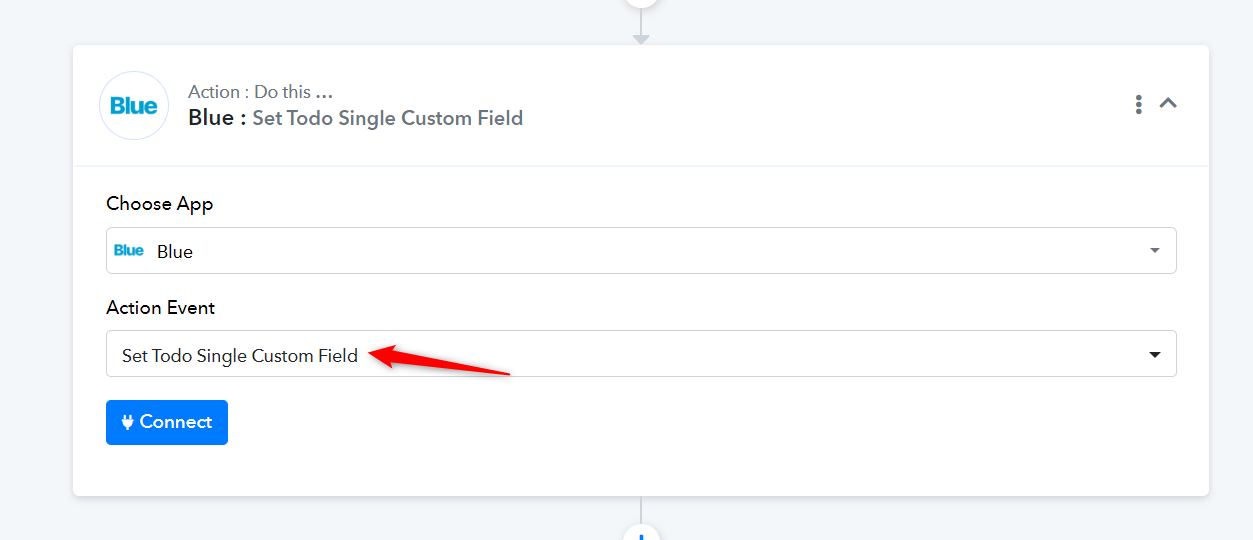
Can you elaborate this? As far as I got, we have to run "Get todo custom fields" first and then map it with "Set todo single custom field", It will consume hell lot of tasks for a single record update. I didn't understand why you structured it like this? It should be like whole record (all custom fields) updated in single step.
Apart from this the "Get todo custom fields" action has errors, throwing "project was not found" error everytime.
Hello @imsaini
As per Blue API docs, setting multiple custom fields via one API request is not possible.
it should be like whole record (all custom fields) updated in single step.
Also as we have tested the "Get todo custom fields" action at our end, it works fine.
Could you please share a screen recording showing the custom fields that exist under the concerned project and the to-do list, so we can better understand the issue?
"Get todo custom fields" action has errors, throwing "project was not found" error everytime.
Please check attached screenshot of error,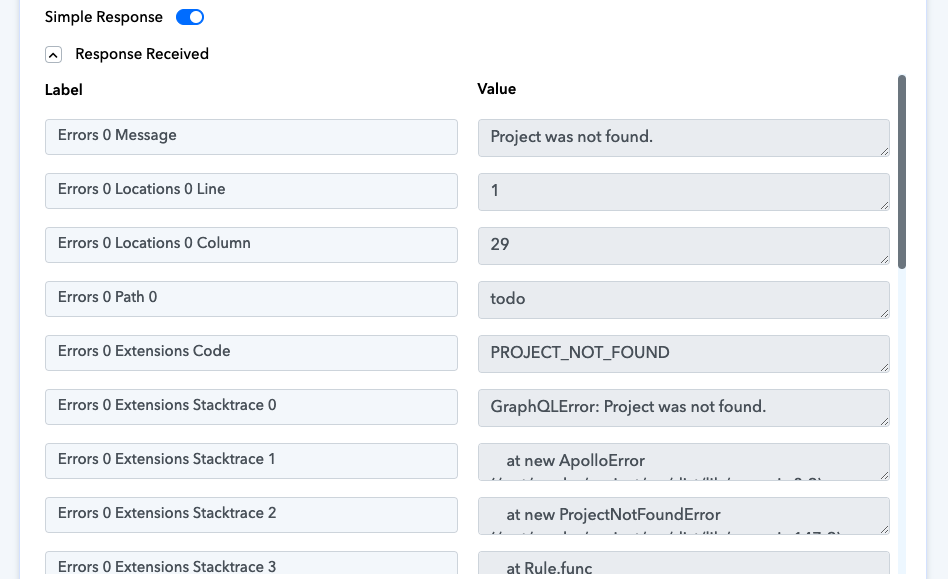
Hello @imsaini
It seems there’s been some confusion. When I asked, "Could you please share a screen recording showing the custom fields that exist under the concerned project and the to-do list so we can better understand the issue?" I was referring to the custom fields in your Blue account, not in Pabbly Connect.
Could you kindly share a screen recording of the custom fields in your Blue account? This will help us better understand the issue and provide a more accurate resolution.
Thank you for your cooperation!
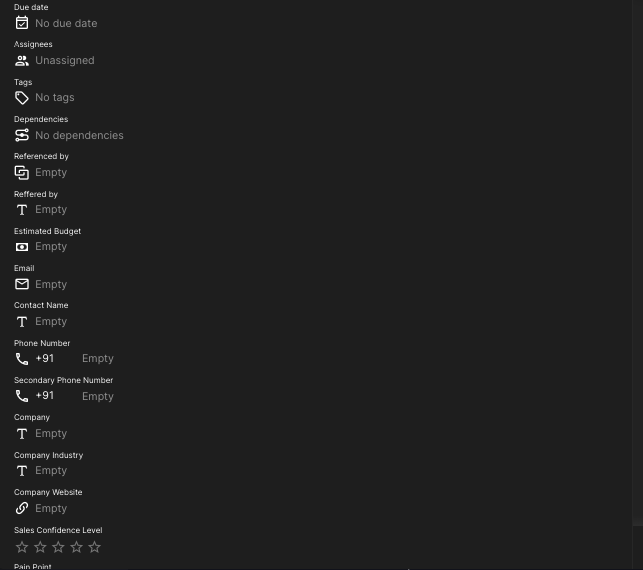
Sorry for the misunderstanding, you can check this ss of blue, custom fields.
Hello @imsaini
Thank you for sharing the screenshot. However, it does not provide the complete context, as it only shows the field names but not the project and the to-do list under which they are located.
To better understand the issue and assist you effectively, we kindly request a short screen recording that clearly shows the custom fields along with the associated project and to-do list. Without this, it will be challenging for us to provide accurate support.
We appreciate your cooperation and look forward to your response.
This issue of error occurs because in Blue, everytime you create a connection, you need to specify the company name and project name . Unlike other apps where if we establish connection, it works seamlessly, in case of blue, for each project there should be a different connection. So while testing, if you created a project A, established connection and then you deleted Project A and created project B , then the connection you used for Project A will not work for Project B. For project B, you need to create connection once again and while establishing the connection itself you should specify the project name. I found this hardway. So putting here as comment so that it can be referred by others as well as myself in the future.
Please check attached screenshot of error,
Hello @Anupam,
Could you please elaborate on the issue you're facing so we can assist you further?
I'm really close to getting this work but need another set of eyes. I have the integration from Bitform to Blue set up.
I am pulling the custom field with the step "Get Todo Custom Fields".
But the last step of actually assigning the custom field is where I'm stumped. Set ToDo Single Custom Field
I am using the Custom Field Single Select Option ID.
The custom field is called Priority and there are four options to select.
When I select the ID and test it - the record in Blue updates the Priority Field but it updates based on what I selected - not what the user selects.
Here's a video showing my process / steps.
What do I need to select or what steps do I need to add to update the Priority of the Record to what the user who filled out the form actually selected?
Hello @Anupam,Could you please elaborate on the issue you're facing so we can assist you further?
Hello Preeti ji, I had mentioned that just as a note . It is a solution to original question. I too had faced similar issue. So i posted it here as a note.
Bitform - Blue Custom Fields
I'm really close to getting this work but need another set of eyes. I have the integration from Bitform to Blue set up.I am pulling the custom field with the step "Get Todo Custom Fields".
But the last step of actually assigning the custom field is where I'm stumped. Set ToDo Single Custom Field
I am using the Custom Field Single Select Option ID.
The custom field is called Priority and there are four options to select.
When I select the ID and test it - the record in Blue updates the Priority Field but it updates based on what I selected - not what the user selects.
Here's a video showing my process / steps.
What do I need to select or what steps do I need to add to update the Priority of the Record to what the user who filled out the form actually selected?
Sorry to barge in your thread. I too am a user like you facing integration issues with Blue and during my research found your thread. Thank you for making your thread public so that people like me can benefit.
Having said above, i want to ask you when you can directly use "Set ToDo Single Custom field", why would you need "GetToDo custom field"? If the input that you are trying to push from bitfom to blue is just a single field called "Priority", it can be directly done by "Set ToDo Single Custom field" without needing "Get ToDo custom field". After that whether you fill the bitform or the user fills the bitform, it does not matter for pabbly. The data that is in "Priority" field of bitform should automatically go to the "Priority" field of Blue.
Sorry to barge in your thread. I too am a user like you facing integration issues with Blue and during my research found your thread. Thank you for making your thread public so that people like me can benefit.Having said above, i want to ask you when you can directly use "Set ToDo Single Custom field", why would you need "GetToDo custom field"? If the input that you are trying to push from bitfom to blue is just a single field called "Priority", it can be directly done by "Set ToDo Single Custom field" without needing "Get ToDo custom field". After that whether you fill the bitform or the user fills the bitform, it does not matter for pabbly. The data that is in "Priority" field of bitform should automatically go to the "Priority" field of Blue.
My understanding is that you have to "Get" the custom field ID first and then you can "Set" it.
Could you make it work? Isn't blue integration too complicated? I am facing issues at "Position" field in "Create ToDo records"
Could you make it work? Isn't blue integration too complicated? I am facing issues at "Position" field in "Create ToDo records"
Yes I got the basic function to work but the custom fields are not working yet.
Were you able to make Create ToDo Record field to work? Are default fields passing through? Looks like instead of pabbly, this is limitation with blue.cc because their api is not flexible with custom fields.
Hey @jkriggs
We have replied to your query over ticket ID - #112781. Please check your email inbox.
@Anupam Please check this thread - https://forum.pabbly.com/threads/blue-cc-integration-position-field.26577/