Calendly Integration
Status: Closed · Asked by Saurabh@Synchrox on · 0 views
I currently have a workflow integrated with Calendly and Ai Sensy in which whenever a new user schedules a meeting with me, an automatic notification gets sent to his mobile via Ai Sensy which includes variables like Meeting Name, Meeting Date, Meeting Type and Meeting Link.
I have used a Date/Time formatter to format the UTC timezone to the desired timezone which is also working fine.
Where I am getting stuck is i want 2 whatsapp messages to be sent to the user as a reminder. The first message is to be sent 2 hours before the scheduled meeting start time and the 2nd reminder is to be sent 10 mins before the meeting start time.
For this I have used a Date/Time Formatter (Add/Subtract Time) followed by a Delay (Until) such that the correct time appears as per the scheduled meeting time.
However, despite all this, the messages are still not being sent via Ai Sensy as per the required time.
The link to the workflow is - https://connect.pabbly.com/workflow/mapping/IjU3NjUwNTZiMDYzMjA0M2M1MjZlNTUzNDUxMzAi_pc
Would appreciate any help to rectify this problem at the earliest please
Cheers,
Saurabh
Hey @Saurabh@Synchrox
If you need to send notifications at specific time intervals, please refer to the following video lesson. This will give you a better understanding of the logic to set up the automation for sending reminders at the desired times.
I followed all the instructions in the above mentioned tutorial but despite that the messages for the reminders are not getting sent on desired time
Hey @Saurabh@Synchrox
There are a few changes the you will have to make in your workflow to rectify the issues you are facing.
1. You will need to keep the format according to the provided help texts. Kindly refer to the image below -
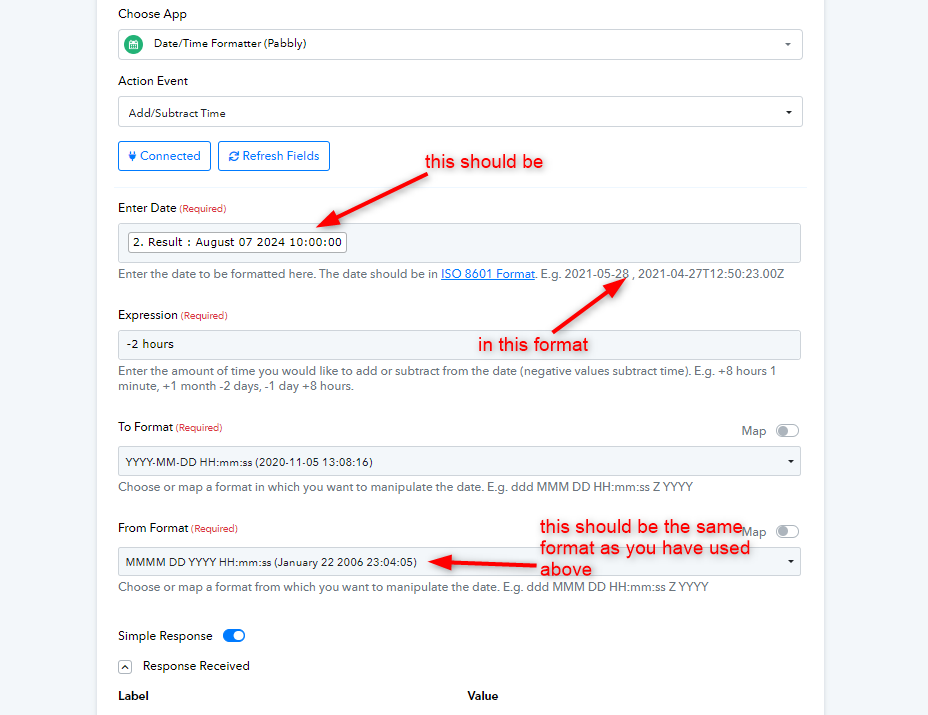
2. The delay should be in UTC format not in IST or any other. 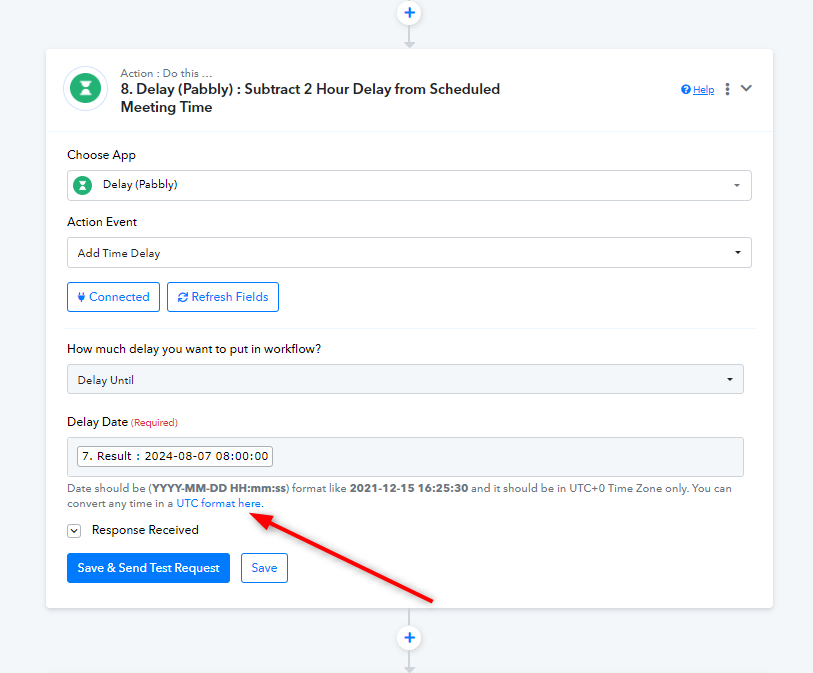
Kindly make the required changes and let us know if you still face any issues.
Have made the suggested changes. Will keep you updated on the progress
Can you please check if the workflow has been setup properly, cause despite the changes suggested, i am still not able to send the reminder messages on time
The link to the workflow is - https://connect.pabbly.com/workflow/mapping/IjU3NjUwNTZiMDYzMjA0M2M1MjZlNTUzNDUxMzAi_pc
Is this the same workflow you have utilized, or have you created a new one? It appears from the task history of this workflow that we can only verify the executions from the 7th of August.
It is the same workflow
As we can see from your latest execution of the workflow, the Delay and Delay Until sequences are set up correctly.
Please review the complete execution of the workflow and let us know if it is working correctly.
Task History ID - IjU3NmQwNTZhMDYzMzA0M2Q1MjZiNTUzZDUxMzM1MTZhNTQzMCI_3D_pc