Cannot Access JSON Body Field in “API by Pabbly” Module Even After Correct Settings
Status: Open · Asked by anamitra srivastava on · 0 views
Hi Pabbly Team,
We’re setting up a workflow where we:
This is blocking us from completing the most critical step — sending a raw JSON purchase event with tier-specific data like content_name to Meta.
Please investigate if there's a bug in how the API by Pabbly module renders the raw JSON field under these conditions — especially inside Router branches or due to internal caching.
Could you please:
I’m encountering a critical issue while setting up an integration using the “API by Pabbly” module.
What I'm Trying to Achieve:
We’re setting up a workflow where we:
- Capture a payment webhook from Razorpay
- Map the amount to Silver, Gold, or Diamond tiers
- Send a raw JSON POST request to Facebook’s Conversions API (CAPI)
This is required to pass fields like content_name, event_id, and user_data for accurate conversion tracking.
Here’s what I’ve configured correctly:
- Module: API by Pabbly
- Action Event: POST
- Payload Type: JSON
- Authentication: No Auth
- All checkboxes turned OFF:
- Add Headers
- Set Parameters
- Simple Response
- Tried:
- Creating this step inside and outside a Router
- Saving after each change
- Refreshing the browser
- Testing in multiple browsers and incognito windows
- Rebuilding the API step from scratch
The problem:
Even after all these steps, the expected “Request Body (JSON)” field does not appear, so I cannot paste the raw JSON payload required for the CAPI integration.
This is blocking us from completing the most critical step — sending a raw JSON purchase event with tier-specific data like content_name to Meta.
Workflow name is Razorpay to META CAPI
Suggested Fix:
Please investigate if there's a bug in how the API by Pabbly module renders the raw JSON field under these conditions — especially inside Router branches or due to internal caching.
Request:
Could you please:
- Confirm if this is a known bug or limitation
- Suggest any workaround
- Or enable the raw JSON body input for us manually (if possible)
Looking forward to your help!
Warm regards,
Anamitra
Hello @Anamitra,
You can simply change the Action Event Method to "Custom Request". Once selected, a field named "Data" will appear, where you can map your request body in JSON format.
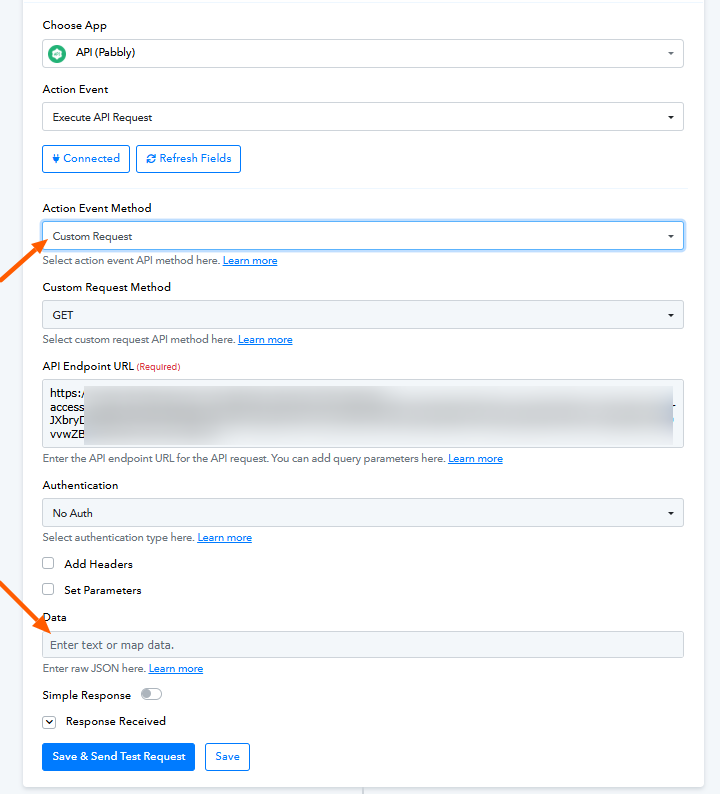
I hope this helps.
Great Thanks a lot Preeti