Cashfree and zoom connection not working
Status: Open · Asked by ABC on · 0 views
I followed the steps shown in the Youtube tutorial to add the cashfree - text formatter - zoom connection. The trigger and the text split action show the correct response however the zoom connection shows "You have exceeded the daily rate limit of (3) for Add meeting registrant API requests for the registrant ([email][email hidden][/email]). You can resume these API requests at GMT 00:00:00."
Is this limit only for trial or for the actual flow as well? I even tried making the actual payment from the cashfree form link. It is accepting payment but registrant not getting added in the Zoom meeting. Please help. Its urgent!
Hi @ABC,
The error you’re encountering is from Zoom’s end—you appear to be hitting the rate limit. Please get in touch with Zoom’s support for a better understanding of this issue.
https://devforum.zoom.us/t/you-have-exceeded-the-daily-rate-limit-3-of-meeting-batch-registration-api-requests-zoom-error/57716/21
Thanks & Regards,
Arshil Ahmad
Customer Support Associate
? Pabbly.com
?Rate your support
Thanks Arshil.
Tried again now the error is not coming have raised to Zoom also so that it does not happen again but now when I use the cashfree payment link to pay - 1) it is not redirecting to the zoom link 2) does not even share it zoom meeting link 3) the registrant is not added either. Only the test info pushed.
Do I have to change the status or something for the connection?
The event is for 15th Feb would appreciate if we can fix this today.
Hi @ABC,
Upon checking your workflow, we noticed that in the Zoom step, both First Name and Last Name are required.
However, from Cashfree, the full name is not consistently coming in, which is causing the issue. Because of this, the Text Formatter (Split Text) is unable to properly split the name into first and last name, and the Zoom action fails.
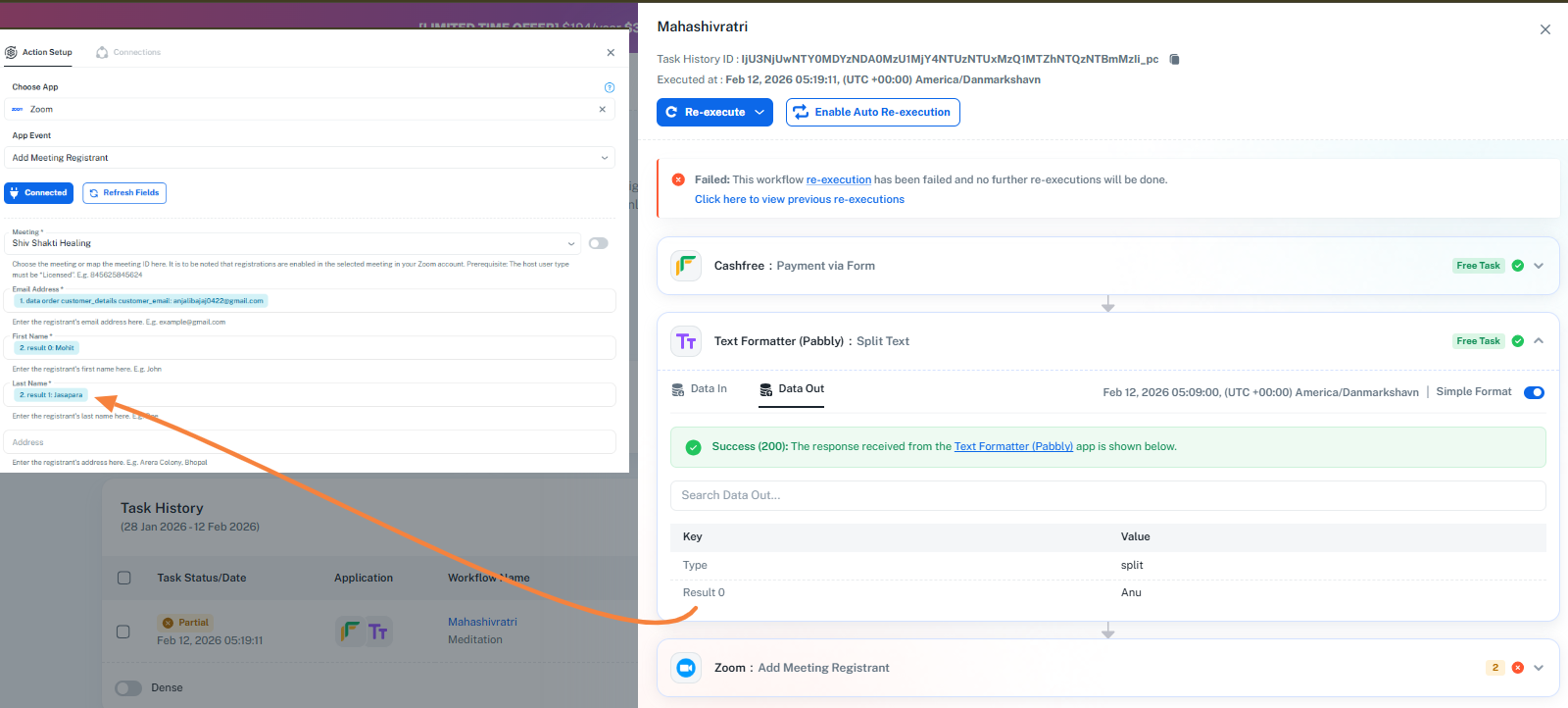
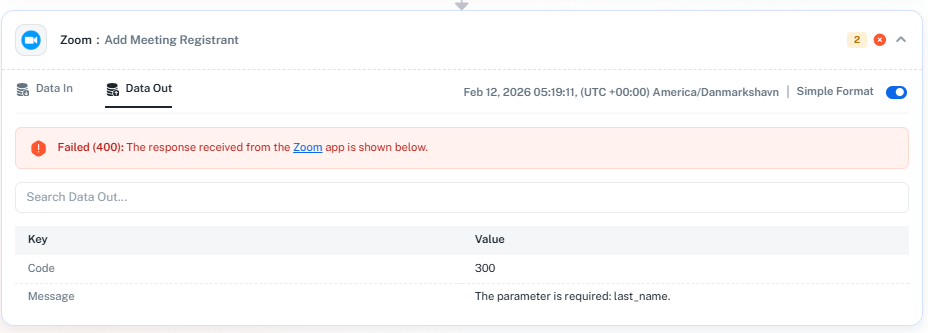
Please ensure that in Cashfree, the customer always enters their full name (First + Last name) in the name field. This will allow the split step to correctly separate the values and map them properly in the Zoom action.
Once updated, please test again and let us know.
Thanks Preeti for the reply. Have changed the name field to "full name" ans made it mandatory. Still the same issue. Should I make two separate fields in the cahfree form for first & last name, make it mandatory and map to zoom fields without text formatter action?
Thanks Preeti for the reply. Have changed the name field to "full name" ans made it mandatory. Still the same issue. Should I make two separate fields in the cahfree form for first & last name, make it mandatory and map to zoom fields without text formatter action?
Yes, that would be the best approach. Once you’ve made these changes, capture a new response in your trigger step and then remap the data.
Thanks & Regards,
Arshil Ahmad
Customer Support Associate
? Pabbly.com
?Rate your support
In the web hook response, the two new fields are not getting captured now. It is only showing customer name and customer details value 1. I have tried updating the web hook url in cashfree also but that gave an error that it already exists. Can you please check again and let me know what needs to be done?
Things changed -
1) Updated the cashfree form gave two separate fields for first & last name and made it mandatory. Hid the original name field and made it optional.
2) Removed the text formatter from the pabbly workflow
Hi @ABC,
Upon checking your workflow, we noticed that you removed the Text Formatter (Split Text) step.
Since you have now updated the Cashfree form to capture First Name and Last Name as separate fields, you will need to recapture the webhook response so the new fields are reflected in Pabbly.
Please follow these steps:
- Click on Recapture Webhook Response in the trigger step.
- Submit the Cashfree form again with the new First Name and Last Name fields.
- Once the new response is captured, remap those fields in the Zoom action.
- Test the workflow again.
Currently, the old response structure is still being used, which is why the new fields are not appearing.
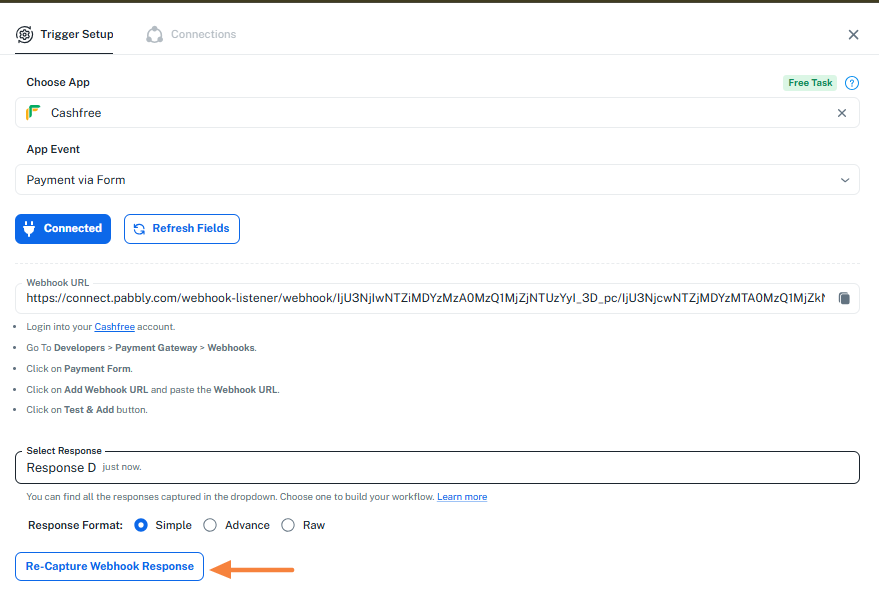
Please try this and let us know how it goes.
When I tried clicking this I m getting this error
Will it be possible for you to correct this at your end as this is urgent and pending since a couple of days.
created a new workflow - https://connect.pabbly.com/workflow/mapping/IjU3NjcwNTZjMDYzMTA0MzA1MjY0NTUzMjUxMzYi_pc
This is the workflow written in Pabbly. Where in two separate fields are created in cashfree form to capture first name and last name then mapped to the fields of zoom. This was working fine in the test environment but stopped working in the Prod with zoom giving 300 error field missing
Please let me know what to do to rectify. If possible to rectify at your end please do the same.
The issue is related to the shuffling of fields in the Cashfree trigger step. Please select Advanced as the response format, then click on Re-Capture Webhook Response and capture a new form submission. This will give you the response in JSON format. Once you’ve done that, please let us know—we’ll add a Code step to your workflow to prevent the shuffling.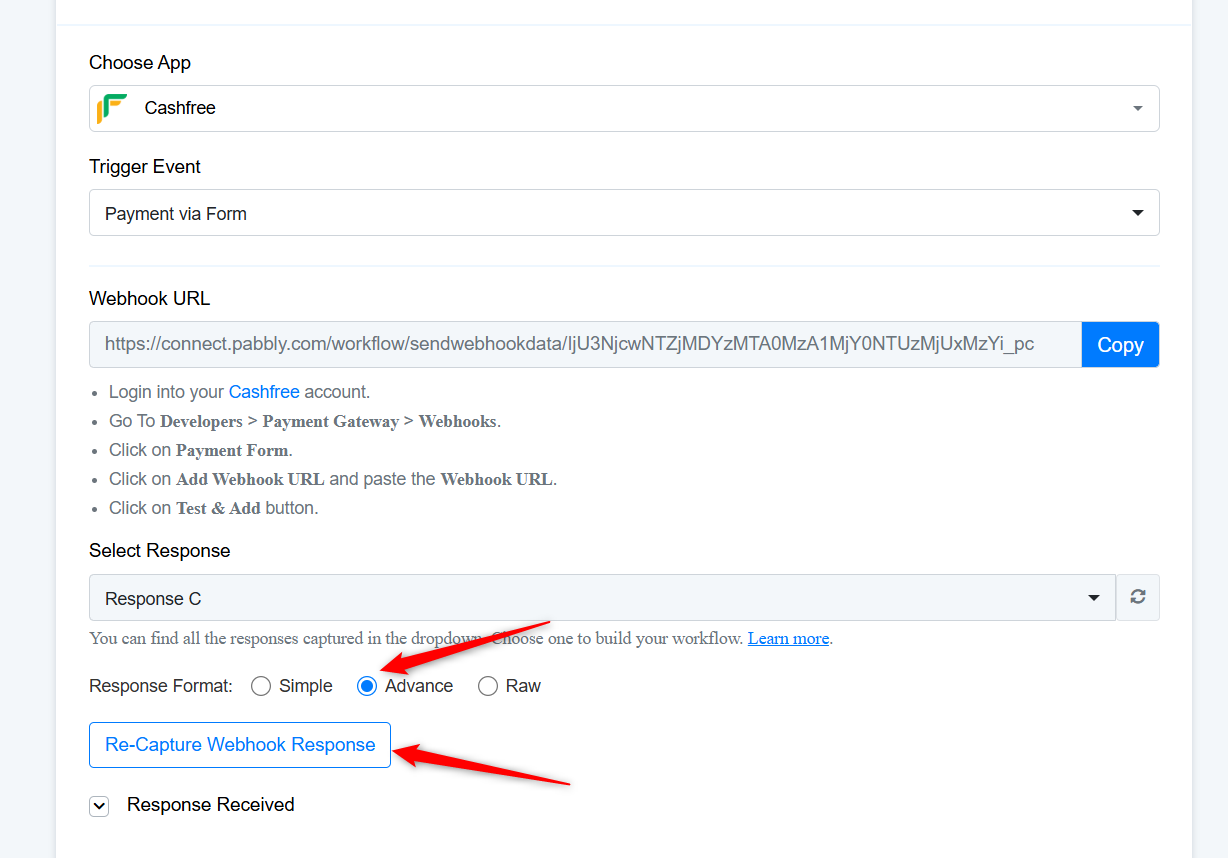
Thanks & Regards,
Arshil Ahmad
Customer Support Associate
? Pabbly.com
?Rate your support
Tried the above step. Now it is showing the timeout error again
Clone the workflow, then set up Cashfree as your trigger step, and while capturing the form submission, capture it in the Advanced format. Once you have done so, please let us know.
Thanks & Regards,
Arshil Ahmad
Customer Support Associate
? Pabbly.com
?Rate your support