Catalog Adding Issue
Status: Open · Asked by NUTRI FIT MARKETING on · 0 views
HI,
i am trying to add a catalog from my meta account but it is showing the error as "(#200) Requires business_management permission to manage the object." and i have already given the permission so please resolve this issue as soon as possible.
Hi @NutriFit,
Could you please provide us with the email address associated with your Pabbly Chatflow account where you are encountering this issue?
Hi @NutriFit,Could you please provide us with the email address associated with your Pabbly Chatflow account where you are encountering this issue?
[email][email hidden][/email]
Could you please create a short screen recording showing this catalog in your Meta Business Suite?
Could you please create a short screen recording showing this catalogue in your Meta Business Suite?
Please find the attached as required. Please share the solution in detail. I am not a developer or tech person.
Hello @NutriFit,
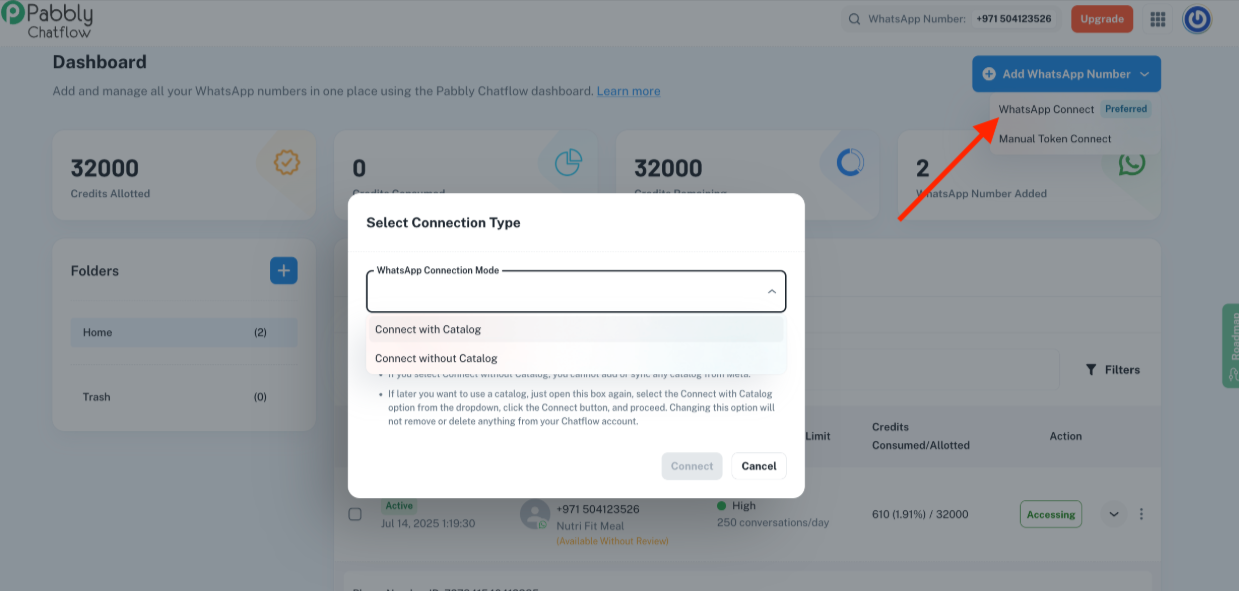
We recommend trying to add the WhatsApp number again, and while doing so, please select the Connect with Catalog connection mode. In the final step of the process, you will be able to select all the catalogs and provide the necessary Business Management permissions. This should help you view the catalogs under Pabbly Chatflow.
Kindly try this and let us know how it goes.
Hello @NutriFit,We recommend trying to add the WhatsApp number again, and while doing so, please select the Connect with Catalog connection mode. In the final step of the process, you will be able to select all the catalogs and provide the necessary Business Management permissions. This should help you view the catalogs under Pabbly Chatflow.
Kindly try this and let us know how it goes.
Hi,
This is not able to be added.
My chat flow is also not working, https://chatflow.pabbly.com/api/flows/share/68b9a442659313d51ccb9b6a
Please help
Hello @NutriFit,
Could you please elaborate more on your concern? and let us know what do you refer to by My chat flow is also not working.
Hello @NutriFit,Could you please elaborate more on your concern? and let us know what do you refer to by My chat flow is also not working.
i have created the chat flow "Creating a Drag & Drop Chatbot Using Flow Builder" Once the flow is created, it will trigger automatically when a user sends a message containing one of the defined keywords. IT IS NOT WORKING so my chat flow is not working when i am receiving the trigger message then the flow is not working.
- When a user sends a message or a flow is triggered, the trigger name will appear in the Chat.
- In any action or message, the name of the flow will be visible, making it easy to track which flow triggered the action.
THIS IS NOT WORKING OR TRIGGER IS NOT ACTIVE WHEN I RECEIVED THE MASSAGE.
Please allow us some time to look into this concern. We will get back to you with an update soon.
Hello @NutriFit,
Please let us know if you have tried this suggestion and added the WhatsApp number again, using this method Connect with Catalog.
If not kindly add the number again and let us know if it helps resolve the issue.
Hello @NutriFit,We recommend trying to add the WhatsApp number again, and while doing so, please select the Connect with Catalog connection mode. In the final step of the process, you will be able to select all the catalogs and provide the necessary Business Management permissions. This should help you view the catalogs under Pabbly Chatflow.
Kindly try this and let us know how it goes.