Changing connection type
Status: Open · Asked by Raul de Heer on · 0 views
I have a workflow that uses a bunch of Salesforce connections. It all works fine, but I want to change the actual connection to another Salesforce account. It's the same organisation etc, just a different account for administration reasons.
However, when I click on a Salesforce step and click on 'Connection' nothing happens.
So my question is: how can I change the connection for all these Salesforce steps?
Hello @raulbooqi,
Thank you for reaching out.
If you would like to change the Salesforce account connected to your workflow steps, please follow the steps below:
- Open any Salesforce action step in your workflow.
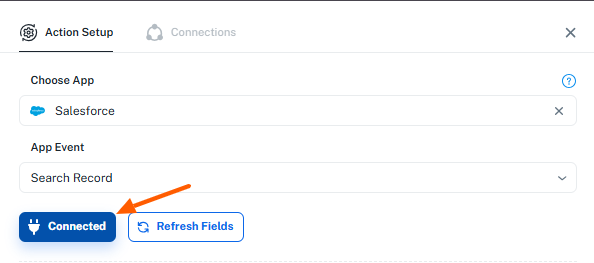
- Click on the Connected button.
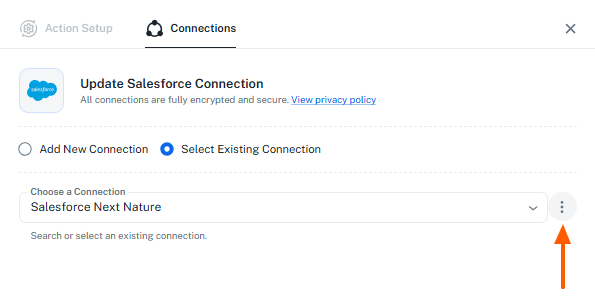
- Click on the three-dot menu (⋮) next to the existing connection.
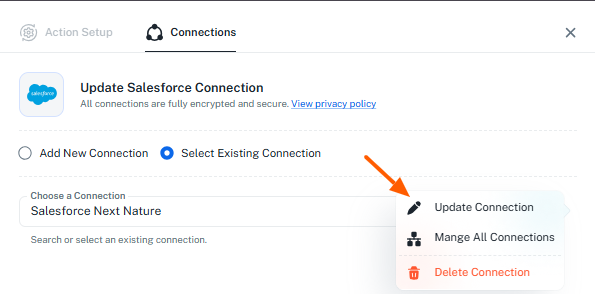
- Select Update Connection.
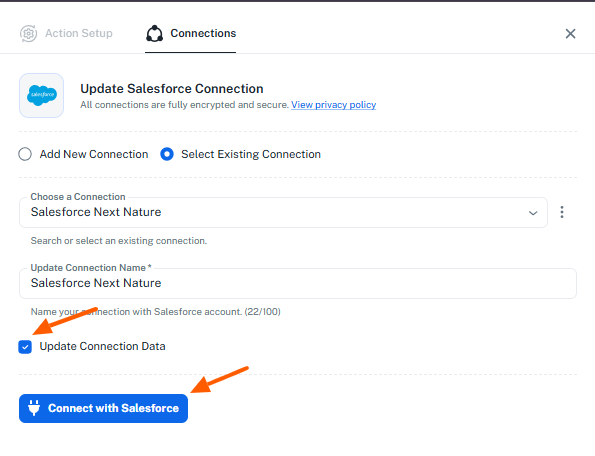
- Enable the Update Connection Data checkbox.
- Click Connect with Salesforce and authorize the new Salesforce account that you would like to use.
- Save the connection.
Once the connection is updated, all workflow steps using that particular Salesforce connection should start using the newly authorized Salesforce account.
If clicking on the Connections tab is not opening anything on your end, please share a short screen recording demonstrating the issue so that we can investigate it further.
Please let us know how it goes. ?