ChatGPT API Error
Status: Open · Asked by gurudutt.narayan on · 0 views
I'm getting /;The model `gpt-4` does not exist or you do not have access to it." error when I try to use Ask ChatGPT action. I have a paid subscription with ChatGPT and I tried other models as well but getting the same error.
Hello @gurudutt.narayan,
Could you please provide the workflow URL where you tried using the ChatGPT action, along with the connection name? This will help us look into the issue and assist you further.
Hello @gurudutt.narayan,
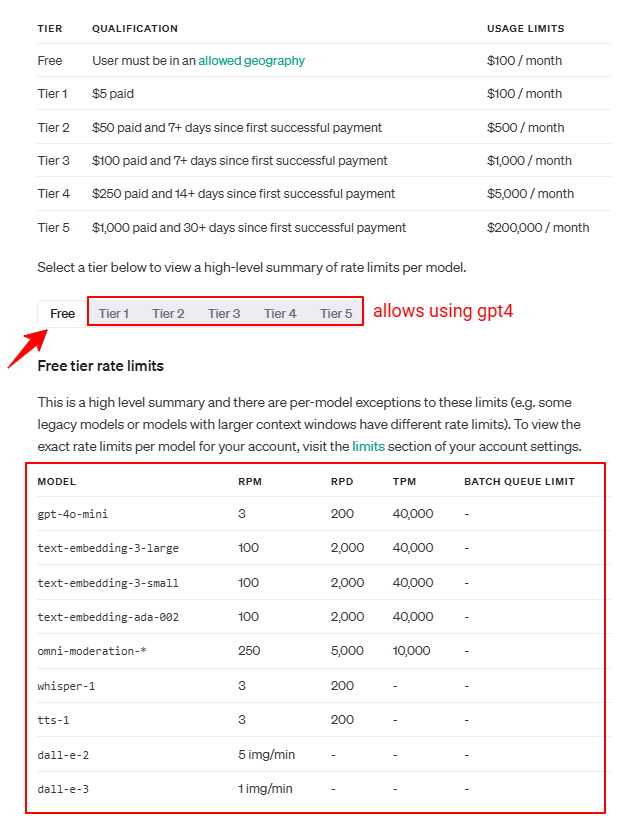
Could you please confirm the plan you're currently using for OpenAI? Please note that OpenAI does not offer GPT-4 in the free version. If you're using the free version, you may need to upgrade to access GPT-4.
For more details, refer to the attached documentation: OpenAI Usage Tiers.
I'm using ChatGPT Plus plan.
Hello @gurudutt.narayan,
It seems you are trying to access ChatGPT (GPT-4 and other versions) in Pabbly Connect but are facing issues despite having the required plans. In this case, we recommend reaching out to ChatGPT support directly, as they will be able to provide more specific assistance regarding access and any potential limitations.
If you need further help setting up or troubleshooting in Pabbly Connect, feel free to let us know.
I have already reached out to them and they said I should check with Pabbly, I also see other users facing same issues with Pabbly (https://forum.pabbly.com/threads/unable-to-connect-gmail-to-openai-to-reply.25835/).
Hello @gurudutt.narayan,
Could you kindly share the response you received from ChatGPT support? This will help us better understand and investigate the issue.
Looking forward to your response!
I have already reached out to them and they said I should check with Pabbly, I also see other users facing same issues with Pabbly (https://forum.pabbly.com/threads/unable-to-connect-gmail-to-openai-to-reply.25835/).
Were you able to ever resolve this?
Need update on this error I'm also having this issue and GPT's response is slow also.
giving up on Pabbly
Hello @gurudutt.narayan,
Please re-establish the ChatGPT connection in your workflow and re-enter your API key in the setup.
If the issue still persists after that, do let us know — we’ll assist you further.