ChatGPT response mapped to email content (body) wrong formatting
Status: Open · Asked by and1gmail on · 0 views
Hello,
thanks for the prompt replies to my recent questions.
This time:
Setup:
I set up an automation that includes a generated ChatGPT reply to be mapped to the email body (main text content) field of a Zoho sent email and the email then to be sent
The issue:
Despite ChatGPT neatly outputting a well-formatted text response with paragraphs and visually appealing the text that is mapped to the Zoho email body field by Pabbly does not contain any paragraphs and looks messy bc all cramped together. How to solve this problem?
I would like the sent emails to have the same text formatting that the original ChatGPT reply has.
I have the same automation set up in Zapier and it works perfectly there with correct proper formatting.
Thanks you.
Hey @and1gmail
It appears the issue is because you are using content type as HTML. Please try using "Plain Text" instead and let us know if it works for you.
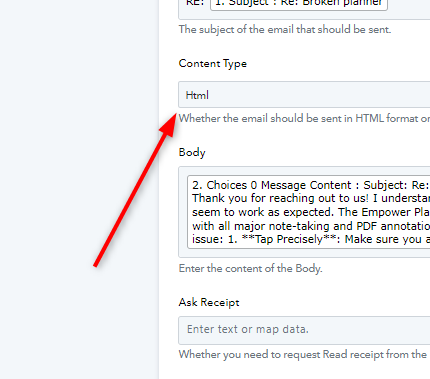
Thanks for your reply. I had actually already tried that but it did not have any effect.
When testing the last Zoho Mail step the text is formatted correctly in the test result displyed but all emails being sent contain the text unformatted. Any idea how to fix this?
Hello,thanks for the prompt replies to my recent questions.
This time:
Setup:
I set up an automation that includes a generated ChatGPT reply to be mapped to the email body (main text content) field of a Zoho sent email and the email then to be sent
The issue:
Despite ChatGPT neatly outputting a well-formatted text response with paragraphs and visually appealing the text that is mapped to the Zoho email body field by Pabbly does not contain any paragraphs and looks messy bc all cramped together. How to solve this problem?
I would like the sent emails to have the same text formatting that the original ChatGPT reply has.
I have the same automation set up in Zapier and it works perfectly there with correct proper formatting.
Thanks you.
Just replied. Thanks.
Hello @and1gmail
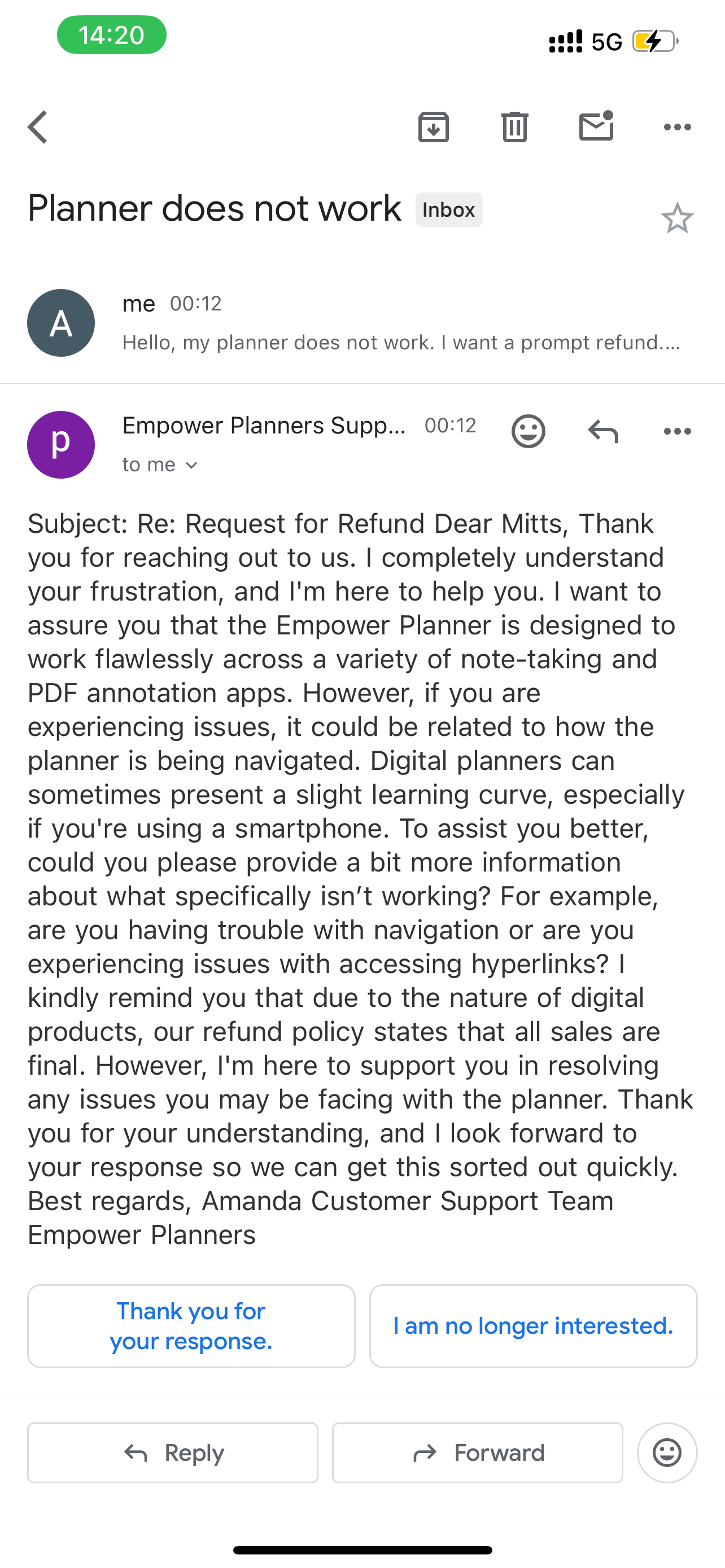
Can you please share a screenshot of how the body text is sent in the mail This will allow us to better look into the issue. Kindly add the screenshot of the mail sent as per the latest task history.
Task History ID - IjU3NjUwNTZjMDYzNjA0MzU1MjZhNTUzMDUxMzA1MTZiNTQzNzBmMzki_pc
Hello @and1gmailCan you please share a screenshot of how the body text is sent in the mail? This will allow us to better look into the issue. Kindly add the screenshot of the mail sent as per the latest task history.
Task History ID - IjU3NjUwNTZjMDYzNjA0MzU1MjZhNTUzMDUxMzA1MTZiNTQzNzBmMzki_pc
Hi, yes. Screenshot if the test email attached.
Thank you.
Attachments
Hello @and1gmail
We have made a few changes to your workflow:
1. Added the prompt to ChatGPT to write the content in HTML.
2. Used text formatter to format the response received from OpenAI.
3. Mapped the response of the text formatter step under the content field of the Zoho Mail: Send Email step.
Kindly check the mail sent and let us know if it got sent as required. If not please attach the screenshot of the mail sent.
Hello @and1gmailWe have made a few changes to your workflow:
1. Added the prompt to ChatGPT to write the content in HTML.
2. Used text formatter to format the response received from OpenAI.
3. Mapped the response of the text formatter step under the content field of the Zoho Mail: Send Email step.Kindly check the mail sent and let us know if it got sent as required. If not please attach the screenshot of the mail sent.
Thank you. I highly appreciate it.
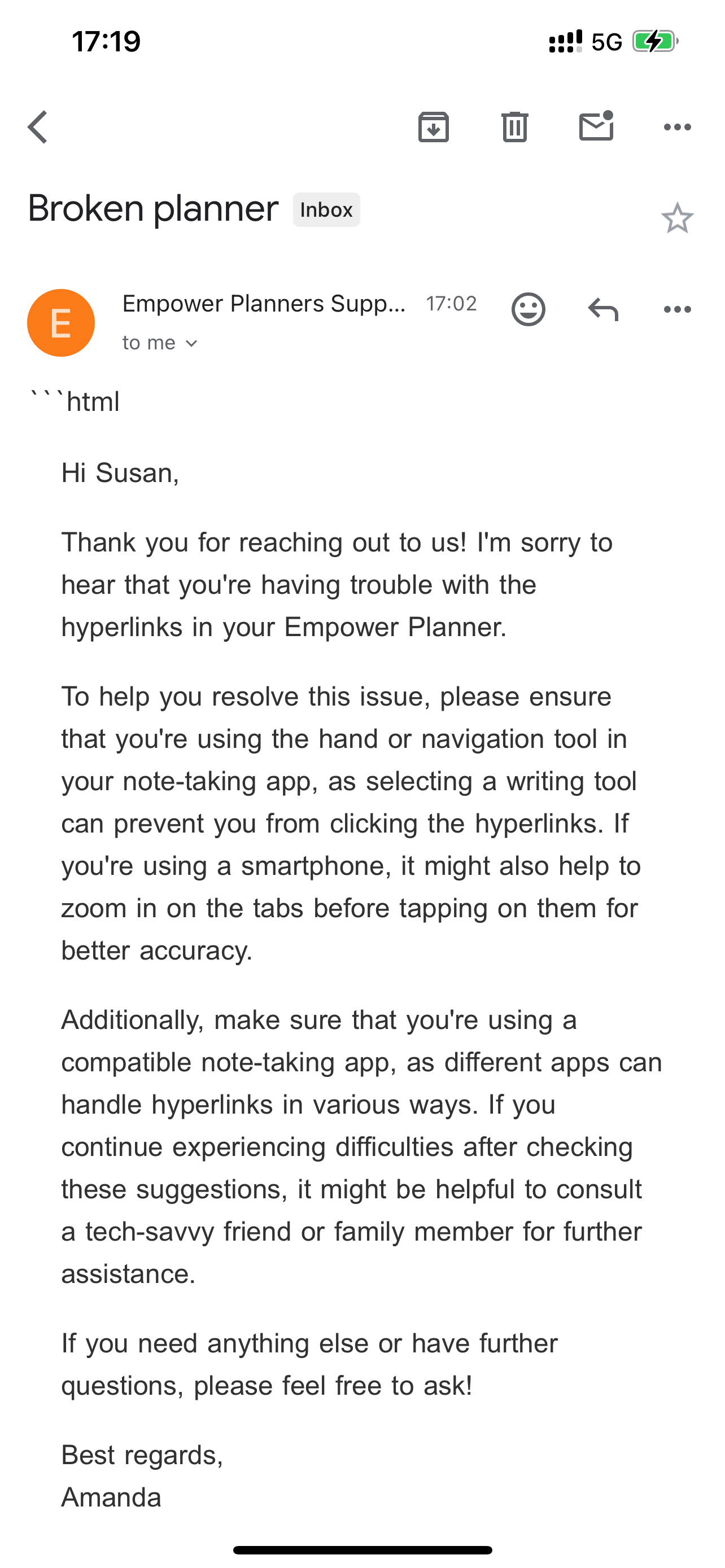
I have received 3 emails now.
The formatting problem is solved.
May I ask you if you have any specific suggestion for removing the first line in the message output that says “html…”?
Thank you
Attachments
Hello @and1gmail
I have added the text formatted step for removing the first line in the message output that says “html…”. Kindly make a test and let us know if the still the text appears.
Hello @and1gmailI have added the text formatted step for removing the first line in the message output that says “html…”. Kindly make a test and let us know if the still the text appears.
Thank you very much.
Hello @and1gmail
Can you please confirm if your issue is resolved
Hello @and1gmailI have added the text formatted step for removing the first line in the message output that says “html…”. Kindly make a test and let us know if the still the text appears.
I have an additional question regarding the task:
I have the exact same setup in Zapier. Also using Chatgpt. With the Zapier setup however Chatgpt replies to customer emails remembering the existing conversation it had with them and elaborates on the content.
With Pabbly ChatGPT always initiates a completely new conversation, completely forgetting any previous information a specifc customer shared in a previous email with ChatGPT.
Can you find any reason for that? If possible I would like to set it up so that the answers generated take pre-existing conversations with from the same sender into consideration.
The prompt is exactly the same
Hello @and1gmailCan you please confirm if your issue is resolved?
Yes, thank you. If you have any clues as to the above described differences between the Zapier and the Pabbly results for continuous email conversations with ChatGPT I'd highly appreciate if you could give your opinion on it. Thank you.
Please check out the video shared below, where we have set up a similar use case to yours. The video demonstrates how you can continue the previous conversation on WhatsApp, and you can apply the same logic to continue the conversation via email.