Circle not providing data
Status: Open · Asked by Soleiman Bolour on · 0 views
Circle not working, data not coming through.
Hi @soleimanb,
Upon checking, it appears that the Circle connection has not been established correctly. Since the Community ID is not appearing in the dropdown, it usually indicates a connection or permission issue.
Could you please confirm:
- How was the connection created (new API token or existing one)?
- Does the API token have permission to access the community and tagged members?
- Is the Host field correctly entered as per your Circle account URL?
Please recheck the token permissions under Circle → Developers → Tokens and ensure it has proper access. Once confirmed, try reconnecting and refreshing the fields.
Let us know the details so we can guide you further.
1. New API token from within circle
2. Yes, circle doesn't show any restrictions on what it gives access to, you just create an api token
3. Yes host field is correct.
I just went to Zapier and did a test and it worked with no issue. I used a different api and I had no problem. I am annoyed and frustrated with Pabbly. I paid for a lifetime plan thinking I would get a good system, but things keep breaking or don't work well. I guess that is what I get for thinking one time fee platform will keep working.
Hi @soleimanb,
To assist you more effectively with this issue, we would recommend connecting over a Google Meet so we can review the setup in real time.
Kindly schedule a meeting at your convenience using the link below:
https://calendly.com/d/cvc9-t8f-vgt
We look forward to connecting with you and resolving this at the earliest.
I appreciate you setting up a support call. I just checked your calendar times and none of them work. I am in USA pst time zone. Your times are too late.
Hi @soleimanb,
Kindly check the available time slots in the following calendar and let us know which time works best for you:
https://calendly.com/arshil-ahmad/new-meeting-1
We look forward to your confirmation.
Thank you. Scheduled a meeting
Thank you for joining the meeting. We have forwarded your concerns regarding:
- The Circle trigger step not capturing data
- Your request to add a Notes field to the “Google Contacts: Update Contact” action step
- Your request for the ability to add tags to a contact directly through the “LeadConnector V2: Create or Update a Contact” action step without replacing existing tags
Our team will get back to you shortly.
Thanks & Regards,
Arshil Ahmad
Customer Support Associate
? Pabbly.com
?Rate your support
Hi @soleimanb,
Regarding the issue with updating the Notes field in Google Contacts, our technical team has reviewed the case and confirmed that the Notes field should be updated using the biographies field in the action.
Instead of using the Notes field directly, please enter biographies in the Fields To Be Update section and map the value in Biographies: Value(s) accordingly.
You can refer to the attached images for guidance on how to configure this correctly.
Once updated, please test the workflow again and let us know if it works as expected.
Hi @soleimanb,
Thank you for your patience.
We’re glad to inform you that the issue where the screen gets blank on adding a specific action has now been resolved. You can continue setting up your workflow and testing by adding the action again. Please let us know how it goes.
Hi @soleimanb,
Instead of using “LeadConnector V2: Create or Update a Contact” please try using “LeadConnector V2: Add tags to Contact” action to add the tags to the contact.
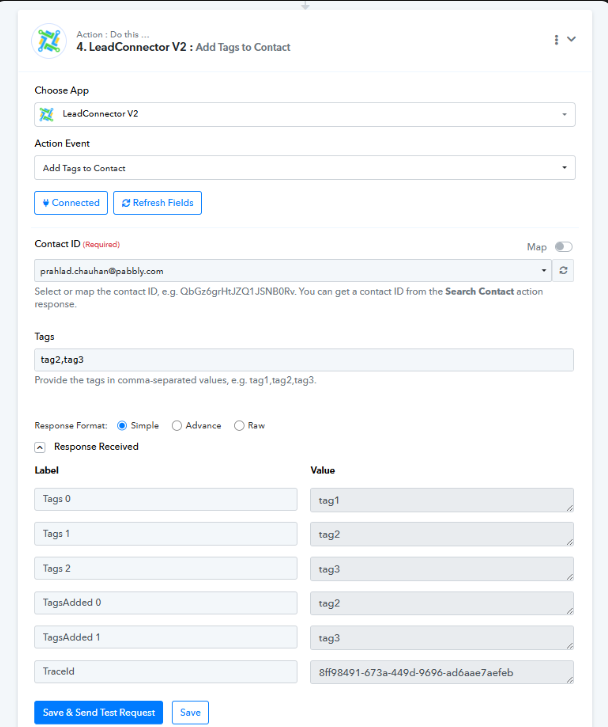
Hi @soleimanb,
Regarding the issue you reported with Circle, our team will need access to your Circle account to investigate and test the issue more effectively.
Could you please share temporary login credentials for your Circle account? Kindly send the details to [email][email protected][/email].
Please let us know once you have shared the credentials so we can proceed further.
Hi @soleimanb,
Regarding the issue you reported with Circle, our team will need access to your Circle account to investigate and test the issue more effectively.
Could you please share temporary login credentials for your Circle account? Kindly send the details to [EMAIL][email protected][/EMAIL].
Please let us know once you have shared the credentials so we can proceed further.
Hi @soleimanb,
Regarding the issue you reported with Circle, our team will need access to your Circle account to investigate and test the issue more effectively.
Could you please share temporary login credentials for your Circle account? Kindly send the details to [EMAIL][email protected][/EMAIL].
Please let us know once you have shared the credentials so we can proceed further.