ClickSend is not working
Status: Open · Asked by Himmelroth Marketing on · 0 views
Hi there!
Can you please help me? I've had a working 4 step connection, and all of a sudden, the ClickSend SMS doesn't send any more. It says message queued for delivery.
What can I do? I already sent tests, all the other steps did work, but not the SMS part (send SMS to testlist).
This is the
Task History ID -
IjU3NjUwNTZlMDYzNjA0MzE1MjZiNTUzMTUxMzQ1MTY0NTQzODBmMzki_pc
Hello @Himmelroth Marketing,
Upon reviewing your workflow, all steps appear to be functioning correctly. However, if the messages are not being delivered after being queued, we recommend reaching out to the ClickSend support team to check the status of the queued messages.
Let us know if you need any further assistance.
@Preeti Paryani thank you!
I just saw the sender ID is invalid, what can I do?
Hello @Himmelroth Marketing,
You can enter the sender's name or number in the "From" field. For more details on the correct format and requirements, please refer to the help text and the attached documentation provided in the interface.
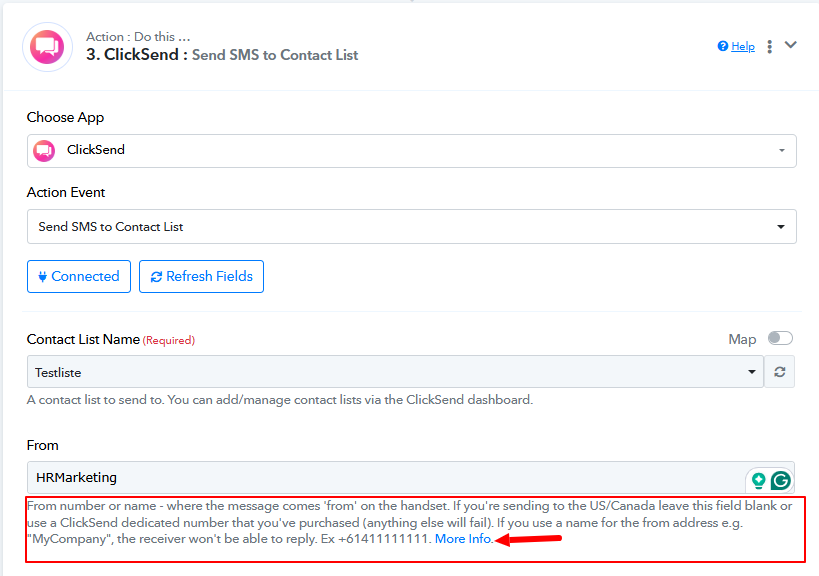
Let us know if you need any further assistance.
OK, thank you, that helps! It seems that my workflow is working again, at least in the testing scenario.
Hello @Himmelroth Marketing,
Thanks for the update!