Client Joy
Status: Open · Asked by SMK Medical on · 0 views
Hello, I use Client Joy to send invoices. Is there a way to have the invoice backed up into my Gdrive account? Last week, clientjoy went down, and I did not have access to invoices. I dont want to be in that position again.
Hello, I use Client Joy to send invoices. Is there a way to have the invoice backed up into my Gdrive account? Last week, clientjoy went down, and I did not have access to invoices. I dont want to be in that position again.
Yes you can do that .
In trigger you need to select clinetJoy as an app and new Invoice as an trigger event . and follow the instruction and in action step you need to select google drive.
If you are still not able to solve this on your own feel free to DM me and we can do a free zoom call. FYI I'm not from Pabbly Connect team, just a freelancer who helps other Pabbly users.
Yes you can do that .
In trigger you need to select clinetJoy as an app and new Invoice as an trigger event . and follow the instruction and in action step you need to select google drive.
If you are still not able to solve this on your own feel free to DM me and we can do a free zoom call. FYI I'm not from Pabbly Connect team, just a freelancer who helps other Pabbly users.
Thank you for the support. I dont want to waste your time. I cant pay you for your time. If this is an offer for just help id love to help if not. Id love some support from pabbly
Hi @rvd4now,
You need to set up 'Clientjoy: New Invoice' as your trigger step to capture new invoices from your Clientjoy account.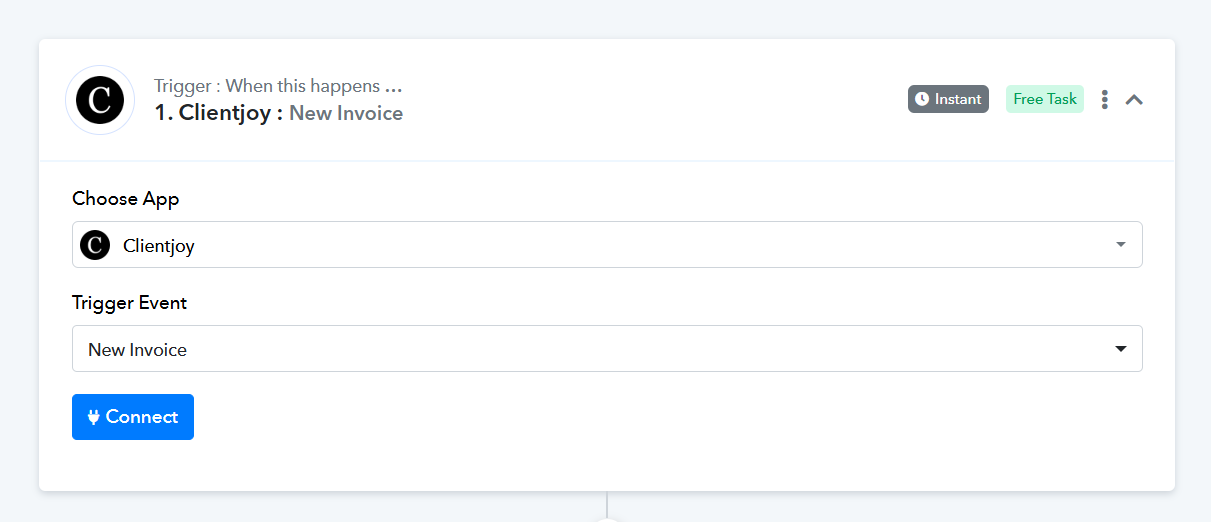
Watch the video shared below to learn how to establish a new connection with your Clientjoy account. In the video, it shows a lead being captured through a submission. Instead of capturing a lead, you need to capture a new invoice. Only the first part of the video is relevant for you.
youtube.com/watch?v=QKOb_iOJ0V0:135
=======================================================================
Once you have set up Clientjoy as the trigger step and captured an invoice in the trigger step, you can set up Google Drive as your action application to upload invoices to your Drive.
Please follow the steps in the video shared below to learn how to set up Google Drive as your action application to upload files. Only the second part of the video is relevant for you.
Thank you for the support. I dont want to waste your time. I cant pay you for your time. If this is an offer for just help id love to help if not. Id love some support from pabbly
@ArshilAhmad , has given some video guidance. Just Implement it and if that doensn't help you out you can ping me, I'll help you out in free zoom call.