Connect Workflows keep getting disabled
Status: Closed · Asked by Brad Turns on · 0 views
Hello Brad,
Your workflow links did not come through in your message. Please reply with the links to the 5 affected workflows.
Once you provide the links, we will check their backend logs to identify the failing step and help you fix it.
Thanks & Regards,
Hrishabh
Customer Support Associate
🌐 Pabbly.com
👉 Rate your support
Thanks for getting back tyo me. The URL's are:
https://connect.pabbly.com/workflow/mapping/IjU3NjcwNTY5MDYzNzA0MzY1MjZiNTUzMDUxM2Ii_pc
https://connect.pabbly.com/workflow/mapping/IjU3NjcwNTZlMDYzMDA0M2M1MjZhNTUzYzUxMzYi_pc
https://connect.pabbly.com/workflow/mapping/IjU3NjcwNTZlMDYzNDA0MzA1MjY0NTUzNjUxMzYi_pc
https://connect.pabbly.com/workflow/mapping/IjU3NjcwNTZlMDYzNDA0MzA1MjY0NTUzNjUxMzYi_pc
Thanks for shearing links.....
Hi Brad,
Thank you for sharing the workflow URLs.
We checked the workflow edit logs and found that the workflows were automatically disabled due to repeated authentication failures while attempting to access the Facebook Lead Ads API.
It appears that the connection associated with your Facebook Lead Ads application was disconnected or became invalid. As a result, when the workflow attempted to fetch data using the expired/unauthorized connection, multiple unauthenticated API requests were made. To prevent continuous failed executions, the system automatically disabled the workflow.
You can also see this reflected in the workflow edit logs, where the message states: "Workflow disabled due to repeated authentication errors."
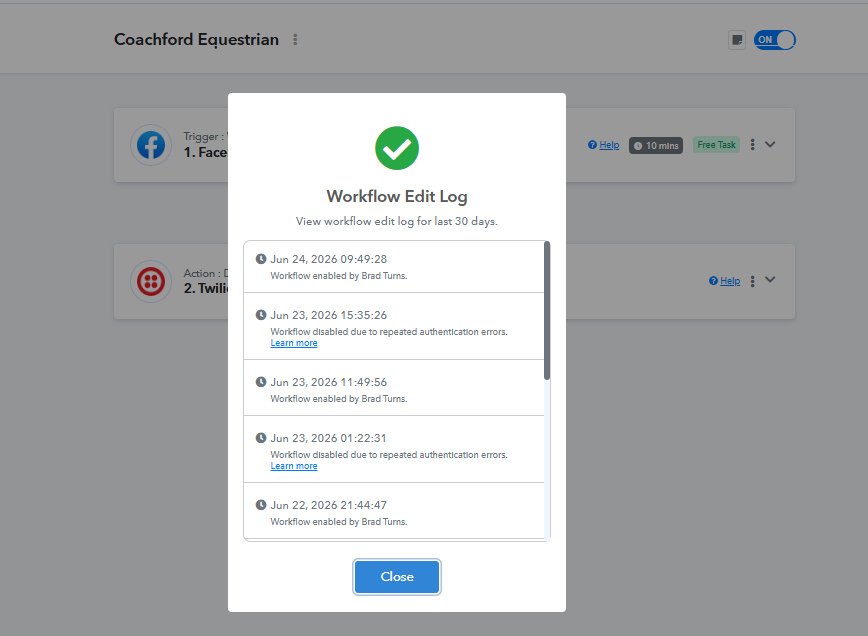
We recommend reconnecting the Facebook Lead Ads account in the affected workflows and then monitoring the executions. Once the connection is successfully reauthenticated, the workflows should continue running normally without being automatically disabled.
Please refer to the attached screenshot showing the relevant edit log entries for reference.
Let us know once you've reconnected the account or if you'd like us to help verify the connection status further.
Thanks and Regards,Preeti Paryani
Customer Success Associate,
Pabbly.com