Connections Not Working
Status: Open · Asked by Abhilesh Jha on · 0 views
after i create and test several connections in between Zoho CRM > Pabbly > Interakt, it works at testing but later it stops working. This has happened for almost all the automations i have created
Hello @taxajca
As we have checked, the mentioned task history and most of your recent task histories are successfully executed. Can you please the workflow URL and concerned task history with which you are facing issues so we can look into it and better assist you.
https://connect.pabbly.com/workflow/mapping/IjU3NjYwNTZkMDYzMjA0Mzc1MjZhNTUzMDUxMzEi_pc
https://connect.pabbly.com/workflow/mapping/IjU3NjYwNTZkMDYzNTA0MzE1MjZkNTUzZDUxMzIi_pc
https://connect.pabbly.com/workflow/mapping/IjU3NjYwNTZkMDYzNTA0M2M1MjZlNTUzZDUxMzYi_pc
Hello @taxajca
As we have checked the workflows shared above, they seem to working fine. Can you please elaborate on the issue you are facing so we can assist you accordingly, adding a few screenshots or a short video explaining the issue will be a lot helpful.
I have added these workflows which works fine when I test but in realtime the automations doesnt happen. For example in first work flow I have automated sending WhatsApp Notification to Clients & Relation Ship Manager on Task Creation in my Zoho CRM but the message is not sent when I am adding a Task in Zoho CRM. In second workflow automated whatsapp message should be sent when Task Status is updated, but that also doesn't happens
Any Update on this? @Preeti Paryani
Hello @taxajca
As we have checked, the above-mentioned workflows are working fine based on the routers. Please note that the mentioned workflows are last executed on the mentioned dates.
1. Zoho CRM task creation update: Sep 22, 2024
2. Zoho CRM task status update: Sep 22, 2024
3. ZohoBooks Invoice generation notify client: Sep 24, 2024
4. Automated replies to YouTube comments: Sep 24, 2024
Also, we have noticed that the message status in Interakt is received in response is queued, so we tested by sending a message to our test number and we successfully received the message.
Kindly check at your end and let us know if the issue persists.
I have just now passed a demo task in my crm for this 1. Zoho CRM task creation update: Sep 22, 2024
But didnt got any message either on client number or on RM
even https://connect.pabbly.com/workflow/mapping/IjU3NjYwNTZkMDYzNTA0M2M1MjZlNTUzZDUxMzYi_pc
has not triggered yesterday got a comment about 19 hours ago but not yet triggered and replied
Hello @taxajca
Kindly allow us some time to look into your concern, we will provide you with the updates soon.
Hello @taxajca
Kindly set up the trigger step for both these workflows once again and capture the response the response in Pabbly Connect by clicking on the "Save and Send Test Request button" and then try testing by making some dummy tests if you still face the same issue with these please notify us.
1. Zoho CRM task creation update: Sep 22, 2024
2. Zoho CRM task status update: Sep 22, 2024
As we have checked the issue regarding this workflow it seems that your Quota has expired, hence the workflow didn't get triggered. For more info regarding Quota, refer to this link - https://developers.google.com/youtube/v3/guides/quota_and_compliance_audits
even https://connect.pabbly.com/workflow/mapping/IjU3NjYwNTZkMDYzNTA0M2M1MjZlNTUzZDUxMzYi_pchas not triggered yesterday got a comment about 19 hours ago but not yet triggered and replied
Still same issue, while Save & Send Test it works, later when i create test task then it doesn't. Is it because I am using same connections for Creating the Task and Also for Updating the Field of Task?
Hello @taxajca
Can you please confirm when you added the test task Please provide the client details so we can check further.
Also, as we can see the last task was created on Sep 27, 2024, at 14:00:45 and updated on Sep 27, 2024, at 14:02:05. Please refer to the attached images for more info.


Hello @taxajca
As we can see you are using the "Zoho CRM: New Module Entry (Instant)" and "Zoho CRM: Update Module Entry (Instant)" triggers in your workflows. The max connection limit using these triggers is 24 hours, here is why it seems that the workflow is not getting triggered.
We recommend you use the "Zoho CRM: New Module Entry" and "Zoho CRM: Update Module Entry" instead to prevent the issues you are facing currently.
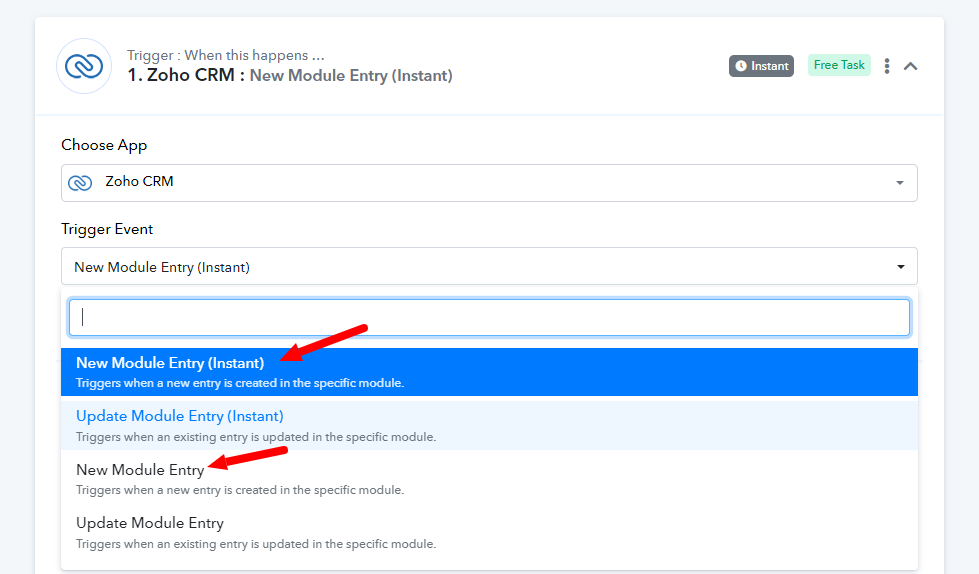
If you further face any issues, please let us know.