Data in show success but condition is false
Status: Open · Asked by Sellnamics Team on · 0 views
hello, can you please check why the condition on "Data In" on my filter is show success but showing error? If you check my filter I added the correct tag and upon testing it shows success. This is the Task History ID - IjU3NjUwNTZmMDYzNzA0M2M1MjY4NTUzNDUxMzA1MTY2NTQzOTBmMzEi_pc
Hi @Clicknamics,
Based on your Task History, we can see that you are not receiving the correct tag during automation, which is why the filter condition is not being met, and your workflow stops at step 4.
https://drive.google.com/file/d/17PfCHPI_p13mBukSR0NM-niRBs0vRzQV/view?usp=sharing
@ArshilAhmad yes, that's why I wanted to know what is the reason why I am receiving the incorrect tag during automation, when if you check the filter step the tag I added is correct even if you run to test it says success.
Hello @Clicknamics,
You have entered the correct string in the filter; however, the key response does not contain the exact string, causing the filter step to fail.
Please refer to this tutorial, where we explain how the filter works - https://www.loom.com/share/1f931179fc4a4c1a99198de8113b79d9?sid=e414ac58-a37d-47fb-a3ba-b7774ad44f44
@Preeti Paryani I need exactly the buy.getkeepcalm.com filter so that it will only send to the exact googlesheet. This work perfectly before and I did not change anything and I'm not sure what exactly causing the problem.
Hello @Clicknamics,
At the moment, we cannot find that string under the mapped key. However, if that exact string appears under a different response key, please try mapping it under the filter. If the key mapped in the filter step doesn’t contain the exact string you’re looking for, it will result in an error.
Let us know if you need further assistance.
The question is why the workflow capture the wrong condition while if you check the tag I added on the " Filter" step is correct. Like for example the screenshot I added, what capture on the condition is the date, why is that happen?
Hello @Clicknamics,
The WooCommerce trigger response is being received with shuffled fields. Since you're already using the WooCommerce Metadata Extractor action, I noticed that in the filter step, you're mapping the response from step 1 instead of step 4. Please double-check that you've mapped the correct response from the right step. If it's incorrect, make the necessary corrections, then run a few test requests to see if it works as expected.
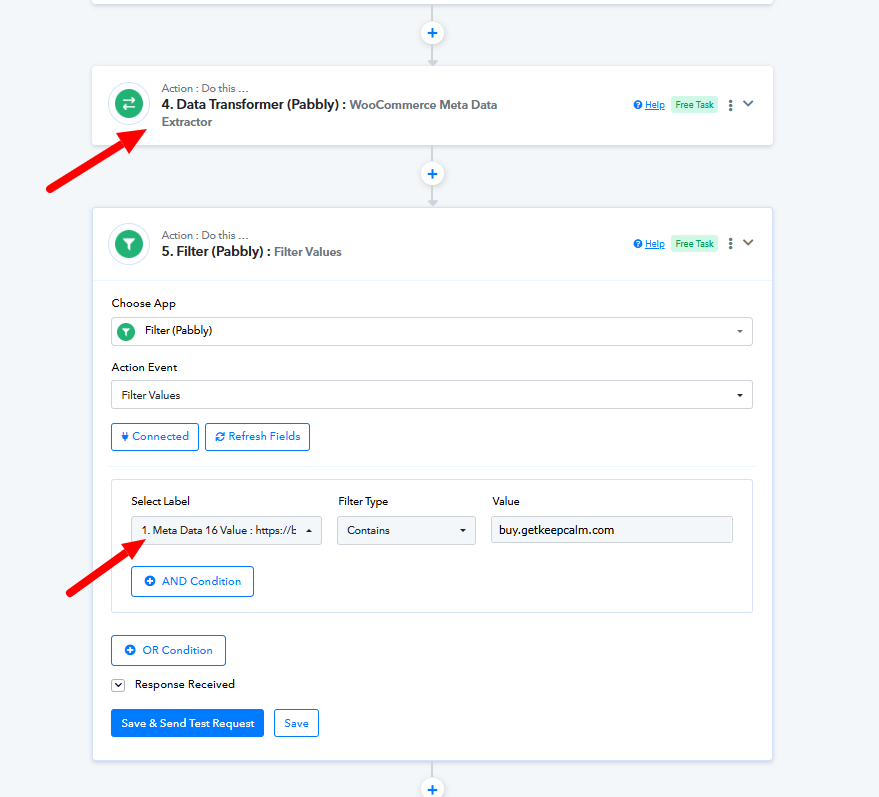
If you're still facing issues, let us know the response key where you're getting the required string, and we can assist in mapping it for you.
@Preeti Paryani I mapped already the step 4 please check if that is correct.
As I run a test still it stops on the filter step and did not proceed to the next steps and capture the wrong condition.
Task History ID - IjU3NjUwNTZmMDYzNDA0Mzc1MjZkNTUzYzUxMzI1MTY0NTQzMzBmMzgi_pc
As I run a test still it stops on the filter step and did not proceed to the next steps and capture the wrong condition.
Task History ID - IjU3NjUwNTZmMDYzNDA0Mzc1MjZkNTUzYzUxMzI1MTY0NTQzMzBmMzgi_pc
You are not getting 'buy.getkeepcalm.com' anywhere in your WooCommerce trigger step, which is why it's not getting extracted in step 4 and the Filter condition is not being met.
@ArshilAhmad can you please check what causing why I'm not getting the trigger? This is the workflow link https://connect.pabbly.com/workflow/mapping/IjU3NjUwNTY0MDYzZjA0MzE1MjY4NTUzNDUxMzQi_pc
Hello @Clicknamics,
We have replied to you over another thread please refer to it to learn about the cause - https://forum.pabbly.com/threads/wrong-id.26190.
Please note that the workflow is getting triggered but failing on step 2.