Deskera Trigger - for When Contact was Update
Status: Open · Asked by M Zeyn on · 0 views
Hi Team Pabbly support,
want to request for Deskera Trigger when Deskera Contact Update at Books need Trigger at pabbly.
cause right now just have Deskera Update Contact CRM only.
@support
#Deskera
#Pabbly
HI @mzayn,
If you want this trigger event to be added to Pabbly Connect, you can submit your request on our dedicated platform:
https://roadmap.pabbly.com/b/Update-Existing-Application
Our integrations team will review your request and, if possible, add the desired trigger event to Pabbly Connect.
Thanks & Regards,
Arshil Ahmad
Customer Support Associate
? Pabbly.com
?Rate your support
HI @mzayn,If you want this trigger event to be added to Pabbly Connect, you can submit your request on our dedicated platform:
https://roadmap.pabbly.com/b/Update-Existing-ApplicationOur integrations team will review your request and, if possible, add the desired trigger event to Pabbly Connect.
Thanks & Regards,
Arshil Ahmad
Customer Support Associate
? Pabbly.com
?Rate your support
Already
https://roadmap.pabbly.com/p/deskera-trigger-update-contact-at-books-plus
Hi @mzayn,
You can use the trigger event visible in the attached image.
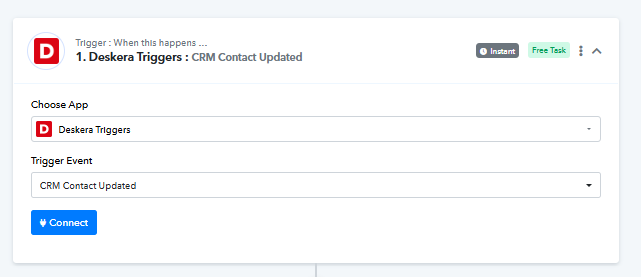
Hi @mzayn,You can use the trigger event visible in the attached image.
hi,
that is CRM apps not BOOKS
i want contact at Books (Deskera Books) Trigger on cotnact.
Alreadyhttps://roadmap.pabbly.com/p/deskera-trigger-update-contact-at-books-plus
Great! Our integrations team will review your request and, if possible, add the desired trigger event to Pabbly Connect.
Thanks & Regards,
Arshil Ahmad
Customer Support Associate
? Pabbly.com
?Rate your support
Hello @mzayn,
Thank you for the clarification.
We’ve confirmed that Deskera Books does not currently provide a dedicated “Contact Updated” webhook. However, you can use the existing Contact Updated (CRM) trigger as a workaround.
https://deskera.github.io/Developer-Documentation/docs/books/webhook/
For users who have dual access (CRM + Books), Deskera automatically syncs contacts between Books and CRM. Because of this, when a contact is updated in Deskera Books, the CRM Contact Updated trigger also gets fired.
To ensure that only Books-related contact updates are processed, you can add a filter step immediately after the trigger and check for the presence of the key receivableAccountCode.
- This field is unique to Deskera Books contacts and is not available for CRM-only contacts.
- If the key exists, it indicates the update originated from Deskera Books.
Using this approach, you can reliably capture and process contact updates from Deskera Books even without a native Books trigger.
Please let us know if you need help setting up the filter step.