Dropbox watch file instant module not useful
Status: Open · Asked by Mark on · 0 views
the Dropbox New File (Instant) module will trigger when a new file is added but will not give the file name or any other info about the file to use in subsequent modules. Is this how it is supposed to work? I want to copy the shareable link to a google sheet when a new file is added to dropbox and it won't work with the new dropbox module. Please advise
Hi @markbares,
Please allow us some time to look into this concern. We will get back to you with an update soon.
Thanks & Regards,
Arshil Ahmad
Customer Support Associate
? Pabbly.com
?Rate your support
Hi @markbares,
Please note that whenever a new file is added to the selected Dropbox folder, Dropbox may send multiple webhook events for the same activity.
In your case, you will notice two different responses:
- Response E is for the event name FILECHANGE (this is not useful for your use case and can be ignored).
- Response D is the correct one where the event name is file_new, and it contains the file name, path, and other file details.
We have already selected Response D in your workflow, so you can now map the file details in the next steps (for example, generating the shareable link and adding it to Google Sheets).
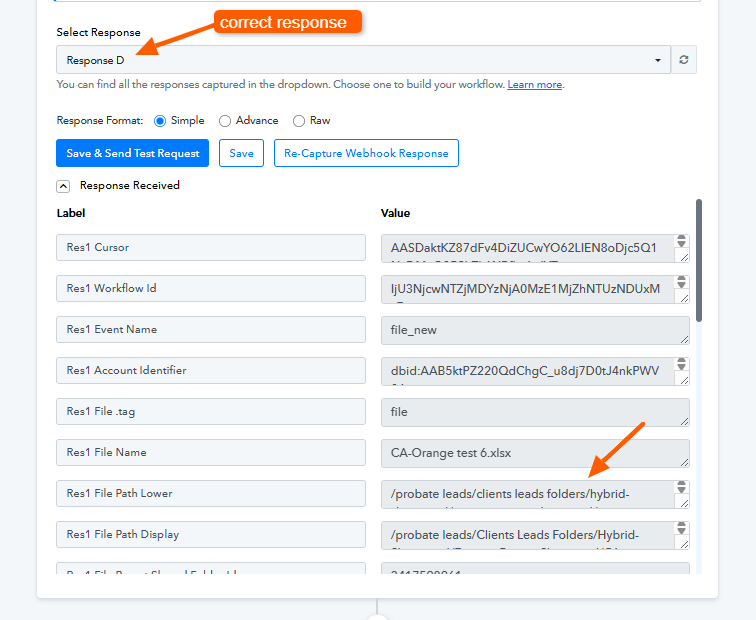
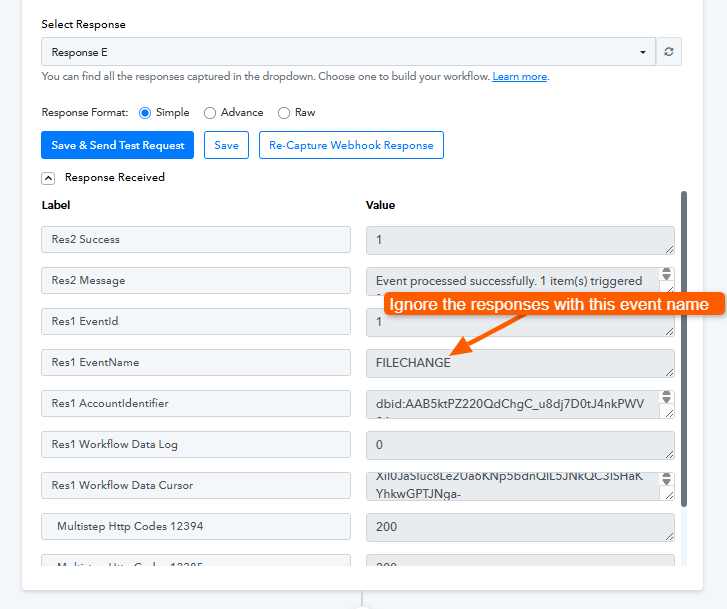
Please refer to the attached images for clarity.
Please watch the video shared below to understand how you can setup 'Dropbox: New File (Instant)' trigger step.
youtube.com/watch?v=viWGi-nl-fQ
Thanks & Regards,
Arshil Ahmad
Customer Support Associate
? Pabbly.com
?Rate your support