Due to data format change the flows are getting failed or diverting to wrong path.
Status: Open · Asked by vivekpathak2025 on · 0 views
Recently, a new update has been implemented on your side regarding the MySQL – Get Rows action in Pabbly Connect.
Earlier, the Get Rows function was returning data in a single row format. With that structure, our workflow was running perfectly without any issues.
However, after the recent update, the same function is now returning data in an array format instead of a row.
Because of this change:
We had to add an Array Formatter step in between to handle the new structure.
After adding the Array Formatter, the workflow is not behaving correctly.
Inside the Router, we have created two routes.
Now the workflow is getting completed in the first route itself, and the second route is not executing as expected.
Earlier, when the response was in row format, both routes were working properly based on conditions.
It seems that due to the structural change (row → array), the router conditions are not evaluating correctly.
We request you to please:
Analyze the workflow from your end
Check whether this issue is due to the recent update
Suggest the correct handling method for the array response
Guide us on how to make the router evaluate conditions properly
For your reference, here is the workflow URL:
https://connect.pabbly.com/workflow/mapping/IjU3NjYwNTY0MDYzNjA0MzU1MjY4NTUzMTUxMzYi_pc
If there is any type of change in future which you are doing please let us know in one week prior at least so that we can manage our flows accordingly. this time this change caused a big loss to us please reply as soon as possible and let us know the solution for this.
Account Id: [email][email hidden][/email]
Hi @vivekpathak2025,
Thank you for sharing the workflow details.
Upon checking the workflow, it appears that the MySQL – Get Rows action is currently capturing the response in Advanced format, which is why the data is being returned in an array structure.
To resolve this, please try the following steps:
- Clear your browser cache.
- Open the MySQL – Get Rows action in your workflow.
- Under Response Format, select Simple instead of Advanced.
- Click Save & Send Test Request, then save the step.
This should return the response in the earlier row format, allowing your router conditions to work as expected.
Please try this and let us know if the issue persists.
We have switched from Advanced to Simple. After making this change, an issue started occurring.
We have implemented a filter to check whether a user exists or does not exist. However, now all flows are going to the "User Exist" path. Previously, everything was working fine.
Could you please review our flow once and let us know what exactly changed or what might be causing this issue?
Hey @vivekpathak2025,
Thanks for reaching back to us.
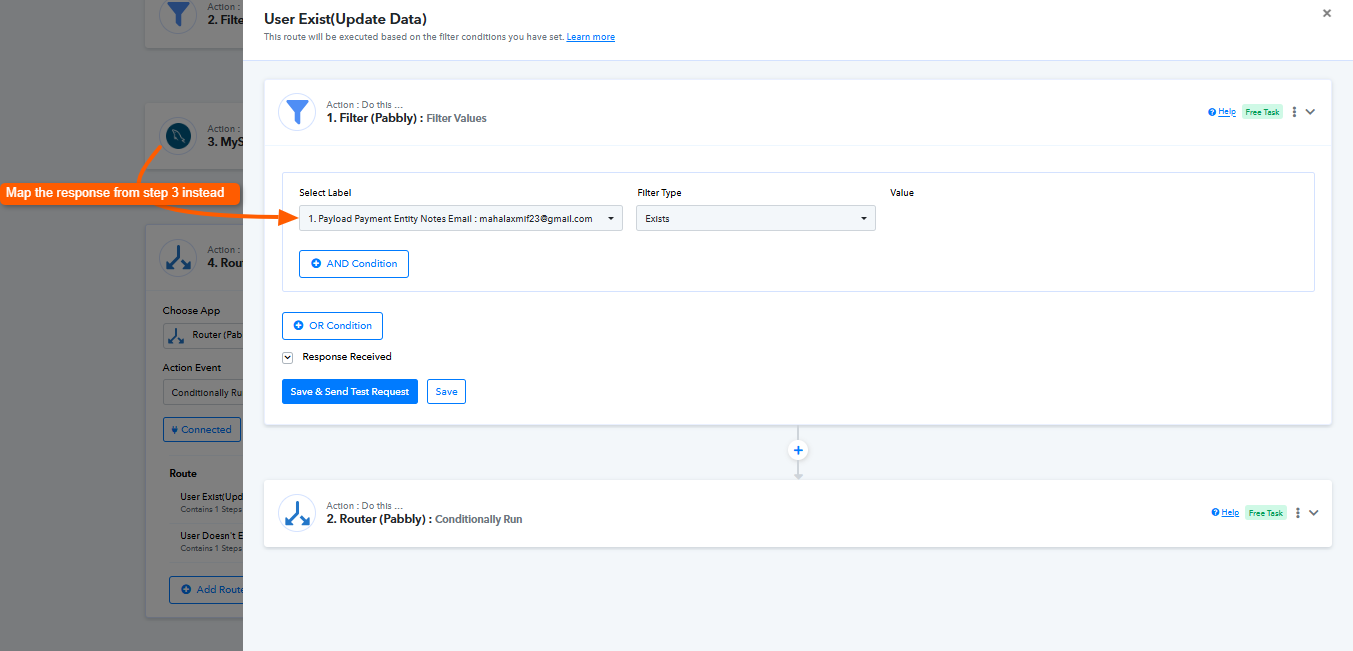
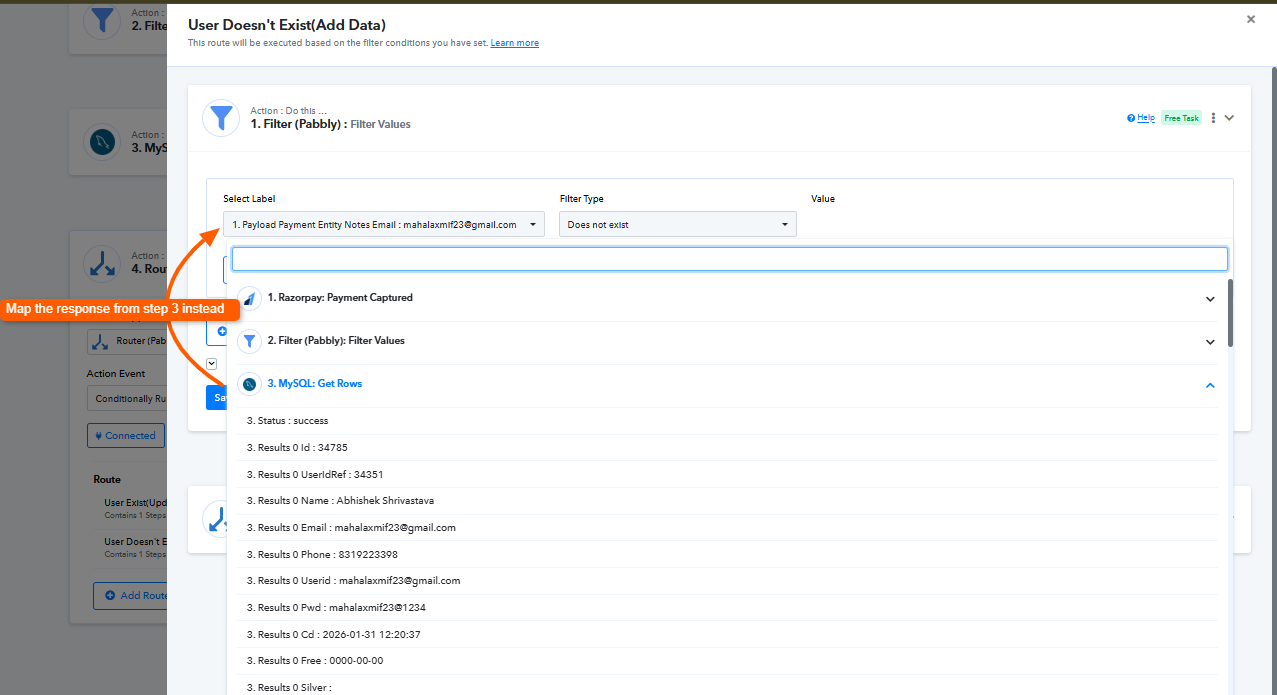
Upon checking the router filter, it appears that you have mapped the response from the first step of the workflow. Instead, the value should be mapped from Step 3 (MySQL – Get Rows), as this is the step that returns the user data used to determine whether the user exists or not.
Because the filter is currently referencing the incorrect step, the condition is always evaluating in a way that sends the execution to the User Exist route.
Please update the mapping in the router filter to use the response from Step 3 (MySQL – Get Rows), as shown in the screenshots. Once updated, the router conditions should work correctly.
Kindly make this change and let us know how it goes.