Error code 400 with AiTable not considered as failed step
Status: Open · Asked by Fanny Opti-Biz on · 0 views
Hello,
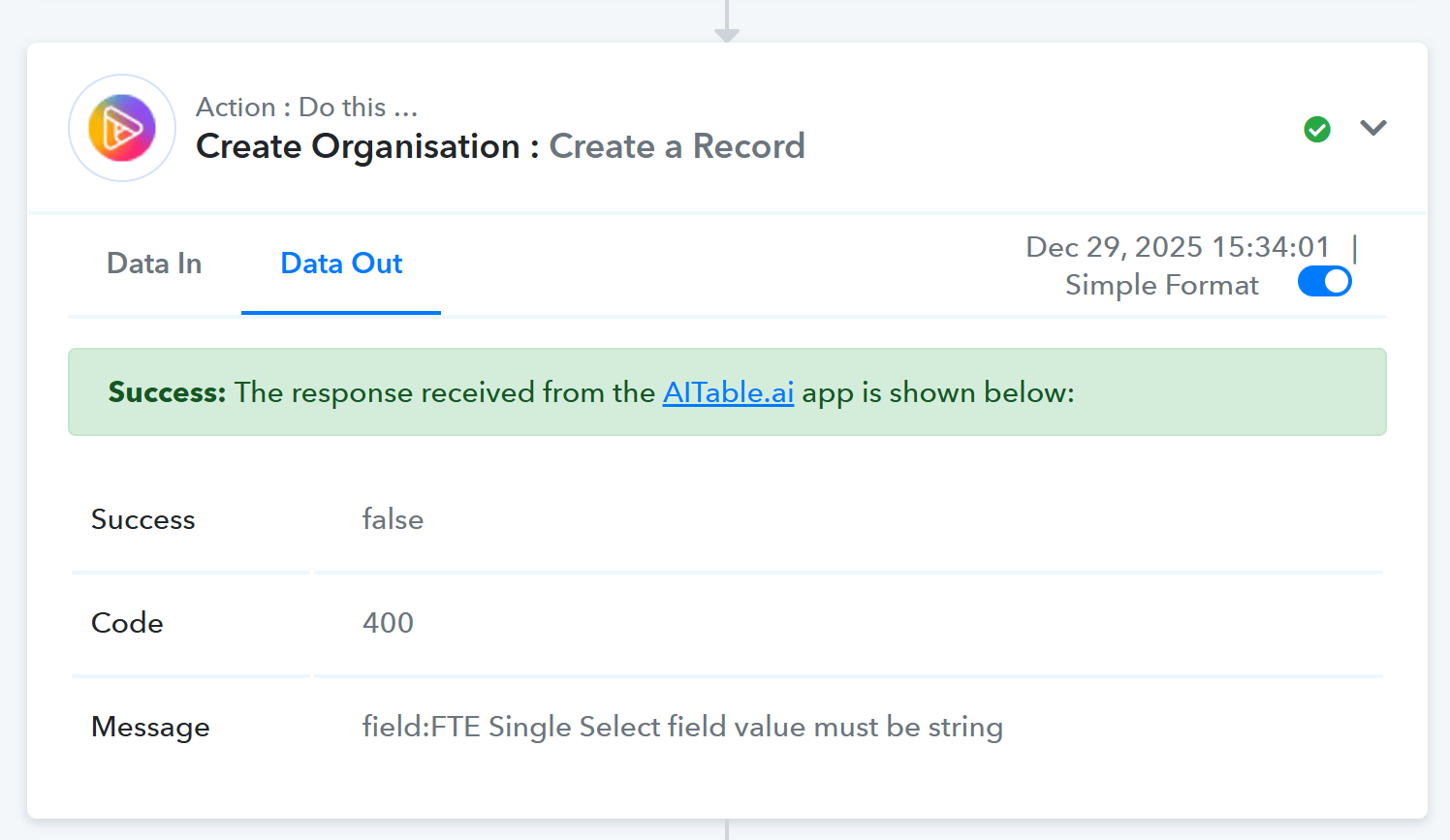
I am using action "Create a Record" for AiTable app, and I see that although we get an error code 400, the step is not considered as failed.
Consequently, all subsequent steps do not function properly, and I can't reexecute faled and skipped steps since this one causing the problem is considered as successful.
What can I do to avoid this ?
Thank you in advance
Hello @opti-biz,
Thanks for sharing the details. Upon checking, it appears that under the FTE field you are passing a decimal value. As indicated in the field description, this field expects a string value.
Please try executing the action again by passing the value as a string and let us know how it goes.
Hello,
Indeed, I understand what the error is, but what I am raising here is that the workflow action is considered successful despite error.
This means that I am not notified that something goes wrong, which is not ok.
This step should have failed and trigger email "A quick notice about recent task execution."
Please allow us some time to look into this concern. We will get back to you with an update soon.
Thanks & Regards,
Arshil Ahmad
Customer Support Associate
? Pabbly.com
?Rate your support
Hello @opti-biz,
Please note that the 400 error is being returned directly by the AiTable API due to a validation issue on the field FTE. As per AiTable’s schema, this field accepts string values only, and passing a decimal value triggers the error.
Since this behavior is controlled by the external API response, we recommend that you reach out to the AiTable support team directly regarding this error. Kindly keep our integration team in CC so we can stay aligned and review the behavior together.
CC: [email][email protected][/email]
Once we receive more clarity from AiTable’s side, we will be in a better position to assess and assist further from our end.
Hi @opti-biz,
Just a follow-up—did you get a chance to connect with AiTable’s support? Please keep our integration team in CC so we can stay aligned and review the issue together.
CC: [EMAIL][email protected][/EMAIL]
Once we receive more information from AiTable, we’ll be in a better position to evaluate the situation and assist you further from our end.
Thanks & Regards,
Arshil Ahmad
Customer Support Associate
? Pabbly.com
?Rate your support
Hi @opti-biz,Just a follow-up—did you get a chance to connect with AiTable’s support? Please keep our integration team in CC so we can stay aligned and review the issue together.
CC: [EMAIL][email hidden][/EMAIL]
Once we receive more information from AiTable, we’ll be in a better position to evaluate the situation and assist you further from our end.
Thanks & Regards,
Arshil Ahmad
Customer Support Associate
? Pabbly.com
?Rate your support
Hello,
I did not get feedback yet; I'll keep you posted. In the meantime, I added steps after the AiTable steps to send me a warning in case code is not 200
Sure, do let us know how it goes.
Thanks & Regards,
Arshil Ahmad
Customer Support Associate
? Pabbly.com
?Rate your support