Error generated vidéo avatar with HeyGen
Status: Open · Asked by Laurent BRIERE on · 0 views
Hi. Tryed this process :
- Fill in a NinjaForm (Wordpress/ simple form : Firstname and message))
- Control the data (first_name and message) writing It in a GoogleSheet
- Generate the video with the "message" value and adding a 15 minutes of delay with Pabbly step
... Connections are OK (Have the right data : avatars, voices...) but impossible to get the final videos : Error in HeyGen
An idea ? I followed this tutorial before doing my own automation...
youtube.com/watch?v=-coeY1hy1zA
It did not change anything. Thanks a lot.
Hello @betrained,
Could you please provide us with the Workflow URL where you are facing this issue? This will help us investigate the problem more effectively and assist you accordingly.
[IMG width="647px"]https://lh7-rt.googleusercontent.com/docsz/AD_4nXcdaVij1GMjtmdAwrirNZayJmJ9dlIh4gM8WhqJO-BJ-fQhccDdrvJUzzA-qo6DuuwtKpN4R8lHozD4FOKWdpapKz_nabS5463PkP2B9WXjzMRR68DlvLwOengWx3slTQ3TbWTc?key=PL4GUVQWZ8u13PditD4i_cYb[/IMG]
Hello @betrained,Could you please provide us with the Workflow URL where you are facing this issue? This will help us investigate the problem more effectively and assist you accordingly.
[IMG width="647px"]https://lh7-rt.googleusercontent.com/docsz/AD_4nXcdaVij1GMjtmdAwrirNZayJmJ9dlIh4gM8WhqJO-BJ-fQhccDdrvJUzzA-qo6DuuwtKpN4R8lHozD4FOKWdpapKz_nabS5463PkP2B9WXjzMRR68DlvLwOengWx3slTQ3TbWTc?key=PL4GUVQWZ8u13PditD4i_cYb[/IMG]
Hello @betrained,Could you please provide us with the Workflow URL where you are facing this issue? This will help us investigate the problem more effectively and assist you accordingly.
[IMG width="647px"]https://lh7-rt.googleusercontent.com/docsz/AD_4nXcdaVij1GMjtmdAwrirNZayJmJ9dlIh4gM8WhqJO-BJ-fQhccDdrvJUzzA-qo6DuuwtKpN4R8lHozD4FOKWdpapKz_nabS5463PkP2B9WXjzMRR68DlvLwOengWx3slTQ3TbWTc?key=PL4GUVQWZ8u13PditD4i_cYb[/IMG]
Sorry : The HeyGen support team indicated that It was a question of video size. With the free plan I am just allowed to use 1280x720 and 3 minutes max (Pro API plan : 1920x1080 and 5 minutes).
https://docs.heygen.com/reference/limits#video-length-and-resolution-limits
Hello @betrained,Could you please provide us with the Workflow URL where you are facing this issue? This will help us investigate the problem more effectively and assist you accordingly.
[IMG width="647px"]https://lh7-rt.googleusercontent.com/docsz/AD_4nXcdaVij1GMjtmdAwrirNZayJmJ9dlIh4gM8WhqJO-BJ-fQhccDdrvJUzzA-qo6DuuwtKpN4R8lHozD4FOKWdpapKz_nabS5463PkP2B9WXjzMRR68DlvLwOengWx3slTQ3TbWTc?key=PL4GUVQWZ8u13PditD4i_cYb[/IMG]
But I am trying too to do the same actions mentioned in the video tutorial. And I can not get the row index field to be updated.
Why ?
Hey @betrained
It appears that you've entered a static video ID in the action event "Retrieve a Video." For dynamic use, you'll need to ensure the video ID is mapped correctly from a previous step or variable. Kindly refer to the screenshot attached below for clarification on how to set it up properly. Let us know if you need help configuring it.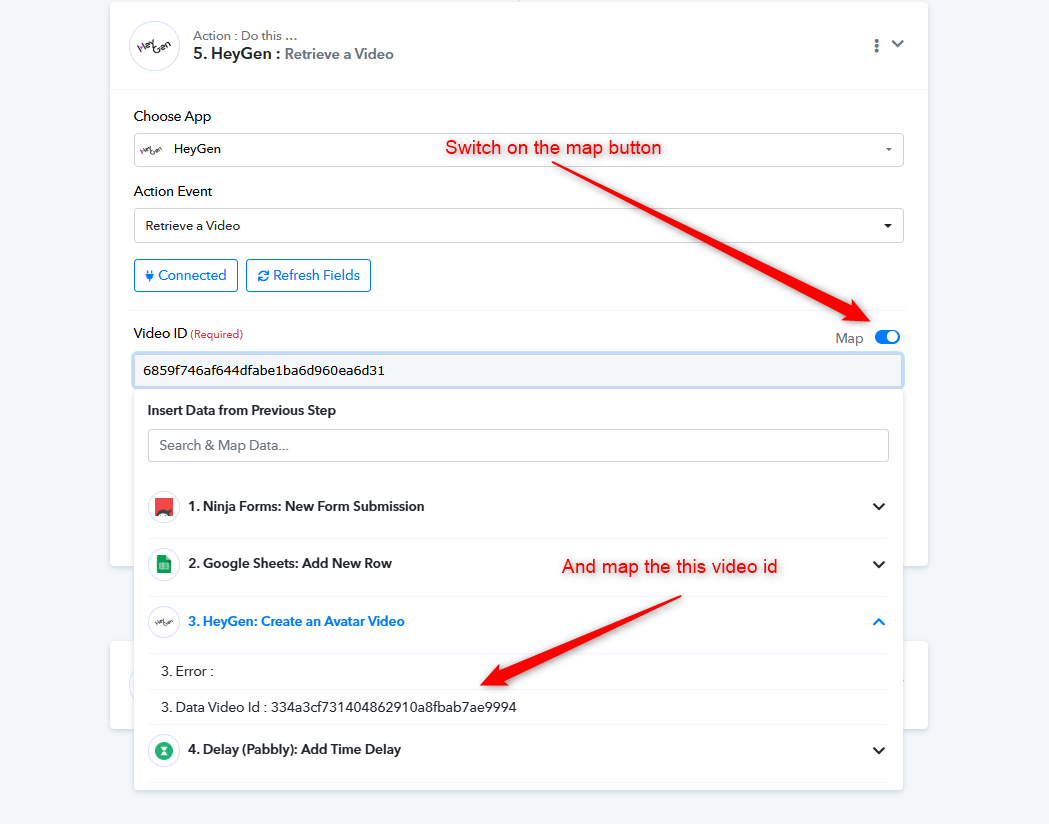
Hey @betrainedIt appears that you've entered a static video ID in the action event "Retrieve a Video." For dynamic use, you'll need to ensure the video ID is mapped correctly from a previous step or variable. Kindly refer to the screenshot attached below for clarification on how to set it up properly. Let us know if you need help configuring it.
OK Manthan.
I've since solved the problem, and my workflow is working. Except for one more thing:
I'm writing the contents of a NinjaForm (from Wordpress) into Google Sheets. After generating a HeyGen video, I want to update Google Sheets, including the URL of the generated video. However, I can't identify the "Row_index number" needed for this update. Can you help me with this last point?
https://connect.pabbly.com/v2/app/workflow/share/CUEFN1IFB2RWHFQ-Ug0HIAwYVlJVD1NuARgFFwQLXCRbFQJpUBEAagBMWHpVGlMyVx4BawVZAzhbT1JWBlBUJ1ZMBTlcX1ctVBkAMwVADj0JVwUtUjM#
We have added a Text Formatter to your workflow to extract the row number where the data is added and mapped it to the 'Update Cell Value' action step. This will allow you to update the correct cell.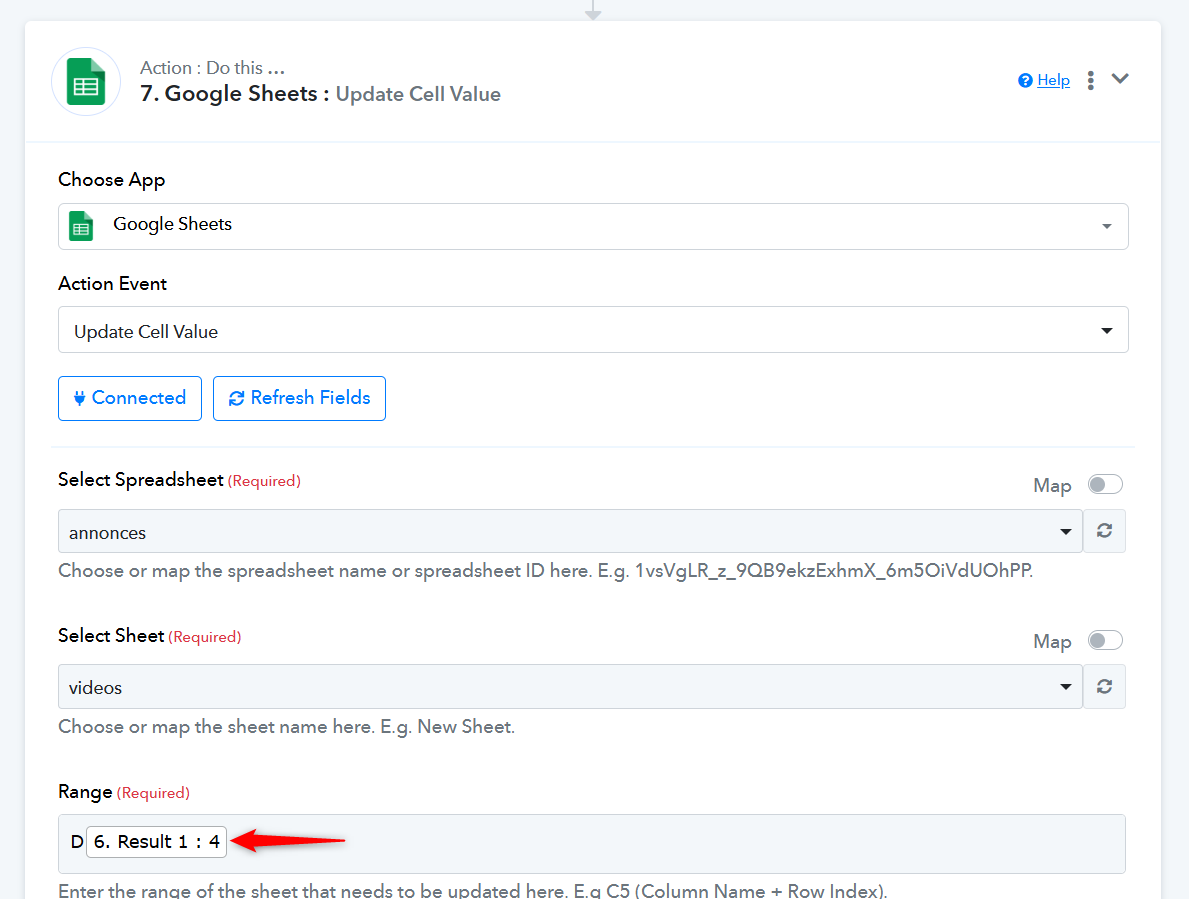
We have added a Text Formatter to your workflow to extract the row number where the data is added and mapped it to the 'Update Cell Value' action step. This will allow you to update the correct cell.
Thanks but why did you do that ? Your colleague (video above) used this trigger that I can not see in my own list... And later in the same video thanks to that trigger he can find the rowindex directly without using this (complicated) regular expression ;-)
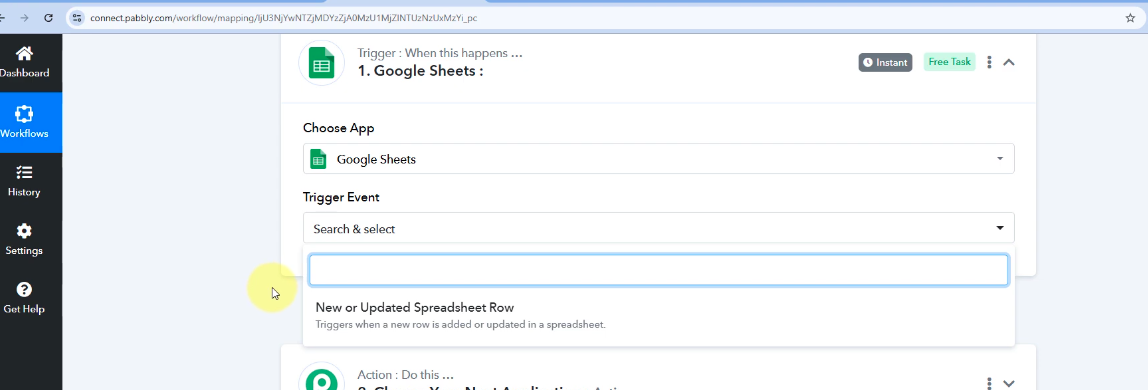
This particular workflow doesn't have Google Sheets as the trigger step (the first step of the workflow). For your use case, the row needs to be extracted from the 'Add New Row' action step.
https://connect.pabbly.com/workflow/mapping/IjU3NjYwNTY4MDYzNjA0MzM1MjZkNTUzNjUxM2Ei_pc