ERROR in Pabbly Save & Send Test
Status: Open · Asked by Steven Everett on · 0 views
Please see this video: https://www.loom.com/share/357734de23a74a4cb4f84798b79f7727
This same error is occurring across all 5 of these workflows inside Ouray Dental Folder
even though I only pasted just one URL below
Best, Steve
Hello @stemd1966,
Thank you for sharing the details and the video.
Upon reviewing the error message — “insufficient_quota: You exceeded your current quota” — we would like to clarify that this issue is not related to the task usage or limits within Pabbly Connect.
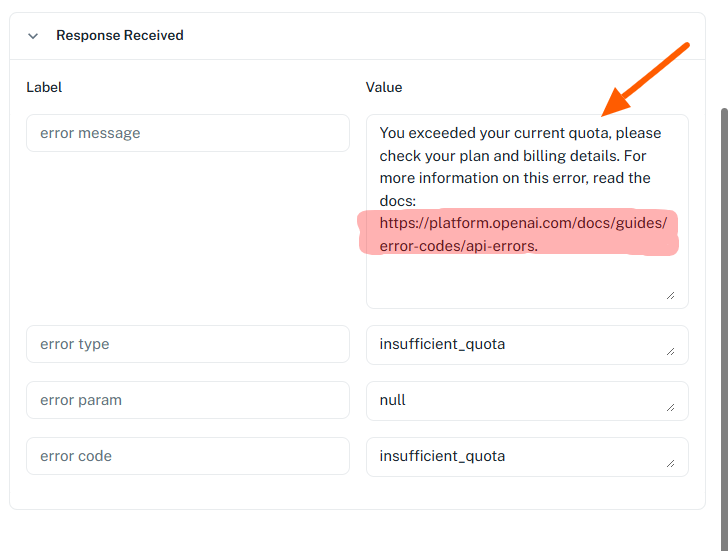
This error specifically indicates that the OpenAI API key used in your workflow (for the ChatGPT step) has exhausted its available quota or billing limit.
To resolve this, we recommend the following:
- Please check your OpenAI account billing and usage details.
- Ensure that you have an active plan and sufficient credits available.
- If needed, you may regenerate or update the API key after resolving the quota issue.
Once the OpenAI quota is restored, the workflow should execute successfully without this error.
Please let us know if you need any further assistance.
Hello @stemd1966,Thank you for sharing the details and the video.
Upon reviewing the error message — “insufficient_quota: You exceeded your current quota” — we would like to clarify that this issue is not related to the task usage or limits within Pabbly Connect.
This error specifically indicates that the OpenAI API key used in your workflow (for the ChatGPT step) has exhausted its available quota or billing limit.
To resolve this, we recommend the following:
- Please check your OpenAI account billing and usage details.
- Ensure that you have an active plan and sufficient credits available.
- If needed, you may regenerate or update the API key after resolving the quota issue.
Once the OpenAI quota is restored, the workflow should execute successfully without this error.Please let us know if you need any further assistance.
Thank you for your reply. I fixed it, BUT I have a question:
Is there a way to create a workflow that will go back and reply to all previously posted reviews?
Hi @stemd1966 ,
Glad to hear the issue has been resolved!
Yes, since you are using Google Business Profile, you can set up a workflow to reply to previously posted reviews.
Recommended Setup:
- Trigger: Schedule by Pabbly
- Set it to run as per your requirement (once or at intervals)
- Action: Google Business Profile → Fetch Reviews (Iterator)
- Make sure to capture the response in Advanced Format
- This will allow you to process each review individually
- Action: ChatGPT / OpenAI
- Generate a personalized reply based on the review content
- Action: Google Business Profile → Reply to Review
- Map the Review ID from the iterator step
- Map the generated response from ChatGPT
Important (Recommended Filter)
To avoid replying to already replied reviews, please add a Filter step before the reply action:
- Condition:
Reply Comment → Does not exist / is empty
This ensures that only reviews without a reply are processed.
Hi @stemd1966 ,Glad to hear the issue has been resolved!
Yes, since you are using Google Business Profile, you can set up a workflow to reply to previously posted reviews.
Recommended Setup:
- Trigger: Schedule by Pabbly
- Set it to run as per your requirement (once or at intervals)
- Action:Google Business Profile → Fetch Reviews (Iterator)
- Make sure to capture the response in Advanced Format
- This will allow you to process each review individually
- Action:ChatGPT / OpenAI
- Generate a personalized reply based on the review content
- Action:Google Business Profile → Reply to Review
- Map the Review ID from the iterator step
- Map the generated response from ChatGPT
Important (Recommended Filter)
To avoid replying to already replied reviews, please add a Filter step before the reply action:
- Condition:
Reply Comment → Does not exist / is empty
This ensures that only reviews without a reply are processed.
THANK YOU so much
Hi there, I am getting an error after following the instructions above. Please check out this video and help: https://www.loom.com/share/cdefc8eb52df49169a83d82a448fad3d
The Google Business Profile: Fetch Review action step already retrieves Unreplied reviews, so you don’t need to add a filter to your workflow. We’ve removed it on your behalf.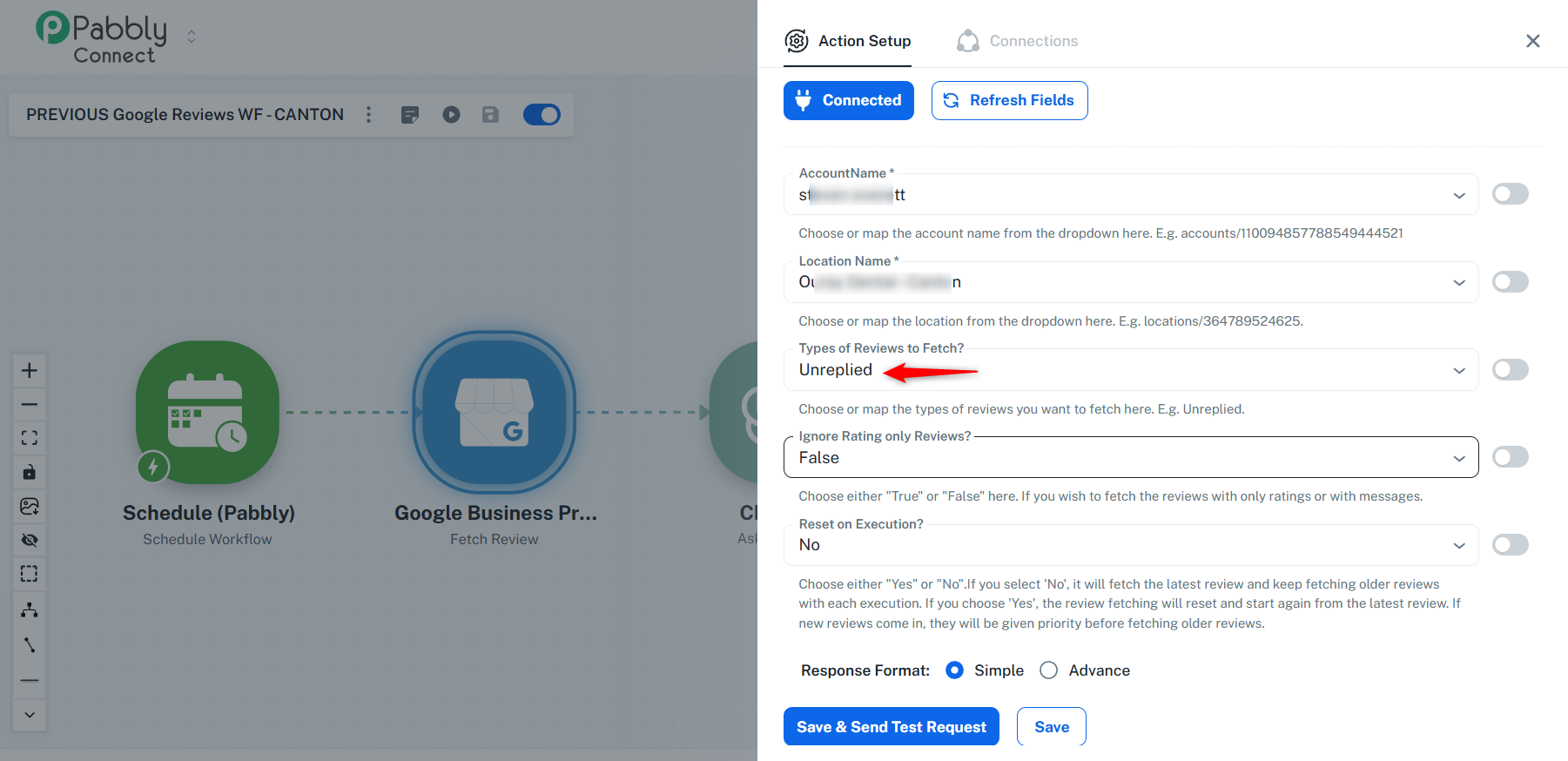
We have also remapped the data in the "Create Reply" action step, which appears to have resolved the error you were encountering. Please monitor your workflow for some time—it should now work as expected.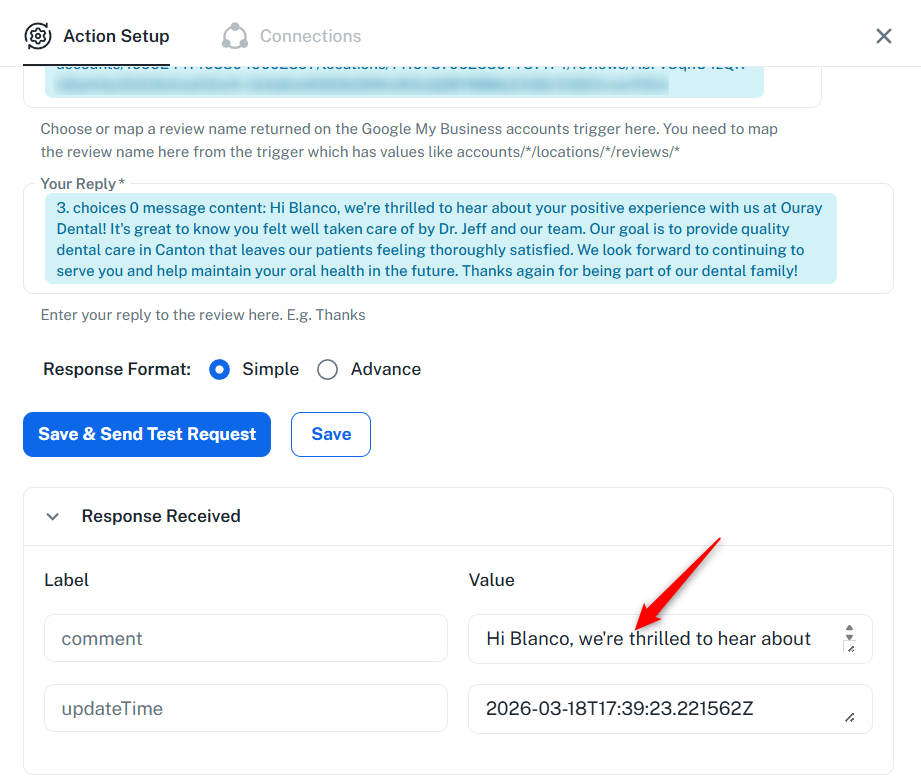
Thanks & Regards,
Arshil Ahmad
Customer Support Associate
? Pabbly.com
?Rate your support
THANKS alot for your help with this
Glad we were able to help.
We’d really appreciate it if you could share some quick feedback on the support you received:
https://forms.gle/GAjS4wdPYKuhnEYV9
Thank you for your time.
Thanks & Regards,
Arshil Ahmad
Customer Support Associate
? Pabbly.com
?Rate your support