Error message everytime I get disconneted due to time out in a Team workflow
Status: Open · Asked by pgaitan on · 0 views
Hi!
I have my own personal Pabbly account. I log in, I go to Settings, Team Members, scroll down up to the "Workflows or Folders Shared With You" section, and I click on the "Access Now" button.
In the Dashboard, I open the folder and then the workflow, so far so good.
The problem is that every time I get disconnected due to inactivity, I re-login but I get this error page: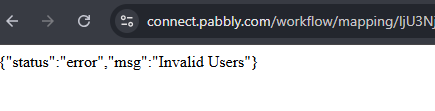
I must manually type the URL connect.pabbly.com and repeat all the process.
Is it possible to improve it? It would be great to go straight to the shared workflow. Otherwise, I think there should be some type of shortcut in my personal dashboard... too many clics to get to the required workflow...
Hi @pgaitan,
Currently, this is how we handle inactivity for security purposes. However, you can submit your suggestion to our development team on our dedicated platform:
https://roadmap.pabbly.com/b/Feature-Request
Our development team will review your request and, if possible, implement the changes you would like to see in Pabbly Connect.
Is it possible to improve it? It would be great to go straight to the shared workflow. Otherwise, I think there should be some type of shortcut in my personal dashboard... too many clics to get to the required workflow...
For now, as a workaround, you can bookmark the Team Member Access page in your browser and access the workflow from that page. This will reduce the number of clicks.
Thanks & Regards,
Arshil Ahmad
Customer Support Associate
? Pabbly.com
?Rate your support