Execution failed or partially failed
Status: Open · Asked by Akiladevi Shanmuganathan on · 0 views
Hi team! How to re-execute the failed or partially failed workflow? There is an option there but that is not working. When I click Re-execute the entire flow or re-execute the failed or skipped steps, Pabbly connect runs once again but then the outcome is not successful. 
Please see the above workflow. This is a workflow when a calendly booking is received we have to email the hosts is the purpose of the workflow. The pabbly connect account connected is [email hidden]. LInk to he workflow is https://connect.pabbly.com/workflow/mapping/IjU3NjUwNTY0MDYzNjA0MzA1MjY1NTUzNjUxM2Ii_pc
Hello @Akiladevi
As we have checked your workflow we noticed that in step 8 named "Google Sheets: Lookup Spreadsheet Rows V2" the Select Sheet field isn't mapped with any data causing the Internal Server error.
Please map the details accordingly, or else you will face the same issue on re-execution as well.
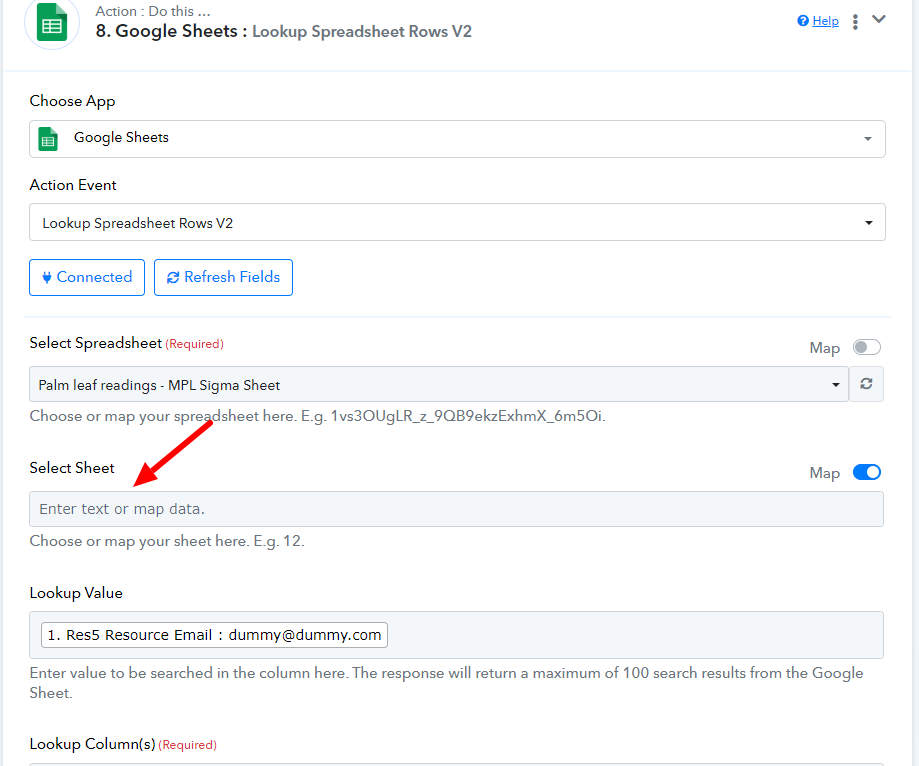
@Preeti Paryani I am not able to map the sheet there. I tried multiple times but it does not work for that sheet. The Google ID for the sheet is "0". So I mentioned zero and it does not get displayed. Do you know what should be done?
Hello @Akiladevi
Can you please provide us with access to the concerned Google Sheets so we can better look into the concern
Please provide us with the access here - [email protected]