Facebook date format changing on the same leadform
Status: Closed · Asked by Baptiste Broch on · 0 views
Hi,
I am wondering why Facebook sends us leads with different date format for the same FORM ID. Is there something that we can do on our side ?
Hello @Map,
Could you please share the specific task history IDs where you noticed the date being received in a different format from Meta’s end? Additionally, kindly confirm the exact field in which this date is being captured. If possible, sharing a screenshot would also help us understand the issue better.
Sure,
Here is a correct task ID : IjU3NjUwNTZhMDYzMDA0Mzc1MjZmNTUzNzUxMzM1MTYzNTQzMTBmMzMi_pc
Exact field :
[TABLE]
[TR]
[TD]Res4 Dob[/TD]
[TD][/TD]
[/TR]
[/TABLE]
Correct DATE FORMAT received :
[TABLE]
[TR]
[TD]01/27/1957[/TD]
[/TR]
[TR]
[TD][/TD]
[/TR]
[/TABLE]
MM-DD-YYYY
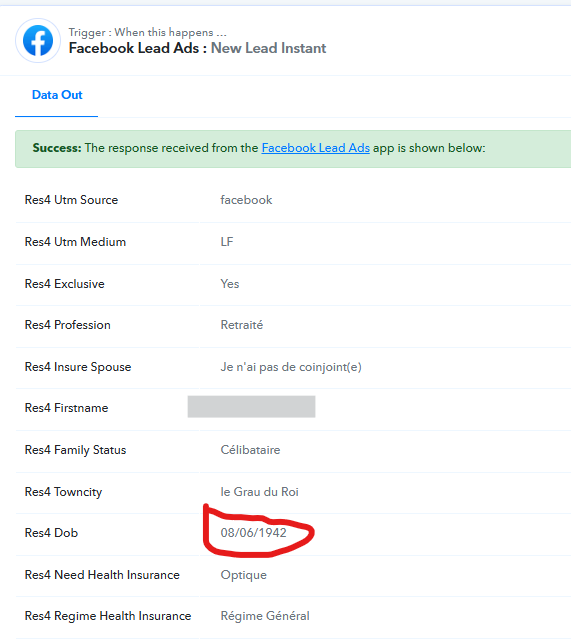
------------------------------------------------------------------------------------------------------------------
INCORRECT TASK ID : IjU3NjUwNTZhMDYzMzA0M2Q1MjZjNTUzNTUxMzY1MTZhNTQzODBmMzci_pc
[TABLE]
[TR]
[TD]Res4 Dob[/TD]
[TD]1936-07-08[/TD]
[/TR]
[/TABLE]
YYYY-MM-DD I guess.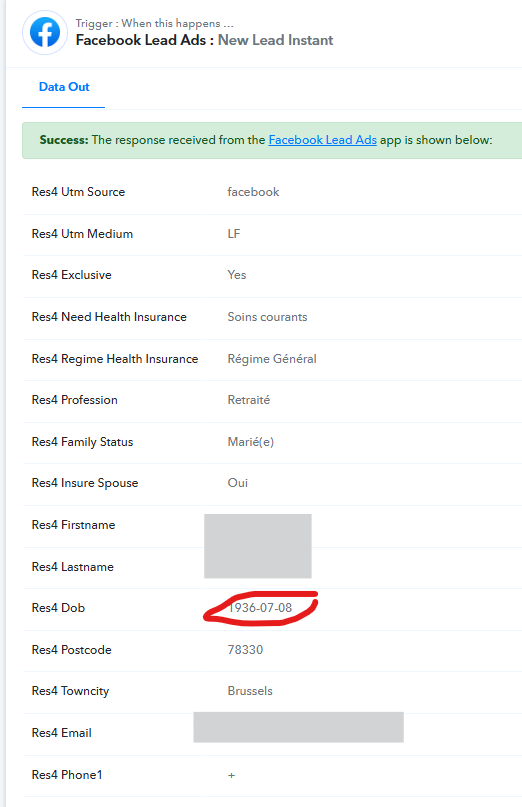
Both data is received from the same form ID : 2266315310557006
Hello @Map,
Thank you for sharing the task history details.
Upon checking, the Res4 DOB field appears to be a free-text field on your form. This means the user filling the form can enter the date in any format, which is why you are receiving different formats such as MM/DD/YYYY in one instance and YYYY-MM-DD in another.
To maintain consistency, please update your form by adding a placeholder or help text showing the exact date format users should follow. This will guide respondents and help ensure the same format is submitted every time.
Hi,
We didn't found that Res4 DOB field appears to be a free-text field on our form. We selected a birthdate parameter in FB lead form creation. Is there any chance to add a rule for those leads which comes with "-" between numbers ? We found that they only come with the same date format : YYYY-MM-DD. We would like to apply a rule like "if the lead contains "-" between days or months or years, format the date into "DD/MM/YYYY"
You can add this Python code to your workflow, which will automatically convert the date format from YYYY-MM-DD to DD/MM/YYYY. If the date is already in DD/MM/YYYY format, it will return it as it is.
https://connect.pabbly.com/workflow/share/CEBSYFcAB2RQGgRuAWRXcAwYAwdXDlEzBx4JG1FeAXlTHQVuAEEBawpGVHYAUwloUxpUPlYKAj5aTgAEUgQIe1JcBhQHBAB6A05UL1YPCjkIVlJ6VzY#
from datetime import datetimedef convert_date_format(date_str):
try:
# Try parsing YYYY-MM-DD
parsed = datetime.strptime(date_str, "%Y-%m-%d")
return parsed.strftime("%m/%d/%Y")
except ValueError:
passtry:
# Try parsing MM/DD/YYYY — if valid, return as is
parsed = datetime.strptime(date_str, "%m/%d/%Y")
return date_str
except ValueError:
pass# If neither format matches, return as-is or raise an error
return date_str
# Examples
print(convert_date_format("2025-11-25")) # → 11/25/2025
print(convert_date_format("11/25/2025")) # → 11/25/2025
Thanks & Regards,
Arshil Ahmad
Customer Support Associate
? Pabbly.com
?Rate your support
Ok thanks, very interesting. Could you check on this task history ID please ? IjU3NjUwNTZhMDYzZTA0MzQ1MjZjNTUzNjUxMzU1MTYzNTQzNjBmMzki_pc It did not work.
Hello @Map,
We have made some adjustments to the code, and it seems to be working fine now. Please map its response in the required step and let us know how it goes.
It works great ! Thank you Arhsil and Preeti :)
Hello @Map,
Glad to know that!
As your issue has been resolved, we’d appreciate it if you could share quick feedback on the support received:
https://forms.gle/GAjS4wdPYKuhnEYV9
Thank you for your time.
PS: We are closing this thread as the issue is resolved. Please feel free to reach out to us if you face any issues in the future.