Facebook Instant Lead Add
Status: Open · Asked by Mike_H on · 0 views
Hi,
I am new to Pabbly and am trying to create a workflow that triggers from all lead submissions. I've connected to my facebook account, selected the correct page, selected All Leadgen Forms, save and test request but I've submitted several test submissions and none arrive in Pabbly.
I have tried disconnecting and reconnecting and following steps again, I have also tried to recreate the workflow from scratch and follow steps again but nothing arrives.
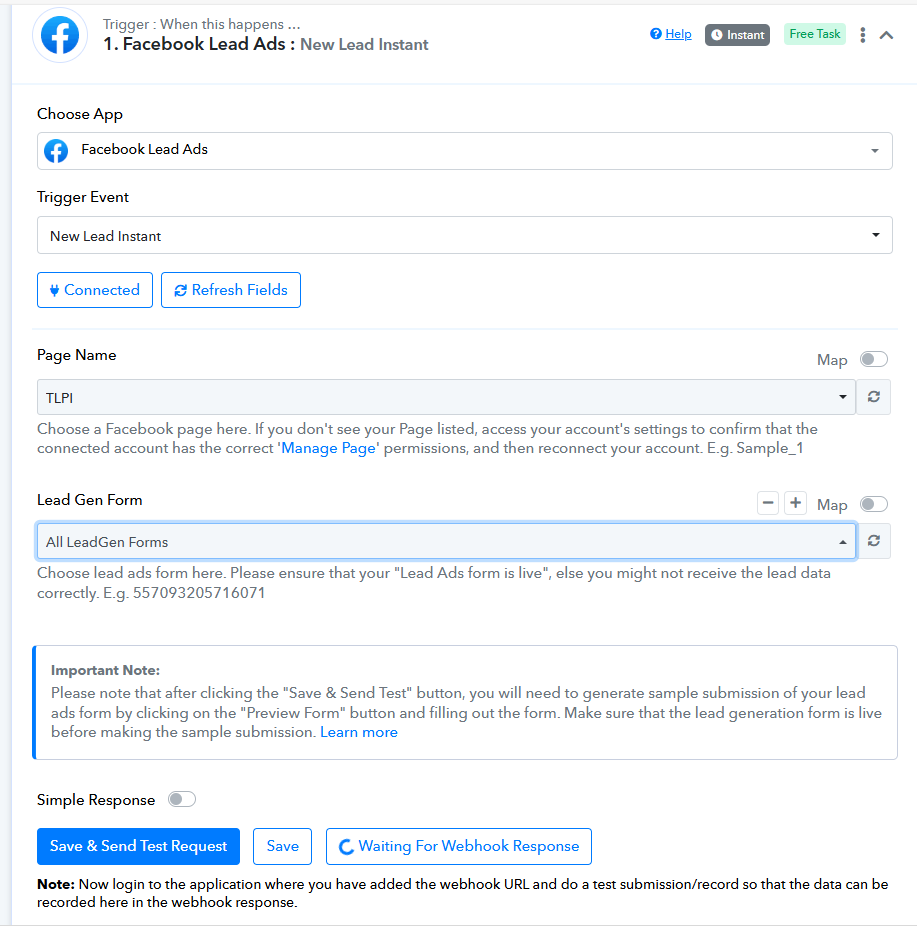
Hi @Mike_H,
Could you please share the Workflow URL where you have this concern?
Hi Arshil, here is the link: https://connect.pabbly.com/workflow/mapping/IjU3NjYwNTZiMDYzZTA0MzU1MjY0NTUzNjUxM2Ii_pc
I didn't get past the first hurdle of receiving lead data to be able to build anything else in the workflow.
I was planning on signing up with Pabbly for an account yesterday if I could have got this to work but have had to build in Zapier now.
Please create a new workflow from scratch without cloning, and set up Facebook Lead Ads as the trigger step by following the steps shown in the video shared below.
youtube.com/watch?v=4isM0J9u0dg
If the test leads don’t show up, add a Delay as Step 2 of your workflow and wait for a real lead to be captured organically. The Delay step will prevent the workflow from getting disabled while it’s waiting for the real lead.
Hi, I have already tried creating from scratch and disconnecting and reconnecting facebook account.
I cannot set up the rest of the workflow because I do not have the merge fields to feed into Hubspot..
Hi, I have already tried creating from scratch and disconnecting and reconnecting facebook account.I cannot set up the rest of the workflow because I do not have the merge fields to feed into Hubspot..
Please try it once again and, as suggested, wait for a real lead to be captured organically. Make sure to add a Delay step to the workflow to prevent it from getting disabled.
Hi, I have already tried creating from scratch and disconnecting and reconnecting facebook account.I cannot set up the rest of the workflow because I do not have the merge fields to feed into Hubspot..
Did this actually get resolved for you Mike?
Workflow link https://connect.pabbly.com/workflow/mapping/IjU3NjYwNTY1MDYzZTA0Mzc1MjY0NTUzNDUxM2Ei_pc ,
Could you please also check mine? It’s not working and keeps getting stuck on “waiting for webhook response,” even when I send a test lead using the Facebook testing tool—nothing happens.
This is quite urgent, so I’d really appreciate your help. Thanks!
Same happened to us, on sept 29 pabbly unsuscribed from messages i checked the app setting in facebook please help
[TABLE]
[TR]
[TD]
Pabbly Connect (652209868906131) unsubscribed from messaggi per questa Pagina[/TD]
[TD][/TD]
[TD]29 set 2025, 15:41[/TD]
[/TR]
[TR]
[TD]
Pabbly Connect (652209868906131) subscribed to messaggi per questa Pagina[/TD]
[TD][/TD]
[TD][/TD]
[/TR]
[/TABLE]
No this didn't get resolved. Sadly I gave up on Pabbly as a result of this experience.
No this didn't get resolved. Sadly I gave up on Pabbly as a result of this experience.
I have a lifetime deal, and it works great for a number of other things - but I feel like this might be due to some API changes.
Please try it once again and, as suggested, wait for a real lead to be captured organically. Make sure to add a Delay step to the workflow to prevent it from getting disabled.
i'm facing same issue webhooks is not capturing leads
https://connect.pabbly.com/workflow/mapping/IjU3NjYwNTY1MDYzZTA0MzA1MjZmNTUzNTUxMzUi_pc
i'm facing same issue webhooks is not capturing leads
https://connect.pabbly.com/workflow/mapping/IjU3NjYwNTY1MDYzZTA0MzA1MjZmNTUzNTUxMzUi_pc
Escalated to a technical team follow along here : https://forum.pabbly.com/threads/fb-ads-instant-lead-trigger-not-receiving-test-submissions.32761/#post-153337 @Capex @Mike_H
Please allow us some time. We will get back to you with an update soon.
It worked! You just need to finalize the permission in Meta Business Suite.
- Go to the Meta Business Suite and select your Business Portfolio.
- Navigate to Settings (gear icon).
- Find Integrations → Leads Access.
- Find your Page, click Assign CRM on the right, and select Pabbly Connect.
It worked! You just need to finalize the permission in Meta Business Suite.
- Go to the Meta Business Suite and select your Business Portfolio.
- Navigate to Settings (gear icon).
- Find Integrations → Leads Access.
- Find your Page, click Assign CRM on the right, and select Pabbly Connect.
Just discovered that CRM was also disconnected, am ooo for the weekend but I hope to see submissions soon ;-)