Facebook Lead Ads form to Pabbly Connect and I keep getting an error during the Trigger setup
Status: Closed · Asked by Gabriele1 on · 0 views
Hi Pabbly team,
I'm trying to connect a Facebook Lead Ads form to Pabbly Connect and I keep getting an error during the Trigger setup, even though the same page has been working fine with Pabbly Connect in the past.
Details:
Error received when I click "Save & Send Test Request":
- Res4 Type: InvalidFunctionType
- Res4 Message: One or more params missing
- Res3 Error Type: GraphMethodException
- Res3 Error Code: 100
- Res3 Error Subcode: 33
- Res3 Error Message: "Unsupported get request. Object with ID '4197494850501xxx does not exist, cannot be loaded due to missing permissions, or does not support this operation. Please read the Graph API documentation at https://developers.facebook.com/docs/graph-api"
What I have already done on the Meta side:
1. Enabled Leads Access in Business Manager.
2. Assigned Pabbly Connect as a CRM on the Facebook Page.
3. Disconnected and reconnected the Meta integration inside Pabbly Connect.
4. Verified the form is Active and has at least one lead.
5. Tried Refresh Fields and re-selected Page + Form from the dropdown.
The form is live, it has leads, and other forms on this same Page have always worked correctly with Pabbly Connect. The object ID in the error (41974948505016xx) doesn't match the current form ID, which makes me think Pabbly is still referencing an older/cached form on your side.
Could you please check on your end what's going on and help me get this trigger working again?
Thanks in advance,
Hello @Gabriele1,
Thank you for reaching out and for sharing the detailed information.
We’ve checked your account and can see that multiple workflows are successfully capturing data from Facebook Lead Ads. To investigate this issue specifically, could you please share the workflow URL where you’re encountering this error?
Please note that this error typically occurs when:
- There have been recent changes to the selected form, or
- The selected form does not have any leads associated at the moment
To thoroughly verify the issue (including checking whether the correct Form ID is being referenced), we’ll need to review the exact workflow.
Kindly share the workflow URL so we can look into it and assist you further.
Hello @Gabriele1,Thank you for reaching out and for sharing the detailed information.
We’ve checked your account and can see that multiple workflows are successfully capturing data from Facebook Lead Ads. To investigate this issue specifically, could you please share the workflow URL where you’re encountering this error?
Please note that this error typically occurs when:
- There have been recent changes to the selected form, or
- The selected form does not have any leads associated at the moment
To thoroughly verify the issue (including checking whether the correct Form ID is being referenced), we’ll need to review the exact workflow.Kindly share the workflow URL so we can look into it and assist you further.
Thanks for reply. This happens in [EMAIL][email hidden][/EMAIL] account, another account of an agency i work with. workflow is https://connect.pabbly.com/v2/app/workflow/mapping/IjU3NjcwNTZlMDYzNzA0MzQ1MjY0NTUzNDUxM2Ii_pc i attach facebook dev tool and response from pabbly. In past i made some working workflow with this account/page/form in thata page
Hello,
Thank you for sharing the details along with the screenshots.
We have reviewed the workflow you provided, and it does not appear to have Facebook Lead Ads configured as the trigger. However, we checked another workflow with a similar name, which seems to be the one where you are facing the issue.
Upon reviewing that workflow:
- The Page ID matches the one shown in your Facebook testing tool.
- However, the Form ID does not match. It appears that a different form is selected in the trigger compared to the one from which you are testing leads.
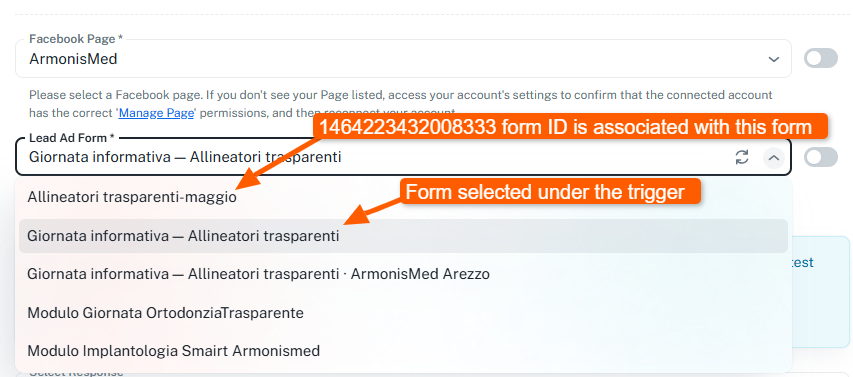
This mismatch is likely the reason why the data is not being captured correctly.
We recommend that you:
- Reconfigure the trigger by selecting the correct Facebook Page and Form.
- Save the setup and capture a fresh test lead.
- Verify if the data is being received correctly in Pabbly.
If the issue still persists, it would be best if you could share a screencast of your setup and test submission so we can review it more precisely and assist you further.
Looking forward to your update.
I make another example to clarify the issue
account [EMAIL][email hidden][/EMAIL]
Workflow url
https://connect.pabbly.com/workflow/mapping/IjU3NjcwNTZlMDYzNzA0MzQ1MjZlNTUzMTUxMzIi_pc
mapping
https://connect.pabbly.com/workflow/mapping/IjU3NjcwNTZlMDYzNzA0MzQ1MjZlNTUzMTUxMzIi_pc
Hey @Gabriele1,
Thank you for sharing the workflow and screenshots with us.
To better understand the issue, it would be best if we connect over a Google Meet. Kindly book a slot using any of the links below:
https://calendly.com/arshil-ahmad/new-meeting-1
https://calendly.com/d/cvpk-sxf-r2c
Looking forward to connecting with you.
Hey @Gabriele1,Thank you for sharing the workflow and screenshots with us.
To better understand the issue, it would be best if we connect over a Google Meet. Kindly book a slot using any of the links below:
https://calendly.com/arshil-ahmad/new-meeting-1
https://calendly.com/d/cvpk-sxf-r2cLooking forward to connecting with you.
Done, thanks a lot!
Hi @Gabriele1,
Thank you for joining us on the meeting.
We hope your concerns were addressed during the session. We’ll be closing this thread for now; however, if you have any further questions or need assistance in the future, please feel free to reach out.