Facebook Lead Ads to Google Sheet Information Misalignment
Status: Open · Asked by SupportHubstrat on · 0 views
Hi, we created two identical automations.
Facebook Leads Ads to Google Sheet
The lead source is the same campaign; the only difference in the automations is the information landing sheet.
Flow 1 (Crescita+): https://connect.pabbly.com/v2/app/workflow/mapping/IjU3NjcwNTZlMDYzNjA0MzI1MjY4NTUzMzUxMzUi_pc
Flow 2 (Oltrera): https://connect.pabbly.com/v2/app/dashboard?folderId=IjU3NjUwNTZjMDYzMDA0MzE1MjZmNTUzMyI_3D_pc
We also tried adding a one-minute delay, hoping it would solve the problem, but the problem persists.
It occasionally happens that the same lead received on both sheets is on two different rows.
Example:
Lead A
On sheet 1, it is on row 3
On sheet 2, it is on row 4
We can't understand how this problem could arise.
I attach the 2 tasks where the leads ended up on 2 different lines.
Task Crescita+: IjU3NjYwNTZkMDYzNTA0Mzc1MjZlNTUzMzUxMzc1MTY2NTQzNTBmMzQi_pc
Task Oltrera: IjU3NjYwNTZkMDYzNTA0Mzc1MjZlNTUzMzUxMzU1MTY3NTQzMzBmMzgi_pc
Hi @SupportHubstrat,
Thank you for sharing the detailed explanation along with the workflow links.
We have reviewed your setup, and the issue appears to be related to the delay configuration. Currently, when a new lead is received, both workflows are triggered, but due to the delay and execution timing, they are processing at slightly different times. This causes one workflow to write the data earlier and the other later, resulting in mismatched row positions across the two Google Sheets.
To resolve this, we recommend updating your delay configuration:
- Instead of using “Delay For”, please use “Delay After Queue”.
- This ensures that the next execution will only proceed after the previous task has been completed, maintaining proper sequence.
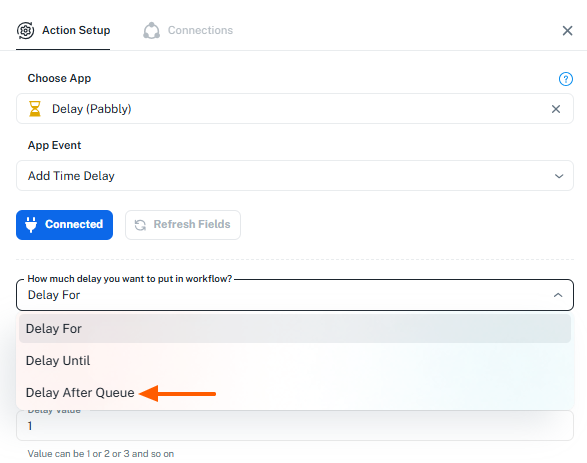
With this setup, records will be added to Google Sheets in a consistent order, which should resolve the row misalignment issue.
Please update the workflow accordingly and let us know how it goes.
Hi thank you your feedback.
We did the modification but the problem still there.
We received more lead and the situation on the sheets is this related to the last 3 leads received
Crescita+:
Mario Porto
GìGì Califano
Marco Paoli
Oltrera:
GìGì Califano
Marco Paoli
Mario Porto
the correct order should be the one on OLTRERA SHEET
Hi @SupportHubstrat,
Thank you for sharing the update.
To investigate this further, we’ll need view access to your Google Sheets. Please share access with the following emails so we can monitor the task history and how data is being added. This will help us identify the exact cause and guide you accordingly.
[EMAIL][email protected][/EMAIL]
[EMAIL][email protected][/EMAIL]
As a more reliable solution, since both workflows are using the same lead source, we recommend using a single workflow instead of two. In that workflow:
- Add one action to send data to Sheet 1
- Add another action to send data to Sheet 2
This will ensure both sheets receive data in the same order and should resolve the issue.
Before to share the information of google sheet we will try to unify the workflow.
And if we have the same problem we will share the access to the sheets
Sure, please try that out and let us know how it goes.
is this the suggestion that you mentioned? I need to map the field in last step always from facebook lead ads?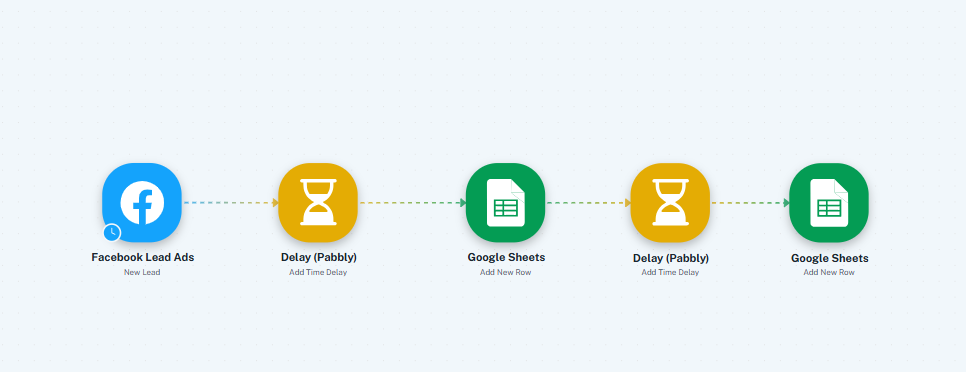
Hi @SupportHubstrat,
Yes, this is exactly what I suggested.
You can keep a single workflow with the same source (Facebook Lead Ads) and add both Google Sheets actions one after another to insert the data into both sheets.
Also, you can remove the delay between the two Google Sheets steps, as it is not required in this setup.
Please try this and let us know how it goes.
Hi, the automation got stuck on the last step with the following error:
[TABLE]
[TR]
[TD]Error Code[/TD]
[TD]400[/TD]
[/TR]
[TR]
[TD]Error Message[/TD]
[TD]Invalid JSON payload received. Unknown name "": Root element must be a message.[/TD]
[/TR]
[TR]
[TD]Error Status[/TD]
[TD]INVALID_ARGUMENT[/TD]
[/TR]
[TR]
[TD]Error Details 0 @type[/TD]
[TD]type.googleapis.com/google.rpc.BadRequest[/TD]
[/TR]
[TR]
[TD]Error Details 0 FieldViolations 0 Description[/TD]
[TD]Invalid JSON payload received. Unknown name "": Root element must be a message.[/TD]
[/TR]
[/TABLE]
Task example: IjU3NjYwNTZkMDYzNTA0MzE1MjZkNTUzMjUxMzY1MTY0NTQzNDBmMzEi_pc
There are 29 task partial completed
Hi @SupportHubstrat,
Thank you for sharing the details.
Upon checking, we noticed that in the Google Sheets action (Add New Row), the last action, no fields have been mapped. Due to this, no data is being added to the sheet.
Kindly map the required fields (such as Name, Email, Phone, etc.) from the trigger step to the respective columns in Google Sheets and then test the workflow again.
This should resolve the issue. Please let us know how it goes.
Hi we still have problems with misalignment of the leads on the 2 sheets
I shared 3 files with the two email addresses you provided.
- Oltrera_Lead (sheet 1 in the workflow)
- Crescita+_LeadAds (sheet 2 in the workflow)
- CHECK OLTRERA ALIGNMENT - CRESCITA+ (This is used to verify whether the leads match between the two sheets.)
The data is entered manually.
Let know us if you find the problem
Hi @SupportHubstrat,
Please allow us some time to monitor the task history and we will share an update soon.
Hi @SupportHubstrat,
Thank you for your patience.
To better understand this issue and explain why this is happening, we recommend connecting over a quick Google Meet so we can review your setup in real time.
Please book a slot using the link below, and we’ll be happy to assist you further:
https://calendly.com/d/cvvz-kwy-9x3
Looking forward to connecting with you.
I've booked the Google Meet and I received the invitation.
Thanks
Hey @SupportHubstrat,
Thank you for connecting with us on the Google Meet today. We hope all your concerns were addressed.
Please monitor the workflow for a while and let us know how it goes.