Find Exact Value in Array via Iterator & Stop
Status: Open · Asked by IT from De Comate on · 0 views
I'm trying to find a specific group ID via UltraMsg using array & iterator.
My goal is to search through the list of groups created using GET, get the array, and run it through the iterator.
Once a match is found, then iterator should stop.
I do have a filter right after my iterator step, but it doesn't seem to work as intended.
Is this possible?
Hi @HelpMeLearn,
Thank you for reaching out and for sharing the workflow details.
Upon checking, we noticed that your workflow contains multiple routes, due to which we’re currently unable to verify the filter configuration accurately.
For your specific use case—finding a particular Group ID from the array using an Iterator—you can add a filter right after the Iterator step with the following setup:
- Map the Group ID from the Iterator (coming from the parent step)
- Set the condition as Equals/Doesn't equal to (depending on whether you only want to run the next steps only for the matched item or not)
- In the value field, paste the specific Group ID you are looking for
This will ensure that only the matched item proceeds further in the workflow.
However, please note that as of now, it is not possible to stop an Iterator mid-execution once a match is found. The Iterator will continue to process all items in the array. That said, only the matched item will pass the filter and execute subsequent steps, while others will be skipped.
Could you please share a bit more detail about your exact use case? This will help us suggest the most feasible and optimized approach.
Looking forward to your response.
Hi @HelpMeLearn,Thank you for reaching out and for sharing the workflow details.
Upon checking, we noticed that your workflow contains multiple routes, due to which we’re currently unable to verify the filter configuration accurately.
For your specific use case—finding a particular Group ID from the array using an Iterator—you can add a filter right after the Iterator step with the following setup:
- Map the Group ID from the Iterator (coming from the parent step)
- Set the condition as Equals/Doesn't equal to (depending on whether you only want to run the next steps only for the matched item or not)
- In the value field, paste the specific Group ID you are looking for
This will ensure that only the matched item proceeds further in the workflow.However, please note that as of now, it is not possible to stop an Iterator mid-execution once a match is found. The Iterator will continue to process all items in the array. That said, only the matched item will pass the filter and execute subsequent steps, while others will be skipped.
Could you please share a bit more detail about your exact use case? This will help us suggest the most feasible and optimized approach.
Looking forward to your response.
Thank you for getting back to me, Preeti.
Since there's a limitation for WhatsApp with group messaging - I'm using UltraMsg to retrieve the created group ID needed to send messages to a particular group.
However, UltraMsg doesn't seem to have a way for me to fetch only 1 group info without me knowing what the group ID is beforehand. So, I have to GET the entire group list, run through the iterator to see which group matches my client's details, then store that group ID for future messaging within the client's group.
My workflow to troubleshoot is the one labeled Troubleshoot - Create Group (Only After Group is Created).
My iterator at the moment does run, but when I check the logs, it doesn't do anything afterwards. My step for filter isn't shown in the log, so I'm unsure if it ran.
Also, your explanation is what I'm implementing, but backwards. I'm just trying to get the specific group ID from a long array (UltraMsg's response). I can't seem to use text formatter to trim off the array because Pabbly says the response is too long to parse.
Basically, I can't directly search for the group based on group ID because I have to first identify the group ID from a list.
Hi @HelpMeLearn,
Thank you for sharing the detailed explanation of your use case.
To help us understand this better, could you please clarify how you are identifying that a specific Group ID belongs to your client? Specifically, what field or value from the trigger are you using to match it with the group data returned by UltraMsg?
We also reviewed the filter setup, but at the moment, it’s not entirely clear why the filter has been configured in that way or how the matching logic is being applied.
It would be really helpful if you could explain your matching logic (i.e., how you're trying to map a group to a specific client). Additionally, if possible, please share a short screencast demonstrating your setup and the issue—this will allow us to assist you more accurately.
Looking forward to your response.
Hi @HelpMeLearn,Thank you for sharing the detailed explanation of your use case.
To help us understand this better, could you please clarify how you are identifying that a specific Group ID belongs to your client? Specifically, what field or value from the trigger are you using to match it with the group data returned by UltraMsg?
We also reviewed the filter setup, but at the moment, it’s not entirely clear why the filter has been configured in that way or how the matching logic is being applied.
It would be really helpful if you could explain your matching logic (i.e., how you're trying to map a group to a specific client). Additionally, if possible, please share a short screencast demonstrating your setup and the issue—this will allow us to assist you more accurately.
Looking forward to your response.
Don't mind step 2 in the workflow. Please ignore & refer to the images as attached in sequence.
Sample GET group response from UltraMsg (this has been trimmed & redacted for clarity, since the actual response is very long):
{"id":"[EMAIL][email hidden][/EMAIL]","name":"Zac & Joe | (date) | E&O","isReadOnly":false,"isGroup":true,"groupMetadata":{"description":"","edit_group_info":"all","send_messages":"all","owner":"[EMAIL][email hidden][/EMAIL]","creation":y,"participants":[{"id":"[EMAIL][email hidden][/EMAIL]","isAdmin":true,"isSuperAdmin":false},{"id":"[EMAIL][email hidden][/EMAIL]","isAdmin":true,"isSuperAdmin":true}]},"last_time":z,"archived":false,"pinned":false,"isMuted":false,"unread":0}
The data in orange is what I'm trying to get. The data in green are what I'm comparing with in my spreadsheet (image 3 below).
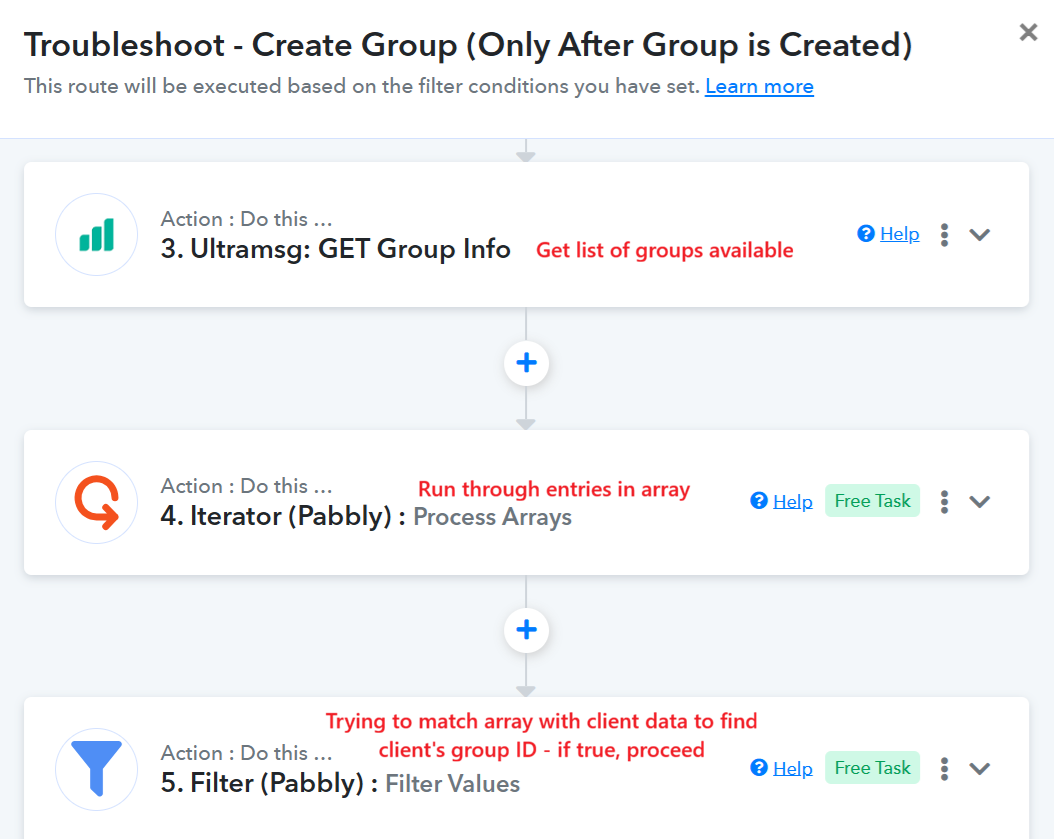
The explanation for my filter is as below:
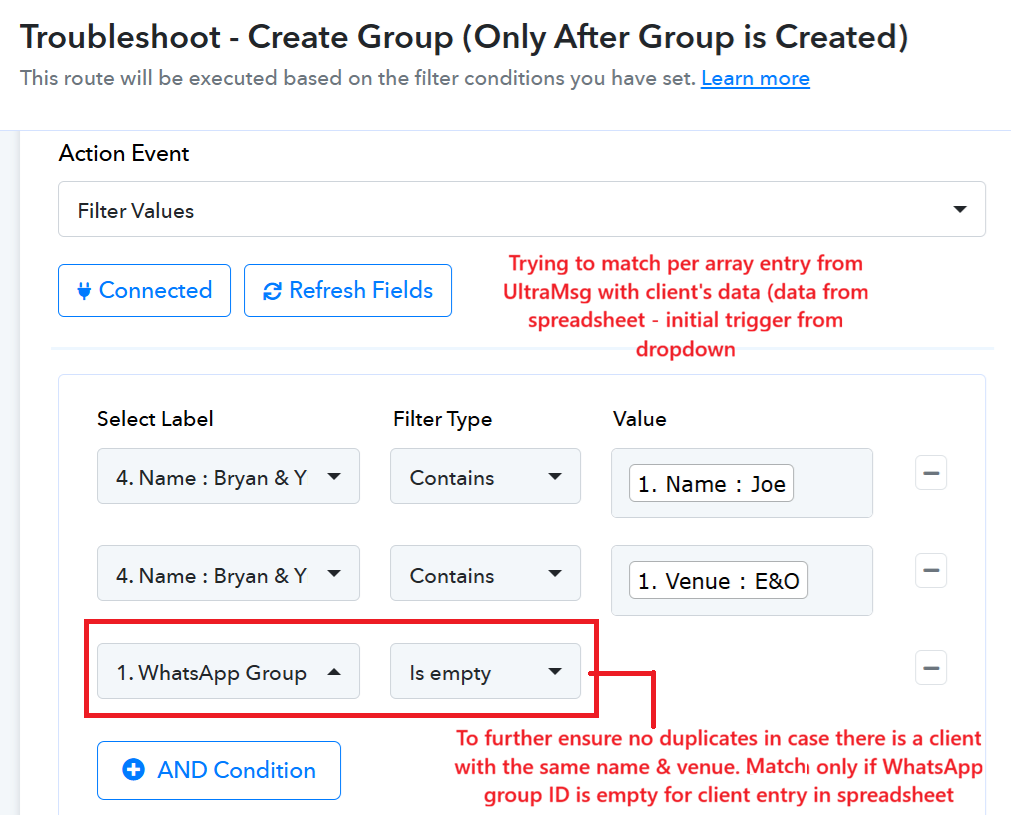
If my filter step isn't clear, then perhaps my logic isn't correct?
Below is a sample of my spreadsheet entry:

If my filter isn't correct - please let me know & guide me to correct it.
I haven't had success yet with this logic, so there isn't a sample video for me to share.
My original workflow is Create Group (Only After Group is Created). It works, but it is a hit & miss as the group created for the group ID identifier isn't always the newest group created (hence, messing up to matching process). It must be the first entry in the array (from UltraMsg's response) for this logic to work. It works about 80% of the time, so I'm trying to fix it.
This workflow is live, so please proceed with caution as it deals with real clients.
Hi @HelpMeLearn,
Thank you for sharing the detailed explanation and screenshots.
The issue appears to be with the filter configuration. Since the group name contains all values (Name, Venue, Date) in a single field, you should apply all conditions on the same field using AND logic:
- Select Group Name (from Iterator) in each condition
- Use Contains
- Add separate conditions for Name, Venue, and Date
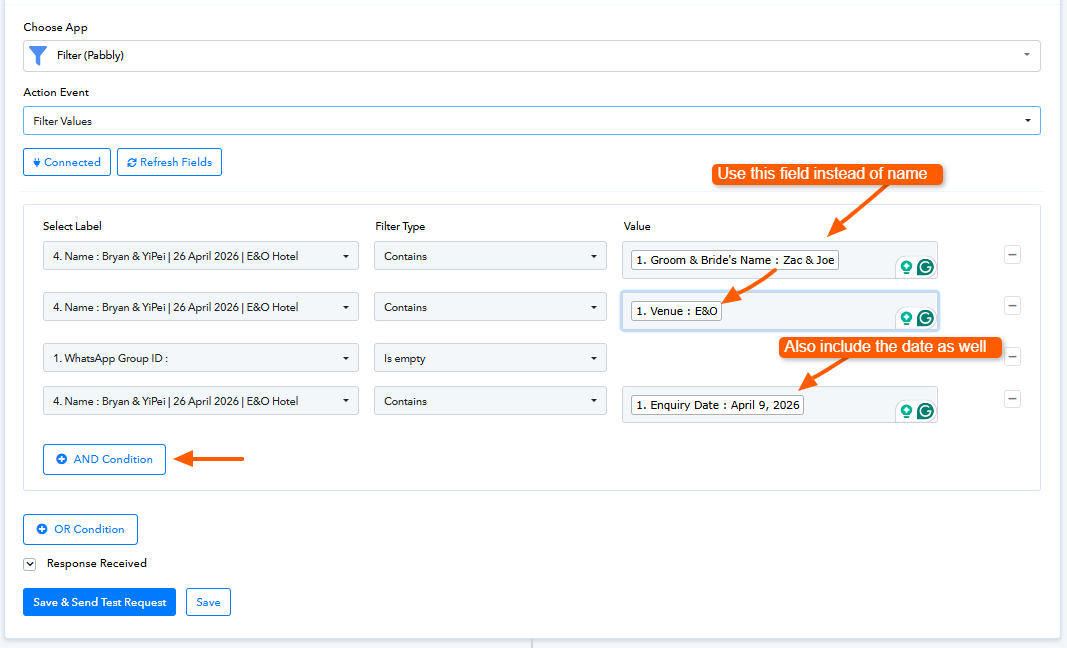
This ensures only the exact matching group passes through.
You can refer to your setup here:
Note: We have not made any changes to your workflow.
Please test this and let us know how it goes.
Hi @HelpMeLearn,Thank you for sharing the detailed explanation and screenshots.
The issue appears to be with the filter configuration. Since the group name contains all values (Name, Venue, Date) in a single field, you should apply all conditions on the same field using AND logic:
- Select Group Name (from Iterator) in each condition
- Use Contains
- Add separate conditions for Name, Venue, and Date
This ensures only the exact matching group passes through.
You can refer to your setup here:
Note: We have not made any changes to your workflow.
Please test this and let us know how it goes.
Thank you for your reply.
I've decided to make use of Google Cloud for this trigger instead. I believe I've tried your solution before, but it didn't work
Hi @HelpMeLearn,
No worries at all—please feel free to go ahead with the approach that best suits your use case.
If you need any assistance or run into any issues along the way, don’t hesitate to reach out. We’ll be happy to help.