Find stuff in large XML
Status: Open · Asked by Pabblynaut on · 0 views
Using API by Pabbly, I've gotten a XML file with 5000 lines of data into Pabbly.
Each line has a date, YYYY-MM-DD.
I want to extract only the rows where YYYY-MM-DD is today, and add only these to a google sheet.
How would I go about this?
Hello @Pabblynaut,
Upon checking, we noticed a few issues in your workflow. To resolve them, we cloned your workflow and made the necessary changes:
- Added a "Date/Time Formatter" step – This retrieves the current date.
- Used "API by Pabbly" to Reverse the Array – The date was not appearing in the earlier objects, so reversing the array ensures proper processing.
- Added an "Iterator" to Process Each Object – This allows handling each item individually.
- Applied a "Filter" to Match the Current Date – This ensures only objects with the current date are processed.
- Mapped the Correct Date Key from the Iterator – Since the keys differ between objects with and without a date, Facebook was throwing an error due to missing keys. Mapping the correct date key should resolve this issue.
Please try running a few test cases and let us know if everything works as expected!
Hello @Pabblynaut,Upon checking, we noticed a few issues in your workflow. To resolve them, we cloned your workflow and made the necessary changes:
- Added a "Date/Time Formatter" step – This retrieves the current date.
- Used "API by Pabbly" to Reverse the Array – The date was not appearing in the earlier objects, so reversing the array ensures proper processing.
- Added an "Iterator" to Process Each Object – This allows handling each item individually.
- Applied a "Filter" to Match the Current Date – This ensures only objects with the current date are processed.
- Mapped the Correct Date Key from the Iterator – Since the keys differ between objects with and without a date, Facebook was throwing an error due to missing keys. Mapping the correct date key should resolve this issue.
Please try running a few test cases and let us know if everything works as expected!
This worked until step 2:
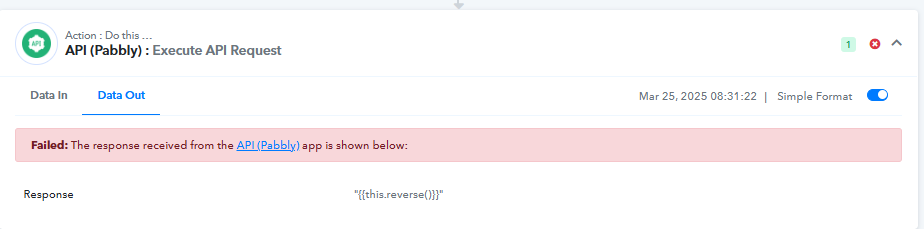
Could the reason be that the XML file is 504.000 characters?
EDIT: I tried to run the flow 3 times. It failed each time on the first try on step 2. But on the auto-retry, it worked each time. So great that it works, but what could be the reason it only worked on the retry?
Hello @Pabblynaut,
Please provide us with the workflow URL where you have tried achieving this use case so we can better assist you.
Hello @Pabblynaut,Please provide us with the workflow URL where you have tried achieving this use case so we can better assist you.
https://connect.pabbly.com/workflow/mapping/IjU3NjYwNTY5MDYzMDA0M2M1MjZmNTUzMTUxMzMi_pc
It looks like 'Auto Re-Execution' is enabled. Since the error resolves when the task is executed, we are unable to pinpoint the exact cause of the issue. Please disable 'Auto Re-Execution', execute the workflow, and if the issue persists, let us know so we can investigate further.