Fluent Booking Error
Status: Open · Asked by Estevez96 on · 0 views
Hello. I am requesting help with this error message. I've included a screenshot of my setup and the error email details below. Thanks in advance for your help!
[TABLE]
[TR]
[TD][JUSTIFY]
This email is to notify you that for the workflow "Fluent Booking >> Zoho Meet" , a recent task was not executed due to following error -[/JUSTIFY]
Task History ID: [redacted]
Step Name: Zoho Meeting > Create a Meeting
Connection Name: My Zoho Meeting Accounts
Task Error Detail:
{
"error > code": 2000,
"error > parameter_name": "startTime",
"error > message": "PATTERN_NOT_MATCHED"
}[/TD]
[/TR]
[/TABLE]
Hi @Estevez96,
In the Start Time field, you were supposed to pass the date in the format stated in the help text. We added a Date/Time Formatter to your workflow to convert the date to the correct format, and it seems to have fixed the issue.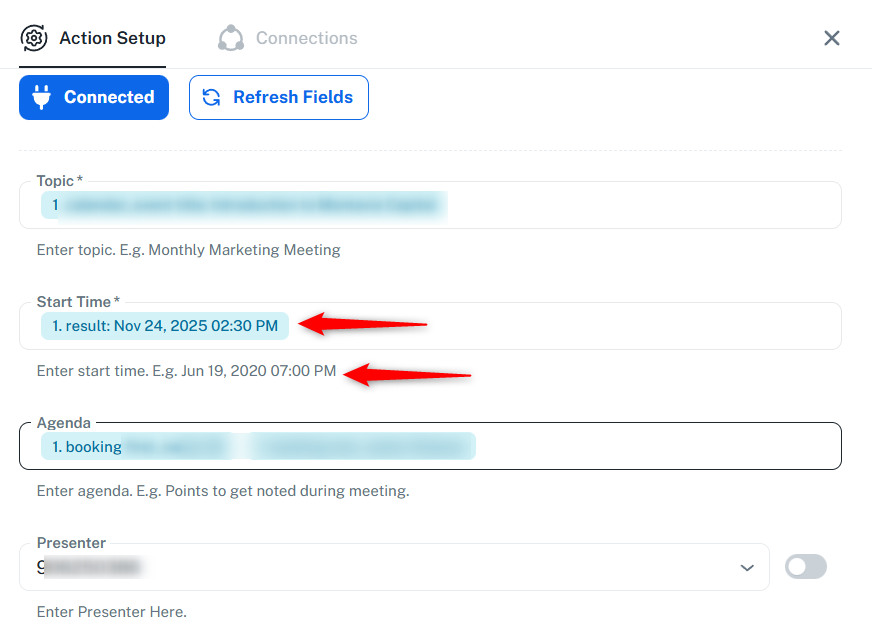
Thanks & Regards,
Arshil Ahmad
Customer Support Associate
? Pabbly.com
?Rate your support
Thanks so much. I am trying to create a workflow to link Fluent Booking with my regular Zoho calendar and am getting an error. The workflow URL is https://connect.pabbly.com/v2/app/workflow/mapping/IjU3NjYwNTY0MDYzZjA0MzQ1MjZkNTUzNzUxMzAi_pc
This time, I tried mapping the dateTime according to the tooltip in the Zoho Calendar node, but I am experiencing new issues.
Thanks in advance for your help. I greatly appreciate it.
Hi @Estevez96,
Could you please try deleting and re-adding the Create Event action and check if it works correctly? If the issue still persists, kindly share a screenshot or a short screencast of the complete setup so we can review it further.
Hello. I created a brand new workflow (URL below), trying to copy the node parameters exactly. The new workflow does not work, and the only discrepancy I can find is that the formatted date output (right-hand panel of image) does not match the original date output result (left-hand panel).
Workflow URL: https://connect.pabbly.com/v2/app/workflow/mapping/IjU3NjYwNTY0MDYzZjA0Mzc1MjZjNTUzZDUxMzUi_pc
Thanks in advance for your continued help and support.
Hi @Estevez96,
Thank you for sharing the details.
We have escalated this issue to our technical team and will update you as soon as we have more information. The behaviour appears to be specific to the new UI, so as a workaround, you may try creating the same workflow in the Classic Builder.
Additionally, the issue you previously reported with Zoho Meeting: Create a Meeting was resolved by correcting the date format. In the current workflow, you are using Zoho Calendar: Create Event, and that action is the one currently under review.
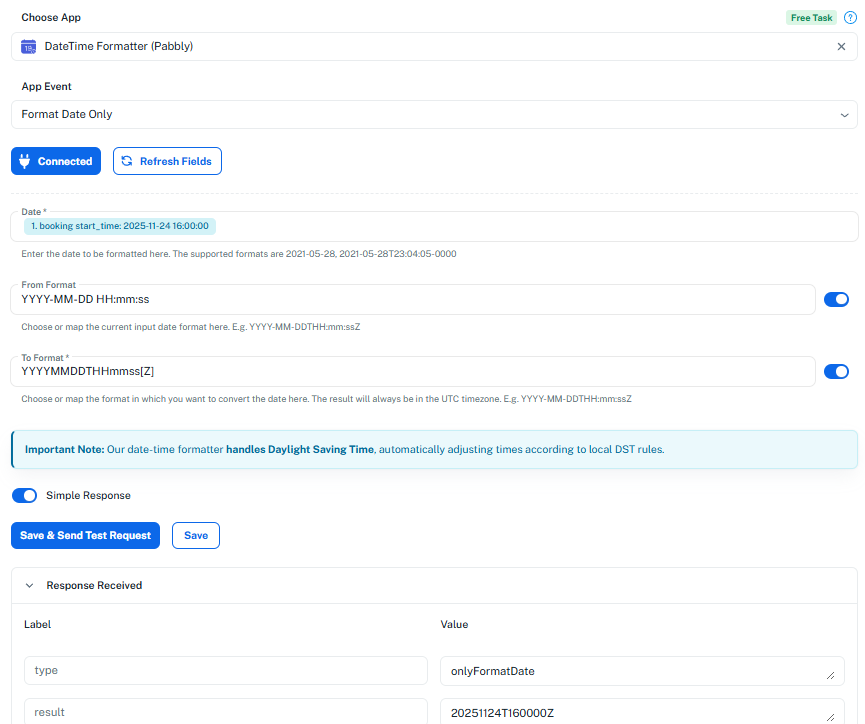
If you configure the Date/Time Formatter exactly as shown in the attached image, the step should not cause any issues in the meantime.
Thanks for your patience while we get this resolved.
Hello! Thank you SO much for providing the specific time formatting. I was able to create the workflow in the classic builder and this fully meets my needs.
Thank you again! I deeply appreciate your help.
Hello, I am returning to this thread because after running one successful test in the classic builder, I am now getting an 500 Internal Error. The other parts of my booking funnel are all working properly. Additional support would be appreciated here.
Hello, I am returning to this thread because after running one successful test in the classic builder, I am now getting an 500 Internal Error. The other parts of my booking funnel are all working properly. Additional support would be appreciated here.
Could you please share the Workflow URL you have setup in the Classic UI?
Could you please share the Workflow URL you have setup in the Classic UI?
Apologies. Here is the URL: https://connect.pabbly.com/workflow/mapping/IjU3NjYwNTY0MDYzZjA0MzE1MjZmNTUzMzUxM2Ii_pc
Please allow us some time to look into this concern. We will get back to you with an update soon.
Hello @Estevez96 ,
Thank you for your patience.
Could you please add the “Attendees Email Addresses” field in the action step Zoho Calendar : Create Event and then test the workflow again?

Once done, kindly let us know the results so we can assist you further.
Hello @Estevez96 ,Thank you for your patience.
Could you please add the “Attendees Email Addresses” field in the action step Zoho Calendar : Create Event and then test the workflow again?
Once done, kindly let us know the results so we can assist you further.
Thank you. The operation seems to be working at the moment, **however** all the calendar events are being created at the same time and date as though the "fix" was hardcoded and does not actually receive the inputs coming in from Fluent Booking and the Time Formatting node (see attached images).
Hello @Estevez96,
Thank you for sharing the images.
Upon checking, we can currently see only one task history after the changes were applied. Based on that, only one calendar event has been created so far. To understand the issue better, could you please clarify which events are getting created with the same date and time?
Please note that the date and time fields are mapped dynamically from the previous steps, so every new entry should capture its own values, convert them through the formatter, and then pass them correctly to the Zoho Calendar action.
Kindly monitor the next few executions and let us know if the issue persists or if we are missing anything in understanding your concern.
Hello. I recorded a video to try and recreate the error. I'm unclear on what might be the root cause but hopefully you will be able to determine it. One takeaway from the video is that it does not appear that the workflow itself is firing on its own; only when I click "save and test." Can you let me know if there's an expected delay or refresh rate for workflows to run?
Here is the video link: https://www.dropbox.com/scl/fi/wumqawh0oegi2wd4hs4fl/Pabbly-Fluent-Booking-Error-Re-creation.mp4?rlkey=ve3yeuong0xt0d0sq5cg6uvfx&st=2ri2iaqf&dl=0
To properly test whether the time changes with each submission, you need to make an actual submission. Based on your task history, which captures actual new submissions, we can see that the time does change according to the 'Booking Start Date' received from the Fluent Booking trigger step, and the events are created as per the time captured in that trigger step
https://drive.google.com/file/d/1ZYGuFftnoLzAaMhBnU8-01dkA-L3Ej0a/view?usp=sharing
Thanks so much. I will test this a few more times over the coming days and reply back if the situation reoccurs.
I appreciate all of your support on this.
Sure, you can make a few test submissions and let us know how it goes.
Thanks & Regards,
Arshil Ahmad
Customer Support Associate
? Pabbly.com
?Rate your support
Hello @Estevez96
The issue you were facing with the action step “Zoho Calendar: Create Event” not saving in the New UI / New Flow Builder has now been fixed.
You can test it on your end, and it should work smoothly.
If you have any other concerns, please let us know — we’ll be happy to assist you.