Getting Error code 3000 you have reached the limit for the number of attendees you can add. contact zoom support for more information
Status: Open · Asked by Rekha babulkar on · 0 views
Getting Error code 3000 you have reached the limit for the number of attendees you can add. contact zoom support for more information.
Need your help urgently
Hi @Rekha Babulkar,
The error code 3000 you’re encountering is related to the attendee limit set by Zoom for your account or plan. Since this limitation is controlled by Zoom, we recommend contacting Zoom’s support team directly for further assistance on increasing the participant limit or exploring available options.
They will be able to guide you more accurately based on your current plan and usage.
https://support.zoom.com/hc/en/article?id=zm_kb&sysparm_article=KB0068002
Please let us know if there’s anything else we can assist you with.
Thanks & Regards,
Arshil Ahmad
Customer Support Associate
? Pabbly.com
?Rate your support
we have only 27 registration for new webinar id and still we are seeing the error as
Error code 3000 you have reached the limit for the number of attendees you can add. contact zoom support for more information
Hi @Rekha Babulkar,
Upon reviewing your workflow, we can see that it has been triggered 4,391 times, which indicates that a large number of registrants have already been added to your webinar. This could be the reason you're encountering the attendee limit error from Zoom.
However, after checking the recent task history, we are not currently seeing this error—everything appears to be working fine from our end.
If you are still facing this issue, please share the Task History ID of the recent failed execution so we can investigate it further.
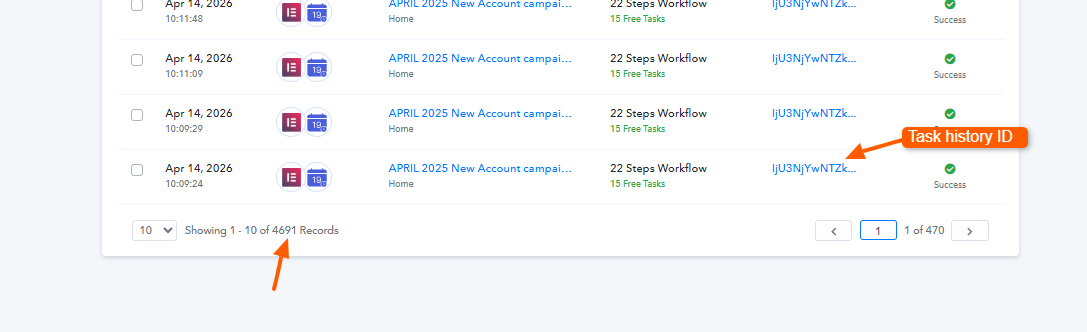
Additionally, for the previously failed task histories, you can try re-executing those steps and check if they go through successfully.
Please let us know how it goes.