GMB Trigger not working
Status: Open · Asked by Shekhar Gaud on · 0 views
Hi Team,
I have created a workflow using:
Trigger: Google Business Profile – New Review (Multi Location)
Action: Router (based on Review StarRating)
Action: Google Business Profile – Create Reply
The issue is:
- Manual “Save & Send Test Request” works perfectly.
- Reply is posted successfully during manual testing.
- However, when a new review is posted on Google, the workflow does NOT trigger automatically.
- No execution appears in the History section.
Additional details:
- All 70 locations are selected in the trigger.
- Workflow is turned ON.
- Polling interval shows 10 minutes.
- I have tested with a brand-new review posted after activating the workflow.
- The connected Google account has Owner/Manager access.
- I waited more than 15–20 minutes after posting the review.
- Still, no history entry is created.
Could you please check:
- Whether the trigger is correctly polling new reviews?
- If there is any issue with multi-location triggers?
- If Google token/connection needs re-authentication?
- If there are known delays with Google Business Profile API?
Hey @Shekhar Gaud,
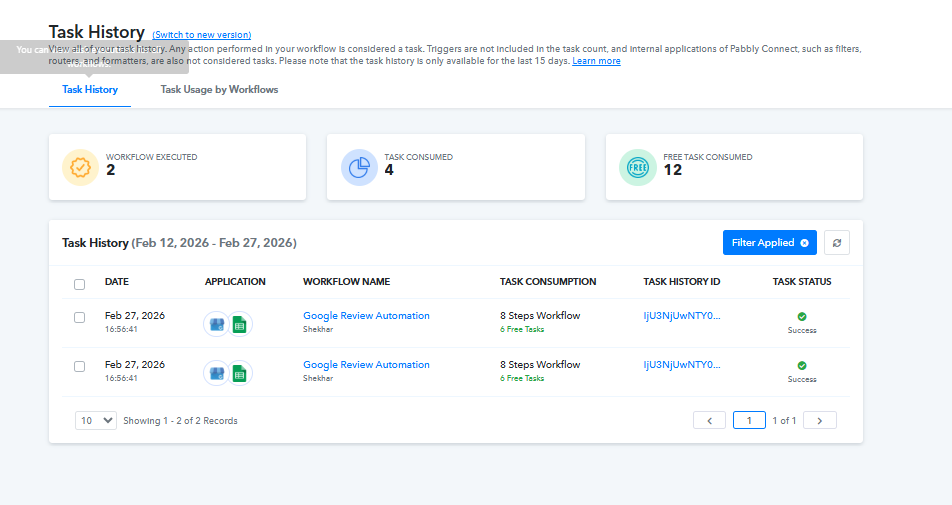
Upon checking your task history, it appears that the workflow has been triggered twice recently. However, after reviewing your workflow settings, it seems there may be a connection-related issue.
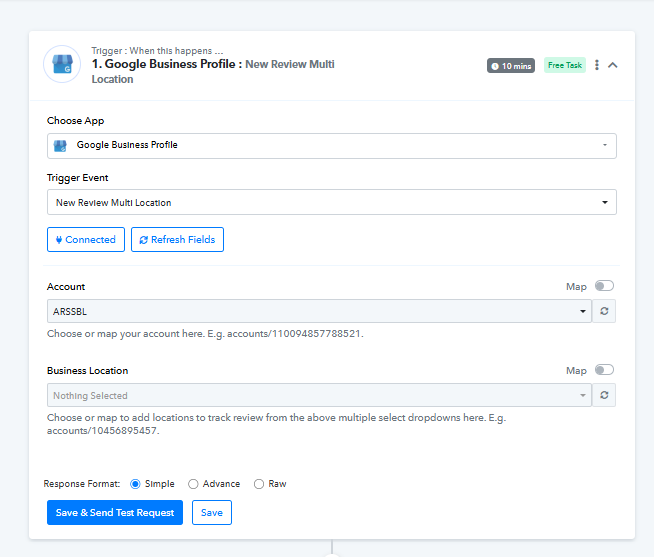
When we click on the Refresh Fields button in the trigger step, the Business Location dropdown becomes empty, which usually indicates a problem with the connection or account selection.
We recommend that you:
- Recheck the Google Business Profile connection
- Ensure the correct Google account is selected
- Reconnect the account if needed
- Refresh the fields again and reselect the locations
Once done, please test again and let us know how it goes.