Google Ads Connection Not Working
Status: Closed · Asked by Dashen Padayachee on · 0 views
Hi
So i wanted to use Pabbly Connect with Google Ads for offline conversion tracking but its not working.
I've tried the MCC ID but the fields stayed blank.
I've tried the Account ID but the fields stayed blank.
I've tried going into my Google security, revoking Pabbly Connect access and trying again and it still didnt work.
Attached is a screenshot showing that no account options are available for selection.
I also confirm i tried refresh fields but it didnt work.
Hello @DashDash,
Thank you for sharing the screenshots.
In this case, please try enabling the Map toggle available beside the "Use Google Ads as..." field and manually enter the Customer ID that was used while creating the Google Ads connection.
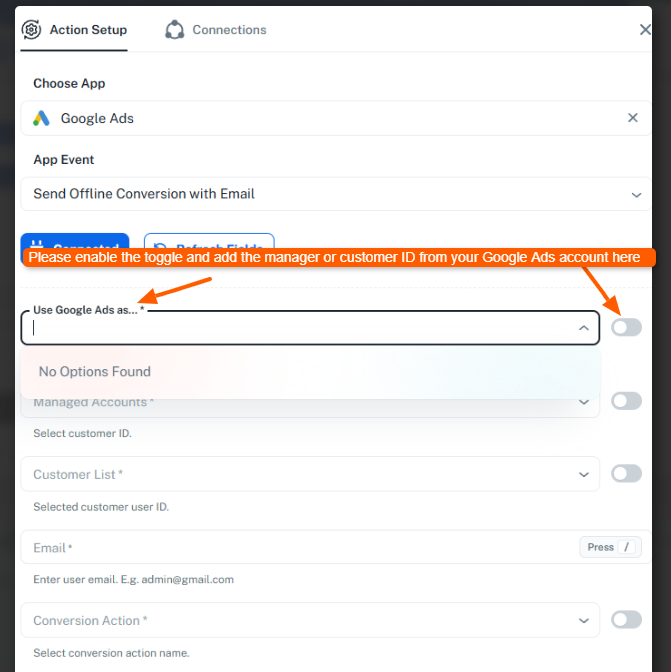
Once you provide the Customer ID in that field, the next dropdown should automatically populate the available account details and related options.
After doing so, please click Refresh Fields if required and let us know how it goes. If the dropdown still does not populate, we'll investigate further.
Thanks, solved, turns out i was using - in the CID when it asked for no - .
Hello @DashDash,
Glad to hear the issue has been resolved.
We'd appreciate it if you could share your feedback with us:
As the concern is resolved, we are closing this thread. Feel free to reach out if you need any assistance in the future.