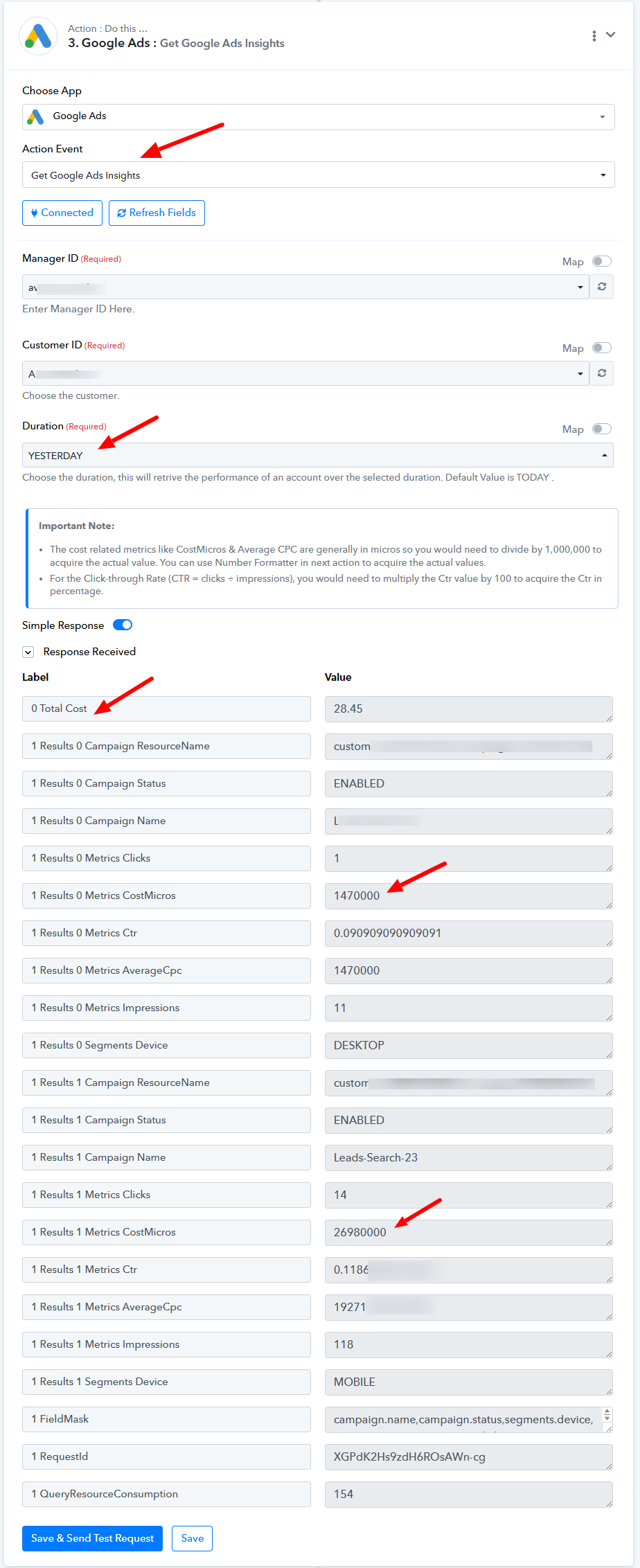
Google Ads Insights has multiple campaigns
Status: Open · Asked by Benjamin Chew on · 0 views
Hi, I'm trying to get the data for each campaign in my Google Ads.
I found out that it provides me multiple campaigns of the same name, as if the same campaign is broken up... I have no idea why... Even if the campaign have only 1 single ad group.
At this point, is there a way for me to combine all the CostMicros together if they're the same campaign name?
Also, is it able to provide me the number of conversions and conversion value (both of these metrics didn't appear) of the same campaigns?
Thank you.
Hi @benjaminshuu,
Please allow me some time to discuss this with my team. We will get back to you with an update soon.
Our development team has informed me that both of your use cases are currently not possible. However, you can capture the response in advanced format and try using 'Code by Pabbly' to write a script that would consolidate CostMicros, if you are familiar with coding (or you can ask ChatGPT to write one on your behalf). Please note that this is just a workaround and we won't be able to assist you with the code as its beyond our scope of expertise.
Our development team has informed me that both of your use cases are currently not possible. However, you can capture the response in advanced format and try using 'Code by Pabbly' to write a script that would consolidate CostMicros, if you are familiar with coding (or you can ask ChatGPT to write one on your behalf). Please note that this is just a workaround and we won't be able to assist you with the code as its beyond our scope of expertise.
ok, if that's not possible,
can i have a way to iterate all available campaign data into a data sheet dynamically? meaning, if i add or remove campaigns, it will still list them all out without me changing the pabbly settings
Hello @benjaminshuu
Please confirm if you want to list all your campaigns with their statuses (active, inactive, etc.).
Hello @benjaminshuuPlease confirm if you want to list all your campaigns with their statuses (active, inactive, etc.).
Yes, not a must, but it's better if i can choose to only list actives.
Hello @benjaminshuu
You use the Custom Query action event to list all Campaigns you require.
You can test the query here - https://developers.google.com/google-ads/api/fields/v17/campaign_query_builder
Also, you can take a reference from this query to list the campaigns -
{
"query": "SELECT campaign.accessible_bidding_strategy, campaign.ad_serving_optimization_status, campaign.advertising_channel_sub_type, campaign.advertising_channel_type, campaign.app_campaign_setting.app_id, campaign.app_campaign_setting.app_store, campaign.app_campaign_setting.bidding_strategy_goal_type, campaign.audience_setting.use_audience_grouped, campaign.base_campaign, campaign.bidding_strategy, campaign.bidding_strategy_system_status, campaign.bidding_strategy_type, campaign.campaign_budget, campaign.campaign_group, campaign.dynamic_search_ads_setting.domain_name, campaign.commission.commission_rate_micros, campaign.dynamic_search_ads_setting.feeds, campaign.dynamic_search_ads_setting.language_code, campaign.end_date, campaign.dynamic_search_ads_setting.use_supplied_urls_only, campaign.excluded_parent_asset_field_types, campaign.excluded_parent_asset_set_types, campaign.experiment_type, campaign.final_url_suffix, campaign.frequency_caps, campaign.geo_target_type_setting.negative_geo_target_type, campaign.geo_target_type_setting.positive_geo_target_type, campaign.hotel_property_asset_set, campaign.hotel_setting.hotel_center_id, campaign.id, campaign.labels, campaign.local_campaign_setting.location_source_type, campaign.local_services_campaign_settings.category_bids, campaign.manual_cpa, campaign.manual_cpc.enhanced_cpc_enabled, campaign.manual_cpm, campaign.manual_cpv, campaign.maximize_conversion_value.target_roas, campaign.maximize_conversions.target_cpa_micros, campaign.name, campaign.network_settings.target_content_network, campaign.network_settings.target_google_search, campaign.network_settings.target_partner_search_network, campaign.network_settings.target_search_network, campaign.optimization_goal_setting.optimization_goal_types, campaign.optimization_score, campaign.performance_max_upgrade.performance_max_campaign, campaign.payment_mode, campaign.percent_cpc.cpc_bid_ceiling_micros, campaign.percent_cpc.enhanced_cpc_enabled, campaign.performance_max_upgrade.pre_upgrade_campaign, campaign.performance_max_upgrade.status, campaign.primary_status, campaign.primary_status_reasons, campaign.real_time_bidding_setting.opt_in, campaign.resource_name, campaign.selective_optimization.conversion_actions, campaign.serving_status, campaign.shopping_setting.campaign_priority, campaign.shopping_setting.enable_local, campaign.shopping_setting.feed_label, campaign.shopping_setting.merchant_id, campaign.shopping_setting.sales_country, campaign.shopping_setting.use_vehicle_inventory, campaign.start_date, campaign.status, campaign.target_cpa.cpc_bid_ceiling_micros, campaign.target_cpa.cpc_bid_floor_micros, campaign.target_cpa.target_cpa_micros, campaign.target_cpm.target_frequency_goal.target_count, campaign.target_cpm.target_frequency_goal.time_unit, campaign.target_impression_share.cpc_bid_ceiling_micros, campaign.target_impression_share.location, campaign.target_impression_share.location_fraction_micros, campaign.target_roas.cpc_bid_ceiling_micros, campaign.target_roas.cpc_bid_floor_micros, campaign.target_roas.target_roas, campaign.target_spend.cpc_bid_ceiling_micros, campaign.target_spend.target_spend_micros, campaign.targeting_setting.target_restrictions, campaign.tracking_setting.tracking_url, campaign.tracking_url_template, campaign.travel_campaign_settings.travel_account_id, campaign.url_custom_parameters, campaign.url_expansion_opt_out, campaign.vanity_pharma.vanity_pharma_display_url_mode, campaign.vanity_pharma.vanity_pharma_text, campaign.video_brand_safety_suitability FROM campaign ORDER BY campaign.id DESC"
}
Hello @benjaminshuuYou use the Custom Query action event to list all Campaigns you require.
You can test the query here - https://developers.google.com/google-ads/api/fields/v17/campaign_query_builder
Also, you can take a reference from this query to list the campaigns -
{
"query": "SELECT campaign.accessible_bidding_strategy, campaign.ad_serving_optimization_status, campaign.advertising_channel_sub_type, campaign.advertising_channel_type, campaign.app_campaign_setting.app_id, campaign.app_campaign_setting.app_store, campaign.app_campaign_setting.bidding_strategy_goal_type, campaign.audience_setting.use_audience_grouped, campaign.base_campaign, campaign.bidding_strategy, campaign.bidding_strategy_system_status, campaign.bidding_strategy_type, campaign.campaign_budget, campaign.campaign_group, campaign.dynamic_search_ads_setting.domain_name, campaign.commission.commission_rate_micros, campaign.dynamic_search_ads_setting.feeds, campaign.dynamic_search_ads_setting.language_code, campaign.end_date, campaign.dynamic_search_ads_setting.use_supplied_urls_only, campaign.excluded_parent_asset_field_types, campaign.excluded_parent_asset_set_types, campaign.experiment_type, campaign.final_url_suffix, campaign.frequency_caps, campaign.geo_target_type_setting.negative_geo_target_type, campaign.geo_target_type_setting.positive_geo_target_type, campaign.hotel_property_asset_set, campaign.hotel_setting.hotel_center_id, campaign.id, campaign.labels, campaign.local_campaign_setting.location_source_type, campaign.local_services_campaign_settings.category_bids, campaign.manual_cpa, campaign.manual_cpc.enhanced_cpc_enabled, campaign.manual_cpm, campaign.manual_cpv, campaign.maximize_conversion_value.target_roas, campaign.maximize_conversions.target_cpa_micros, campaign.name, campaign.network_settings.target_content_network, campaign.network_settings.target_google_search, campaign.network_settings.target_partner_search_network, campaign.network_settings.target_search_network, campaign.optimization_goal_setting.optimization_goal_types, campaign.optimization_score, campaign.performance_max_upgrade.performance_max_campaign, campaign.payment_mode, campaign.percent_cpc.cpc_bid_ceiling_micros, campaign.percent_cpc.enhanced_cpc_enabled, campaign.performance_max_upgrade.pre_upgrade_campaign, campaign.performance_max_upgrade.status, campaign.primary_status, campaign.primary_status_reasons, campaign.real_time_bidding_setting.opt_in, campaign.resource_name, campaign.selective_optimization.conversion_actions, campaign.serving_status, campaign.shopping_setting.campaign_priority, campaign.shopping_setting.enable_local, campaign.shopping_setting.feed_label, campaign.shopping_setting.merchant_id, campaign.shopping_setting.sales_country, campaign.shopping_setting.use_vehicle_inventory, campaign.start_date, campaign.status, campaign.target_cpa.cpc_bid_ceiling_micros, campaign.target_cpa.cpc_bid_floor_micros, campaign.target_cpa.target_cpa_micros, campaign.target_cpm.target_frequency_goal.target_count, campaign.target_cpm.target_frequency_goal.time_unit, campaign.target_impression_share.cpc_bid_ceiling_micros, campaign.target_impression_share.location, campaign.target_impression_share.location_fraction_micros, campaign.target_roas.cpc_bid_ceiling_micros, campaign.target_roas.cpc_bid_floor_micros, campaign.target_roas.target_roas, campaign.target_spend.cpc_bid_ceiling_micros, campaign.target_spend.target_spend_micros, campaign.targeting_setting.target_restrictions, campaign.tracking_setting.tracking_url, campaign.tracking_url_template, campaign.travel_campaign_settings.travel_account_id, campaign.url_custom_parameters, campaign.url_expansion_opt_out, campaign.vanity_pharma.vanity_pharma_display_url_mode, campaign.vanity_pharma.vanity_pharma_text, campaign.video_brand_safety_suitability FROM campaign ORDER BY campaign.id DESC"
}
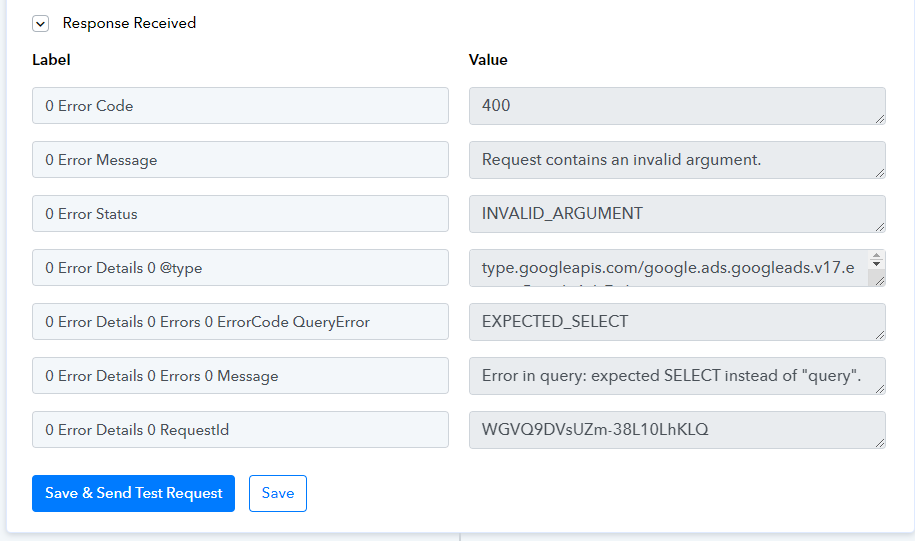
Looks very confusing.......
I just want it to tell me, yesterday what campaigns are active, then its cost, conversions, and conversion value.
I don't want to be greedy if it's complicated.
Hello @benjaminshuu
The only way you can get the required details without taking the complicated way is by using the "Get Google Ads Insights" action, it will return the required info of the enabled campaigns.
Please refer to the attached screenshot for more info.
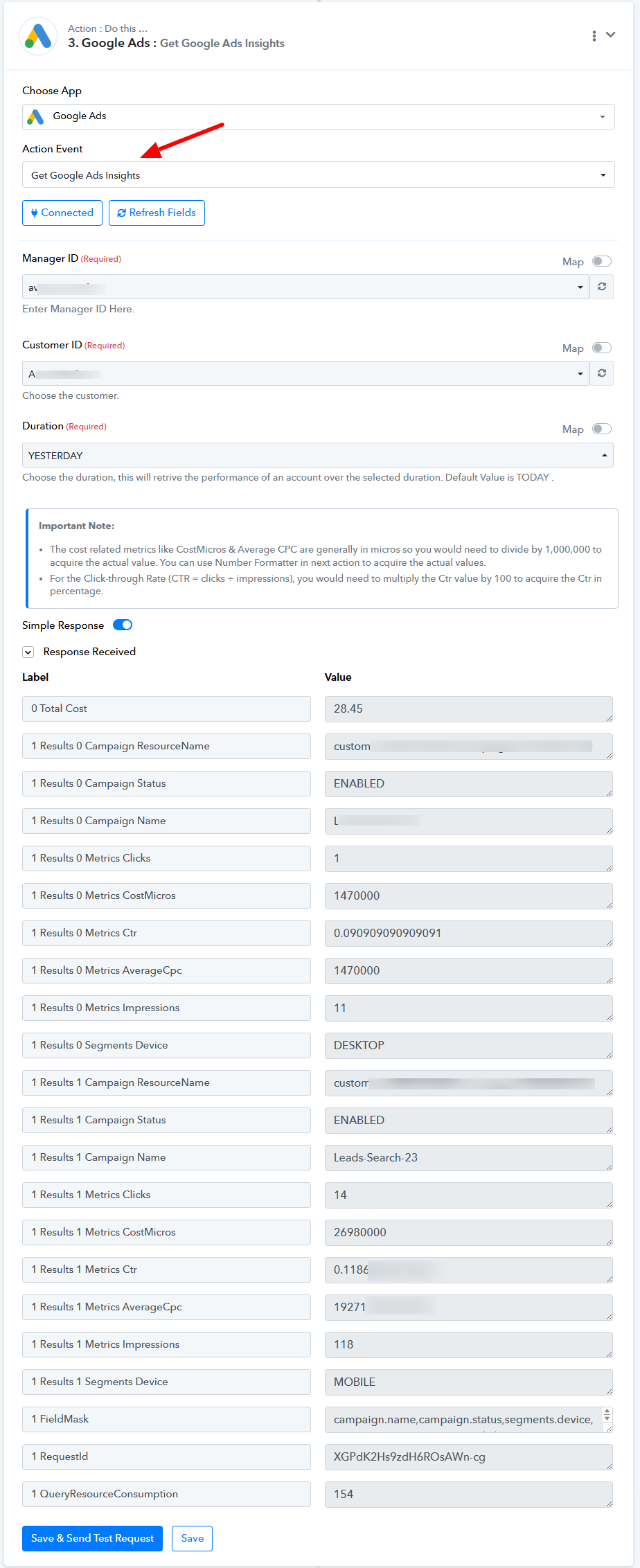
Hello @benjaminshuuThe only way you can get the required details without taking the complicated way is by using the "Get Google Ads Insights" action, it will return the required info of the enabled campaigns.
Please refer to the attached screenshot for more info.
I know this. But, this one doesn't show me conversions.
Hello @benjaminshuu
Please note that the action response that one gets is sent by Google Ads based on the API endpoint, further, we do not manipulate data at the end.
To address your inquiry, Google Ads will only send data for campaigns that have had activity during the specified period and have contributed to the total cost. If you’re looking for details such as active campaigns, costs, conversions, and conversion values, these can be retrieved using a custom API request.
We’ve already shared the relevant details on how you can make such requests through the Google Ads API. If you find the process challenging, we recommend hiring a consultant with expertise in Google Ads. They can assist in crafting a tailored solution based on your needs.
Thank you for your understanding.