Google appointments to Asana - Task deletion
Status: Open · Asked by Hareendra Alahakoon on · 0 views
@ArshilAhmad My Google appointment cancellation to Asana workflow is not working again
I keep getting these object not found emails. I did not delete any tasks from Asana manually.
[JUSTIFY]This email is to notify you that for the workflow "Google Calendar Booking cancelation from Asana" , a recent task was not executed due to following error -[/JUSTIFY]Task History ID: IjU3NjYwNTZkMDYzMzA0MzU1MjZkNTUzNDUxM2E1MTYwNTQzMzBmMzUi_pc
Step Name: Asana > Delete a Task
Connection Name: Wix form to Asana
Task Error Detail:{
"errors > 0 > message": "task: Unknown object: 1213924332960558",
"errors > 0 > help": "For more information on API status codes and how to handle them, read the docs on errors: https://developers.asana.com/docs/errors"
}
Any help would be appreciated. TIA
Hi @Hareendra,
We’ve checked your workflow and found that the issue is due to an invalid or non-existent Task ID being passed to the Asana “Delete Task” action.
The error “Unknown object” indicates that no task exists in Asana with the provided ID. To verify this, we also tested using a Get Task by ID action, and it failed to retrieve any task for the same ID.
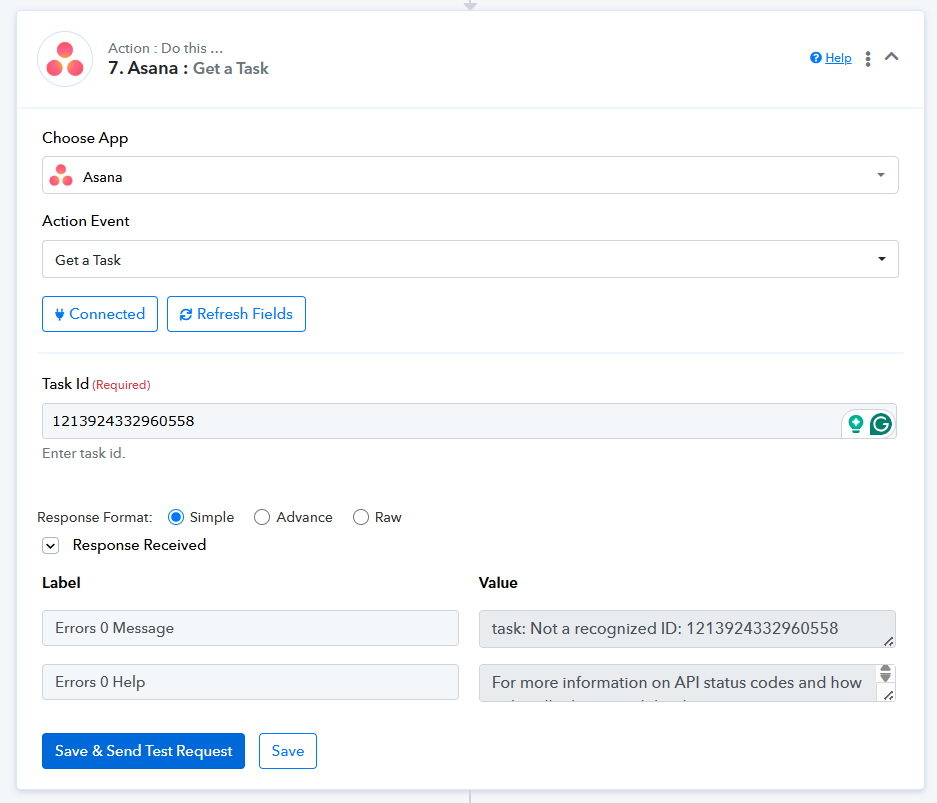
What we recommend:
- Please check your Google Sheet (or source step) and confirm that the correct Task IDs are being stored and passed
- Verify in your Asana account whether those tasks:
- Still exist, or
- Have already been deleted
This should help identify why the workflow is attempting to delete a task that cannot be found.
Let us know what you find, and we’ll assist you further if needed.
@Preeti Paryani Thank you! It looks like the task IDs are saving in the spreadsheet correctly. It could have been that someone might have deleted the task manually without my knowledge. I will continue to monitor the situation. But I've noticed before, that it was taking a very long time to delete the task from Asana after a cancellation from Google calendar. This maybe the reason that they deleted the task from Asana manually.
Sure, please monitor your workflow for some time and see if the issue gets resolved. Please note that the Google Calendar: Event Cancelled trigger is a polling-based trigger, so it may take some time for the task to be deleted from your Asana account after the event is cancelled.
Thanks & Regards,
Arshil Ahmad
Customer Support Associate
? Pabbly.com
Thanks @ArshilAhmad! Can we set the polling time? Because I have noticed before, it didn't get deleted for a couple of days.
Thanks @ArshilAhmad! Can we set the polling time? Because I have noticed before, it didn't get deleted for a couple of days.
The polling time is already set to its minimum of 10 minutes, which means the workflow should be triggered within 10 minutes of the event being cancelled.
Could you please share the task history ID where the event was cancelled, the workflow was triggered, and the task was deleted after 2 days?
Thanks & Regards,
Arshil Ahmad
Customer Support Associate
? Pabbly.com
Sorry, I can't remember which task it was.
Sorry, I can't remember which task it was.
No worries. If you encounter the issue again, please share the Task History ID along with the exact time when the event was cancelled. We will look into the issue from our end.
Thanks & Regards,
Arshil Ahmad
Customer Support Associate
? Pabbly.com
Will do. Thanks!
Now I'm getting these
[JUSTIFY]This email is to notify you that for the workflow "Asana custom field" , a recent task was not executed due to following error -[/JUSTIFY]Task History ID: IjU3NjYwNTZkMDYzMTA0MzA1MjZmNTUzZDUxMzY1MTYxNTQzMzBmMzIi_pc
Step Name: JSON Extractor (Pabbly) > Extract JSON Data
Connection Name: No Auth Connection
Task Error Detail:{
"status": "error",
"message": "Empty data"
}
Based on your Task History, it appears that the field mapped to the JSON Extractor was not received in the "Asana: New Task in Project" trigger step. Because of this, no data was mapped to the JSON Extractor action step, which caused the issue you encountered.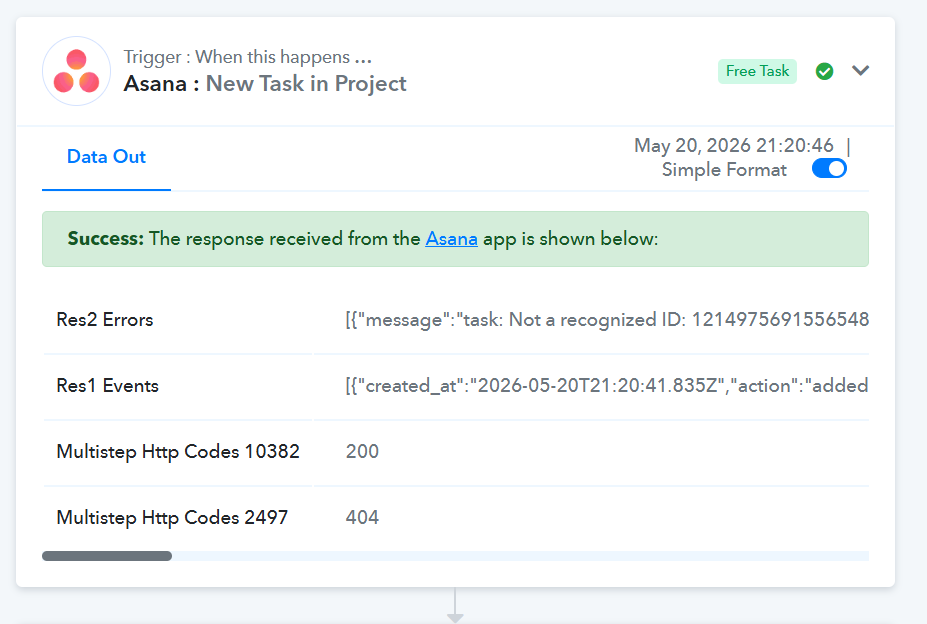
Please make another submission by creating a new task in the "Enrolled Students/Referral Payments" project and verify if the required data is received correctly.
Thanks & Regards,
Arshil Ahmad
Customer Support Associate
? Pabbly.com
Oops sorry I posted this in the wrong thread. Should be moved to https://forum.pabbly.com/threads/asana-custom-field.36254/
We will address your concern there itself.
Thanks & Regards,
Arshil Ahmad
Customer Support Associate
? Pabbly.com