Google Business Profile Trigger Issue: Missing Locations (1000+ Locations Managed)
Status: Open · Asked by stevenphan on · 0 views
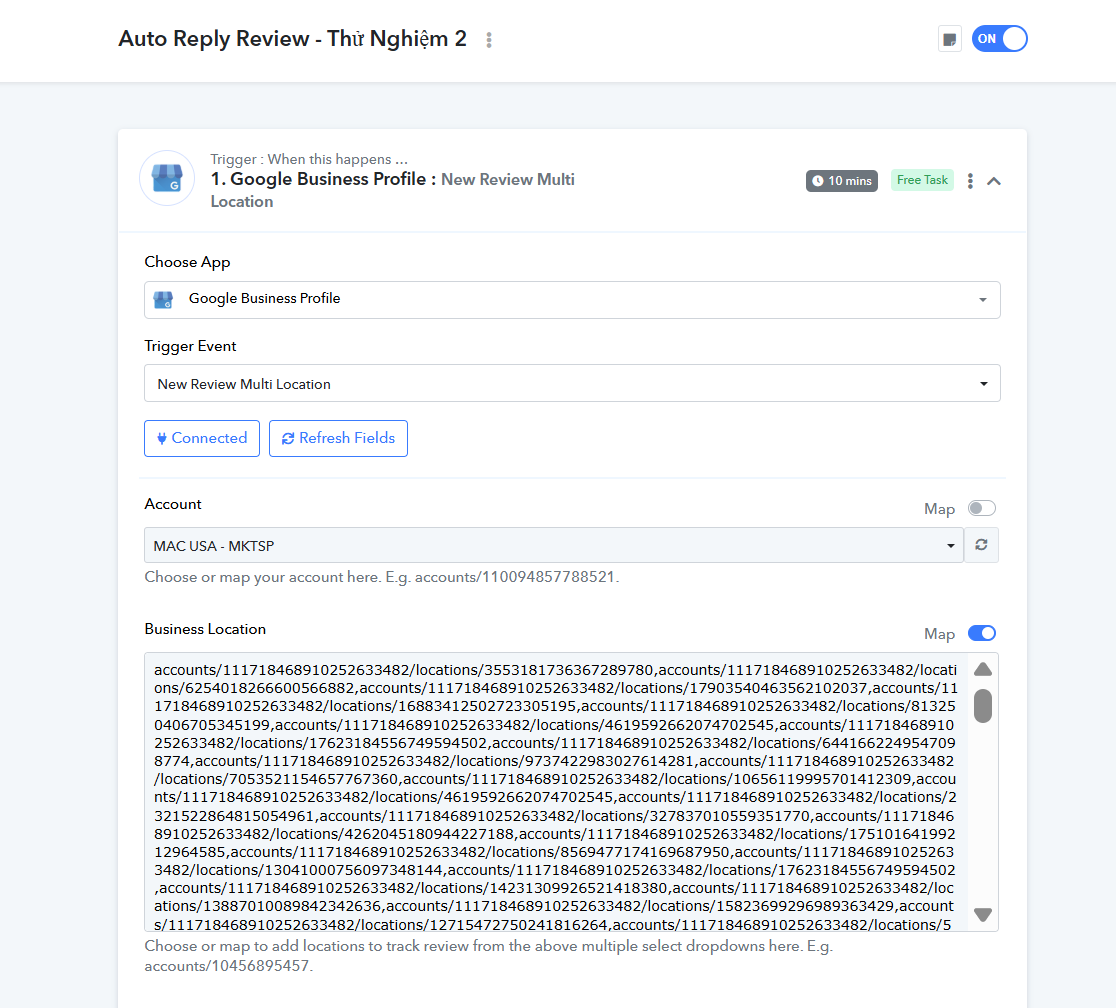
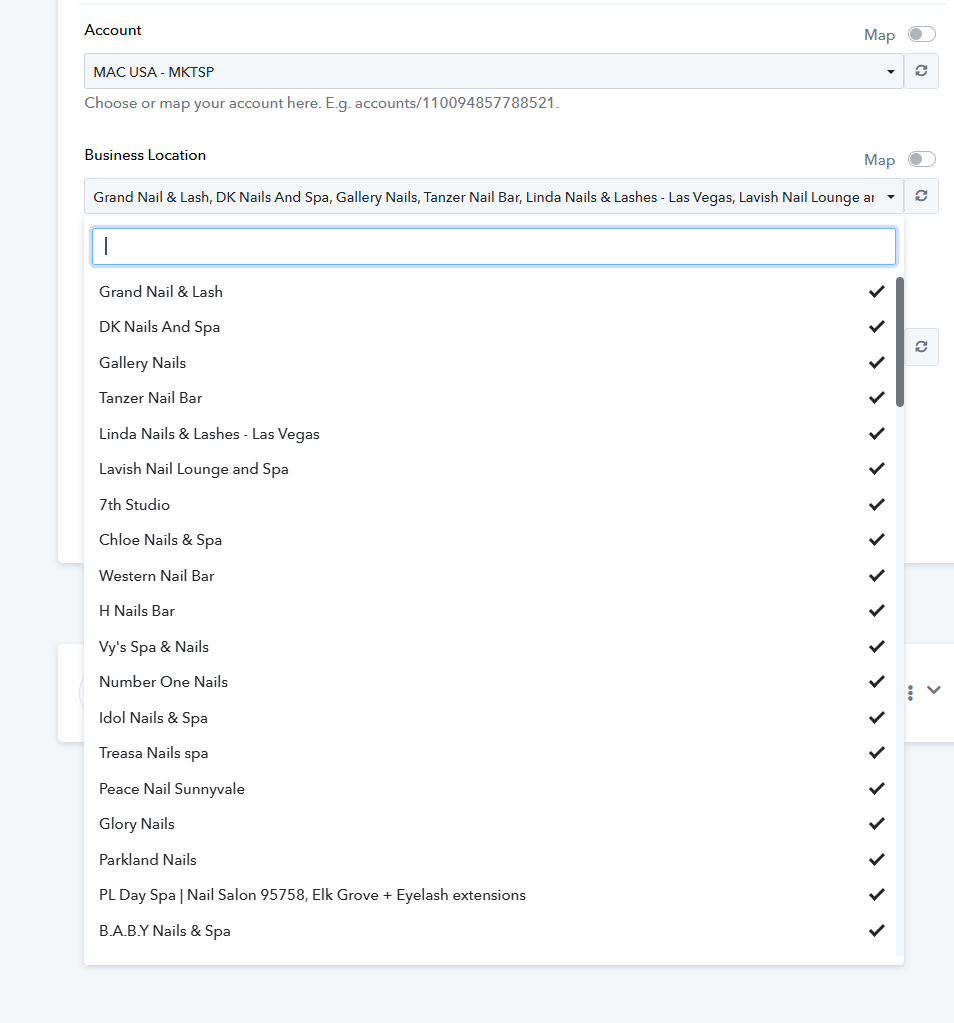
Tôi đang thiết lập quy trình làm việc bằng trình kích hoạt **Hồ sơ Doanh nghiệp Google: Đánh giá Nhiều Địa điểm Mới**, nhưng danh sách thả xuống địa điểm chưa hoàn chỉnh. Hiện tại, tôi quản lý **hơn 1.000 địa điểm** trong tài khoản Google được kết nối này.
Tôi đã xác nhận rằng hành động **Liệt kê Địa điểm** đã trả về thành công tất cả hơn 1.000 ID cửa hàng, cho thấy kết nối và quyền đang hoạt động chính xác. Tôi tin rằng sự cố nằm ở giới hạn hiển thị UI/danh sách thả xuống trên chính trình kích hoạt.
Việc nhập thủ công tất cả ID Địa điểm không phải là giải pháp bền vững, đặc biệt là khi tôi thường xuyên thêm cửa hàng mới. Tôi cần một **giải pháp tự động, có khả năng mở rộng** để giám sát **tất cả các địa điểm hiện tại và tương lai** do tôi quản lý mà không cần cập nhật quy trình làm việc thủ công. Bạn có thể tư vấn về phương pháp hay nhất cho người dùng khối lượng lớn trong trường hợp này (ví dụ: phương thức API cụ thể hoặc thiết lập Webhook) không?
Liên kết: https://connectpabbly.com/workflow/mapping/IjU3NjYwNTY1MDYzMzA0MzA1MjZiNTUzMTUxMzAi_pc
Hi @stevenphan,
Currently, we list 100 locations in the Google Business Profile trigger step. Please allow me some time to discuss the possibility of increasing this limit with the technical team. We will get back to you with an update soon.
Thanks & Regards,
Arshil Ahmad
Customer Support Associate
? Pabbly.com
?Rate your support
Hi @stevenphan,Currently, we list 100 locations in the Google Business Profile trigger step. Please allow me some time to discuss the possibility of increasing this limit with the technical team. We will get back to you with an update soon.
Thanks & Regards,
Arshil Ahmad
Customer Support Associate
? Pabbly.com
?Rate your support
Please reply as soon as possible as I need to reset my review reply flow. It is having problems.
Hi @stevenphan,
Thank you for your patience while we checked this further with our technical team.
The limitation you are facing is due to the Google Business Profile API, which only allows up to 100 locations to be listed in a single request. Unfortunately, this is not something we can extend from our end.
As a workaround to capture reviews from all of your 1,000+ locations, you can follow these steps:
- Use the Get Location endpoint to fetch all of your location IDs.
- Store these IDs in a Google Sheet (or any reference method that works best for you).
- In the trigger step, instead of relying on the dropdown, enable the Map button and manually add all the location IDs (separated by commas).
This will allow the workflow to capture reviews from all your locations, including any new ones you add in the future, without depending on the dropdown limitation.
Please give this approach a try and let us know if it works fine for you.
Hi @stevenphan,Thank you for your patience while we checked this further with our technical team.
The limitation you are facing is due to the Google Business Profile API, which only allows up to 100 locations to be listed in a single request. Unfortunately, this is not something we can extend from our end.
As a workaround to capture reviews from all of your 1,000+ locations, you can follow these steps:
- Use the Get Location endpoint to fetch all of your location IDs.
- Store these IDs in a Google Sheet (or any reference method that works best for you).
- In the trigger step, instead of relying on the dropdown, enable the Map button and manually add all the location IDs (separated by commas).
This will allow the workflow to capture reviews from all your locations, including any new ones you add in the future, without depending on the dropdown limitation.Please give this approach a try and let us know if it works fine for you.
Ok, I tried another way with the link: https://connect.pabbly.com/v2/app/workflow/mapping/IjU3NjYwNTY1MDYzMTA0MzY1MjZhNTUzMTUxMzYi_pc
However, even though I used the same version, the history part did not change according to the name I set.
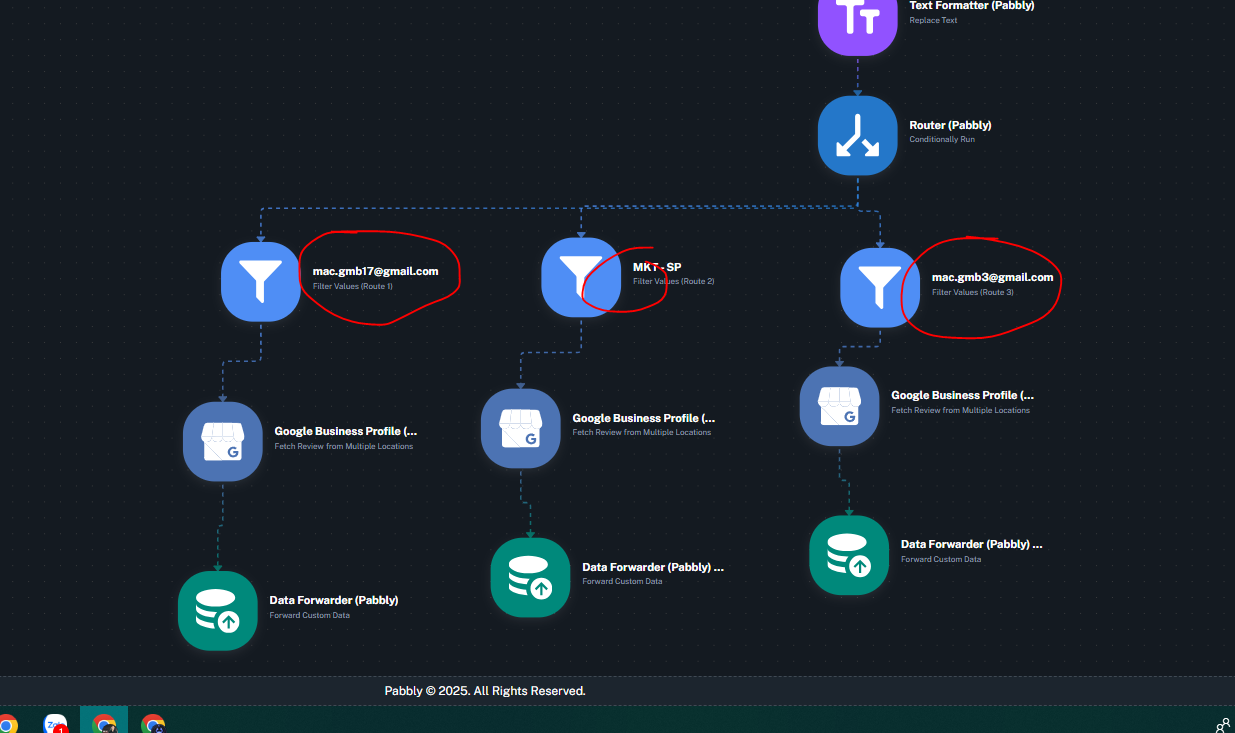
History: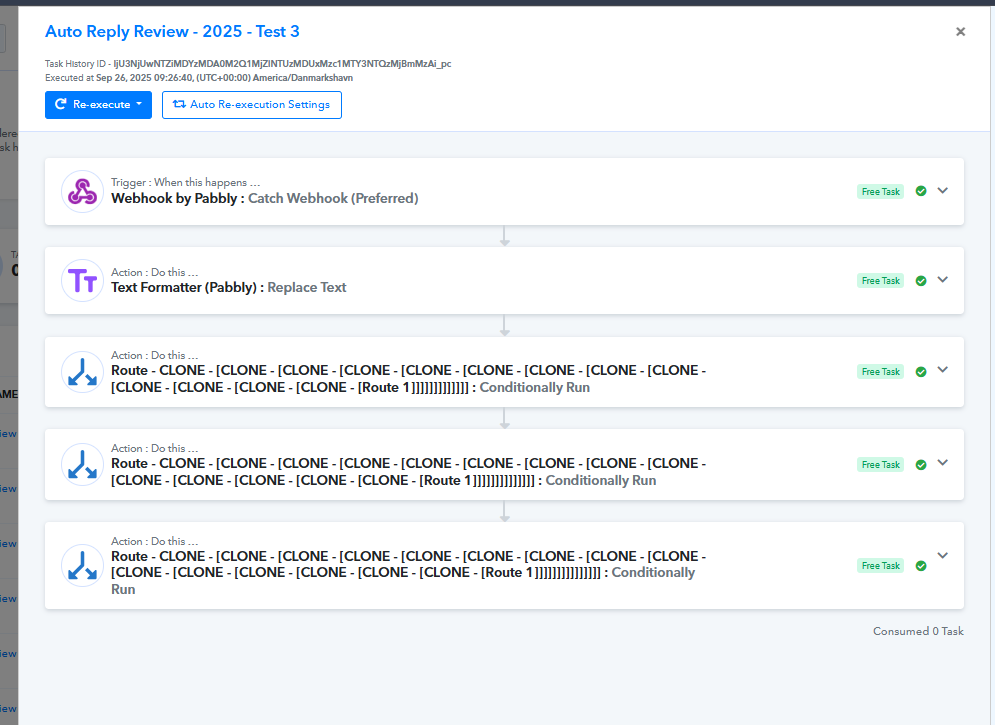
Hello @stevenphan,
We have escalated your concern to the technical team. They are currently working on it. We will update you as soon as we receive any response.
Hi @stevenphan,Thank you for your patience while we checked this further with our technical team.
The limitation you are facing is due to the Google Business Profile API, which only allows up to 100 locations to be listed in a single request. Unfortunately, this is not something we can extend from our end.
As a workaround to capture reviews from all of your 1,000+ locations, you can follow these steps:
- Use the Get Location endpoint to fetch all of your location IDs.
- Store these IDs in a Google Sheet (or any reference method that works best for you).
- In the trigger step, instead of relying on the dropdown, enable the Map button and manually add all the location IDs (separated by commas).
This will allow the workflow to capture reviews from all your locations, including any new ones you add in the future, without depending on the dropdown limitation.Please give this approach a try and let us know if it works fine for you.
I tried this method, but if there is a new store, I have to manually add it or re-list the location. I can't be proactive in this part. When I review many locations, if there is a location that is no longer in the management email, is there an error?
Hello @stevenphan,
We understand your concern. However, this is a limitation from the Google Business API itself. You can refer to the screenshot and API documentation shared below for confirmation.
API Documentation : https://developers.google.com/my-business/reference/rest/v4/accounts.locations/list
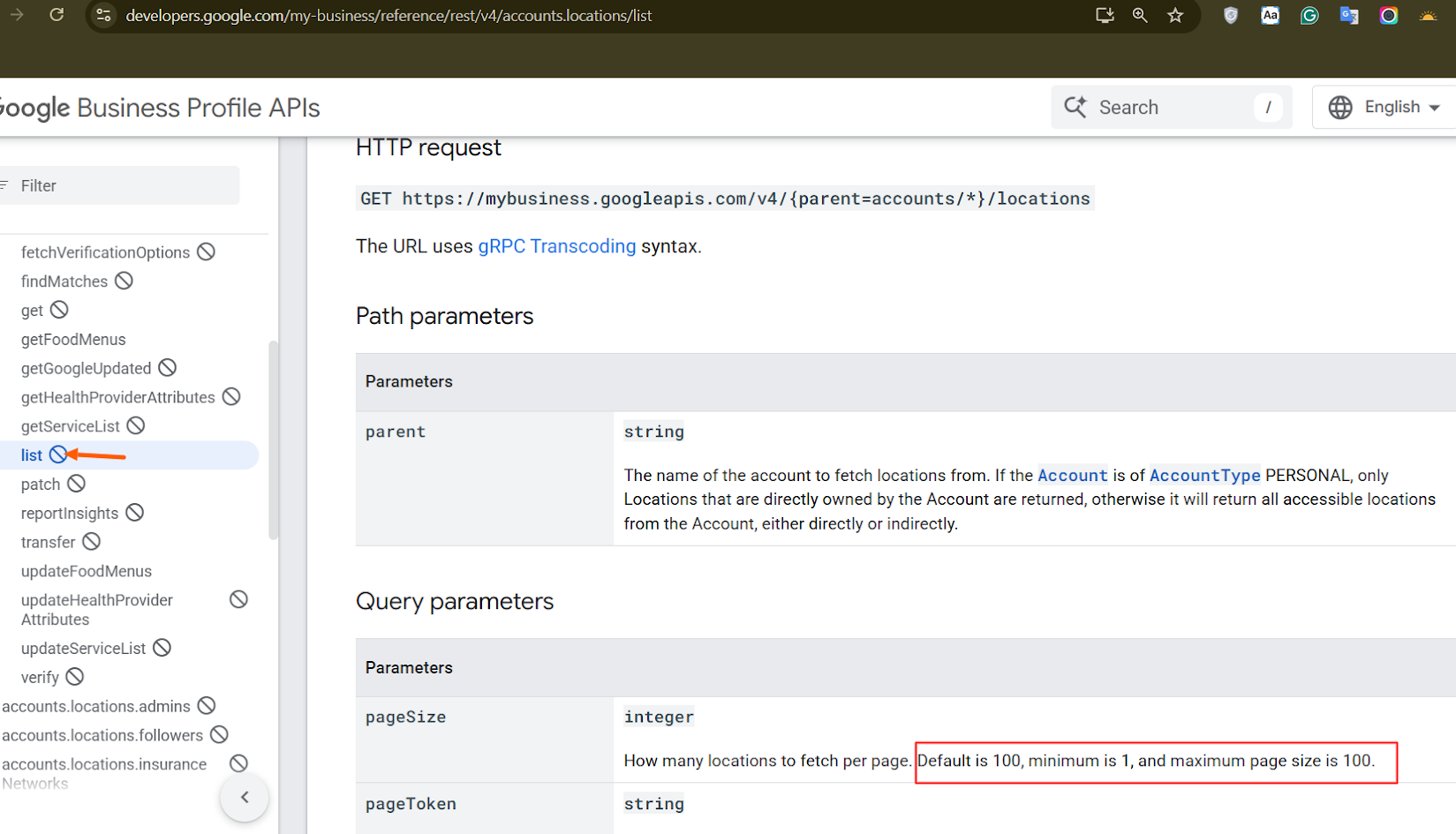
Unfortunately, there is no alternative available to increase this limitation.
Hello @stevenphan,We understand your concern. However, this is a limitation from the Google Business API itself. You can refer to the screenshot and API documentation shared below for confirmation.
API Documentation : https://developers.google.com/my-business/reference/rest/v4/accounts.locations/list
Unfortunately, there is no alternative available to increase this limitation.
Currently my business has too many locations to manage, so the setup is a lot, if it can be streamlined and save time. If you have any suggestions to help me improve this part.
We have discussed your concern with our technical team, but unfortunately, there is no workaround available for your use case at the moment. The locations need to be passed manually in the Google Business Profile trigger step.
Thanks & Regards,
Arshil Ahmad
Customer Support Associate
? Pabbly.com
?Rate your support
Hi @stevenphan,Thank you for your patience while we checked this further with our technical team.
The limitation you are facing is due to the Google Business Profile API, which only allows up to 100 locations to be listed in a single request. Unfortunately, this is not something we can extend from our end.
As a workaround to capture reviews from all of your 1,000+ locations, you can follow these steps:
- Use the Get Location endpoint to fetch all of your location IDs.
- Store these IDs in a Google Sheet (or any reference method that works best for you).
- In the trigger step, instead of relying on the dropdown, enable the Map button and manually add all the location IDs (separated by commas).
This will allow the workflow to capture reviews from all your locations, including any new ones you add in the future, without depending on the dropdown limitation.Please give this approach a try and let us know if it works fine for you.
i have done as you said but it is not working.
link: https://connect.pabbly.com/workflow/mapping/IjU3NjYwNTY1MDYzZTA0M2M1MjY1NTUzNzUxMzQi_pc
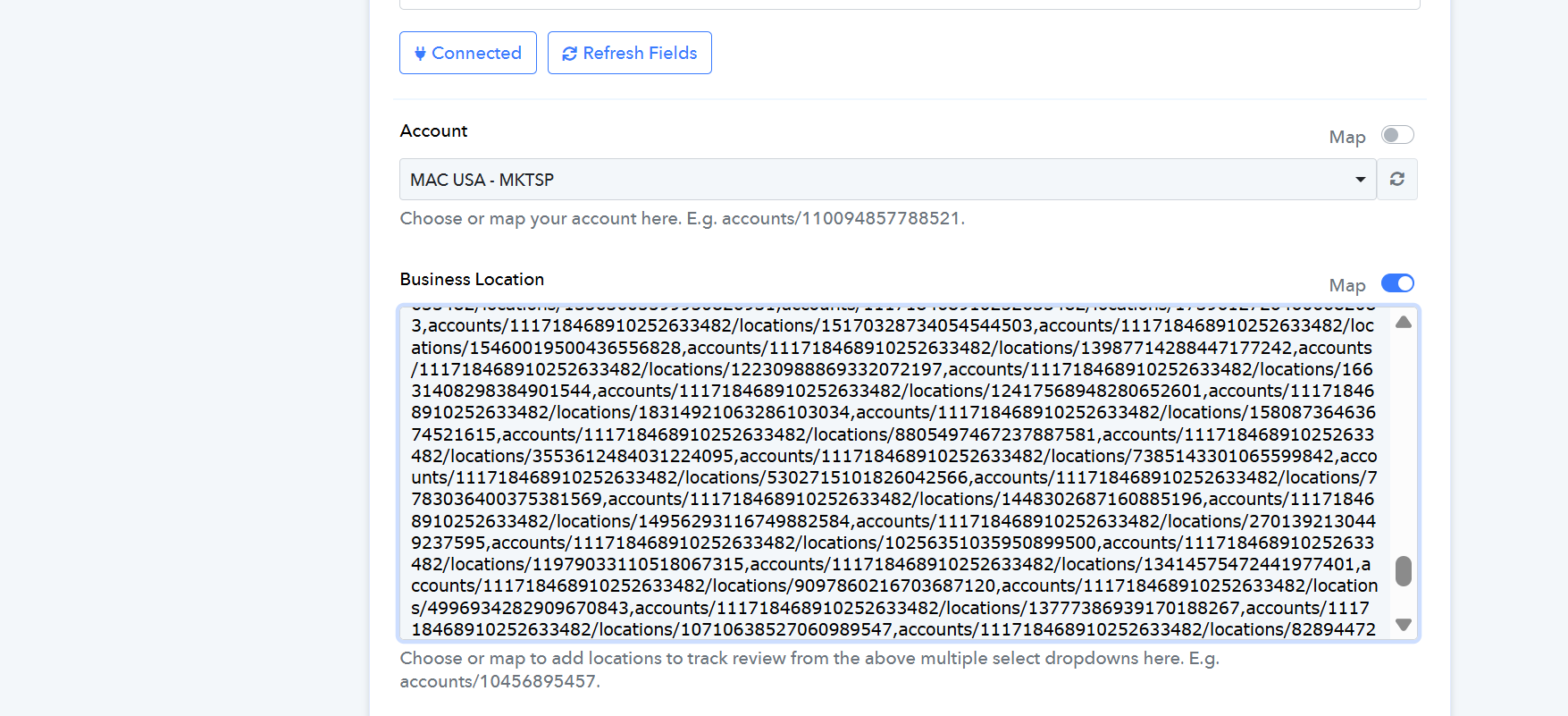
Could you please elaborate a bit more on the exact issue you are encountering so we can better understand the problem and assist you accordingly?
Could you please elaborate a bit more on the exact issue you are encountering so we can better understand the problem and assist you accordingly?
I made a list of all locations and used mapping to review many of them. But when I mapped it, it didn't work.
Hello @stevenphan
As we checked the workflow "New Review MKT-SP - [2025 [Good - Bab [MAU - Nail]]", we found that it is currently inactive. We request you to activate the workflow and monitor it for some time, as no task history has been created. Please monitor the workflow and let us know the results.
Ok, I tried another way with the link: https://connect.pabbly.com/v2/app/workflow/mapping/IjU3NjYwNTY1MDYzMTA0MzY1MjZhNTUzMTUxMzYi_pc
However, even though I used the same version, the history part did not change according to the name I set.
History:
Hello @stevenphan,
We have fixed the issue, and it’s working now. However, please note that the workflow mentioned earlier is in the Trash folder, so it’s no longer possible to test it.
Moving forward, any new task histories captured will have the correctly named router filters.
Let us know if the issue still persists!