Google Doc generation has issues with linebreaks
Status: Open · Asked by Anders Nielsen on · 0 views
Google Doc generation with Pabbly Connect has issues - fields are not replaced properly. They get weird linebreaks.
This worked before but now stopped working out of the blue.
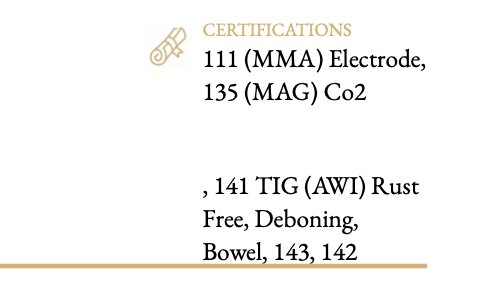
Check this video to see the issue:
https://share.zight.com/6qu1Znl9
It is this flow:
https://connect.pabbly.com/workflow/mapping/IjU3NjUwNTY5MDYzMzA0M2M1MjZkNTUzNDUxMzMi_pc
See this taskhistory item:
IjU3NjUwNTZkMDYzMzA0MzE1MjZiNTUzMjUxMzc1MTYwNTQzNzBmMzgi_pc
This is the Google Doc:
https://docs.google.com/document/d/1Y4K5CHHa9mULrbi46qAKmYkQKHNM4LBTBZJF7aCpgrc/edit
Hello @apps
You can use the "Text Formatter: Replace Text" action step to resolve your issue. Please enter the text which is been mapped to the CertificationsCascaded field in the text field on the text formatter step and then add the data to the further fields as shown in the attached image.
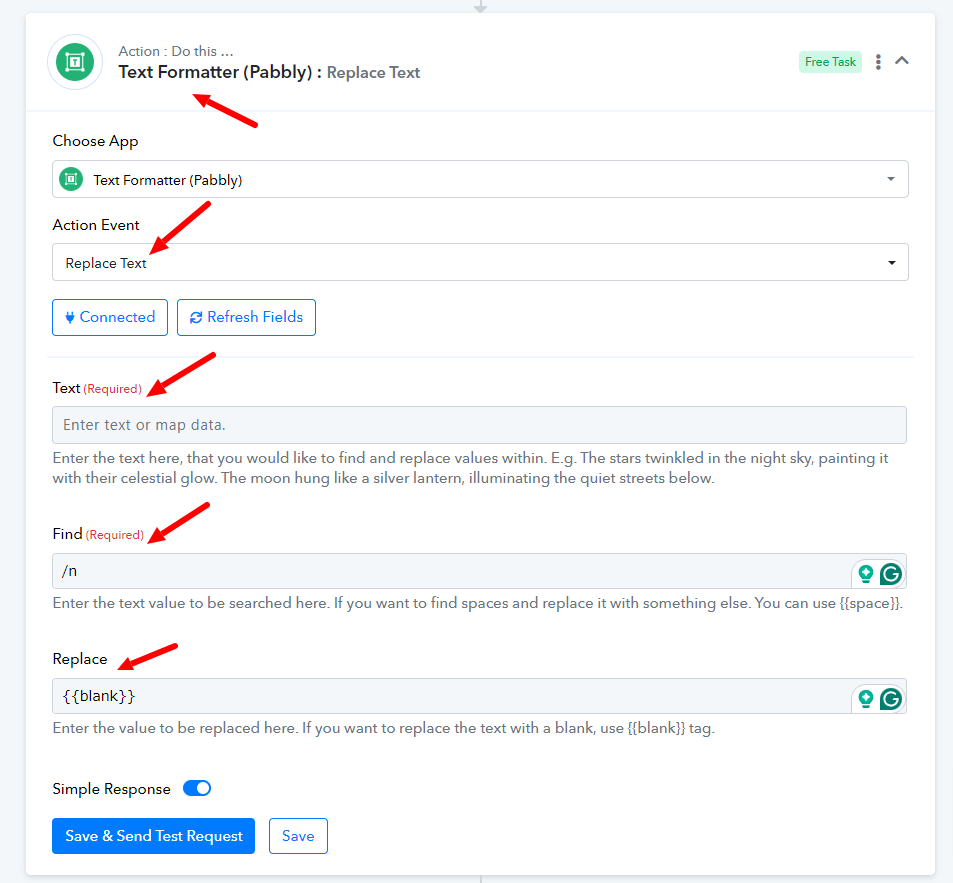
Please let us know if it works for you.