Google Drive > Salad Transcription > Webhook instead of pabbly delay
Status: Open · Asked by ericcpi on · 0 views
Hi,
I was able to make a proof of concept of this Pabbly Connect with Salad IO.
youtube.com/watch?v=2UK2ZH8SvRI:5
However this demo makes use of Pabbly Delay instead of webhook. There might be a use case that a file might be uploaded small or big depending on the size of the audio so as much as possible I want this to be dynamic that when the processing of the Salad Transcription ends then the next processing should take place.
One of the concerns that I have when using webhook is that the filename is lost coming from the google drive as well.
And then after transcription was done, I plan to move the audio or mp4 file from another folder as well, but then again when having webhooks, I cannot trace the ID of the google drive file that was involved.
Hello @ericcpi
Can you please provide us with the workflow URL in which are facing these issues This will allow us to better assist you.
Hello @Preeti Paryani .
Initial creation of the API call for transcription is here.
https://connect.pabbly.com/workflow/mapping/IjU3NjYwNTZjMDYzNDA0MzQ1MjZjNTUzMTUxMzQi_pc
The webhook that listens after the Salad is done is here.
https://connect.pabbly.com/workflow/mapping/IjU3NjYwNTZjMDYzNDA0MzQ1MjZjNTUzMzUxMzIi_pc
Hello @ericcpi
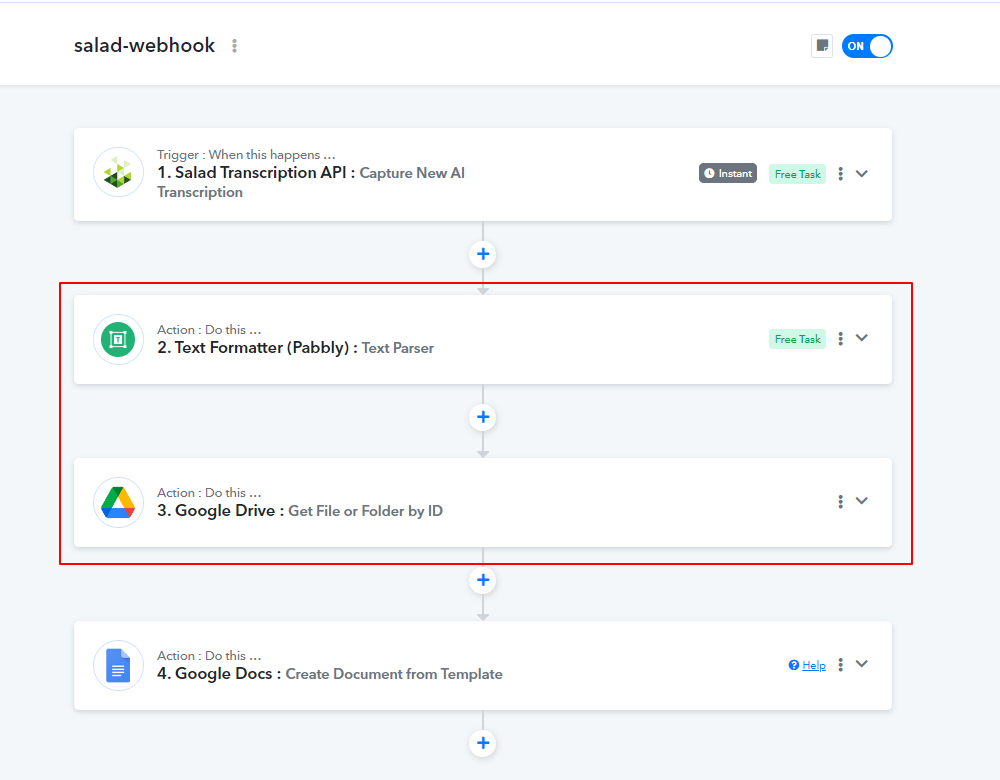
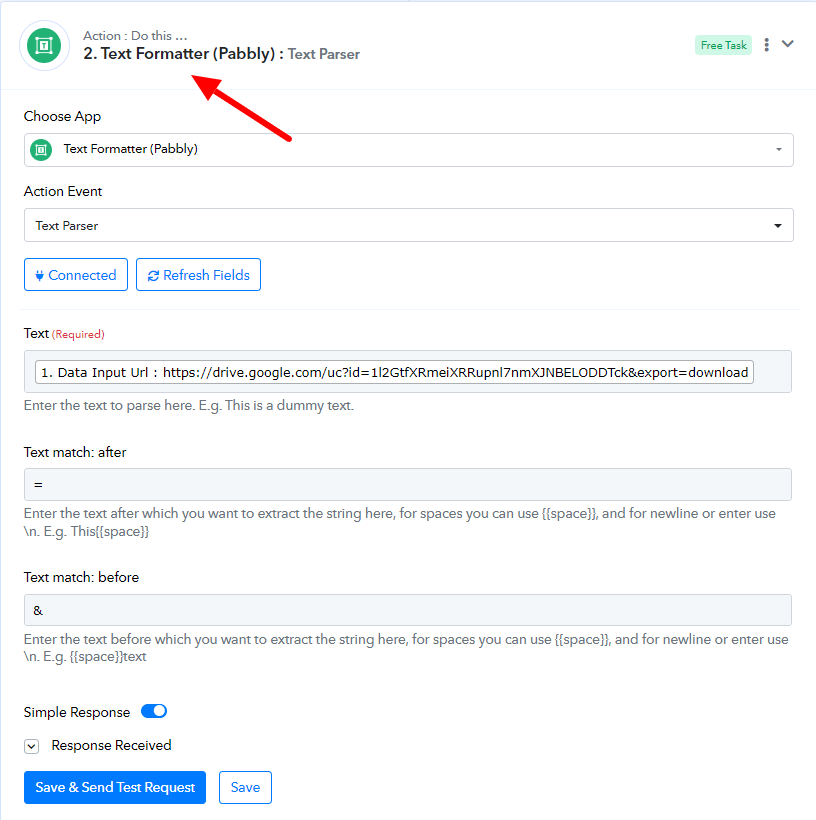
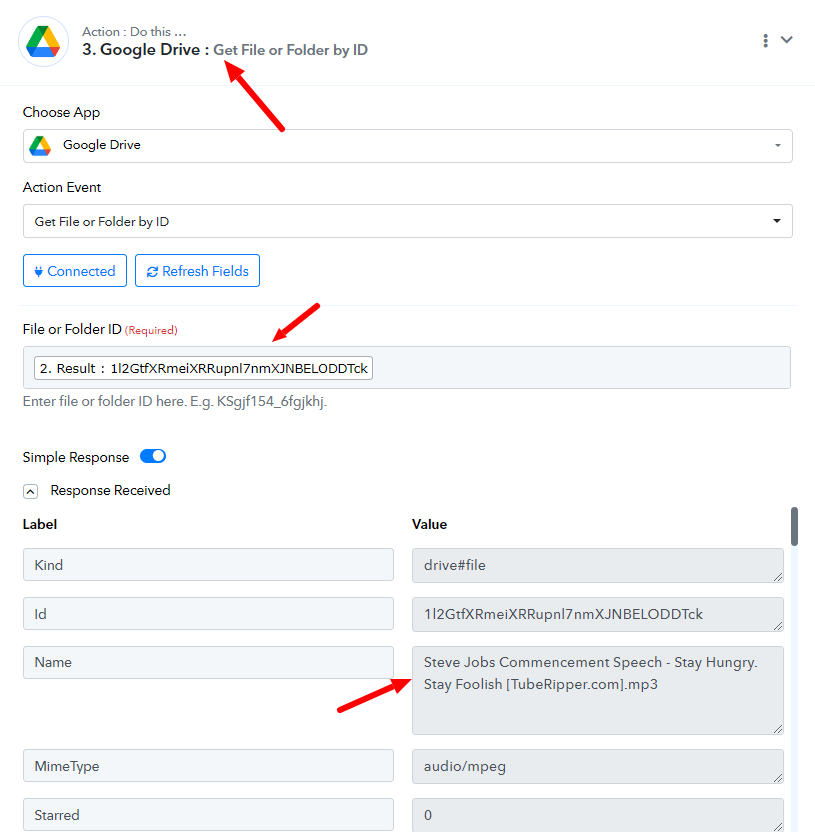
To resolve your issue I have added two additional steps to your workflow(1 free). Please refer to the attached screenshots to learn more about the changes made.
One of the concerns that I have when using webhook is that the filename is lost coming from the google drive as well.
And then after transcription was done, I plan to move the audio or mp4 file from another folder as well, but then again when having webhooks, I cannot trace the ID of the google drive file that was involved.
hi @Preeti Paryani
I am trying to explore what you have adjusted and would like to ask what you mean about this
two additional steps to your workflow(1 free).
- What is not free and what si free, thanks
Hello @ericcpi
To resolve your issue we require the file ID and to retrieve that I have added the below actions:
- Text Formatter: Text Parser (Free action) - To extract the File ID from the Data Input URL.
- Google Drive: Get File or Folder by ID (Paid action) - To get the File details using the File ID received from the previous step, so you can map the file name received in the response of this step in the subsequent step as required.
What is not free and what si free
Hi Pretti, thanks for that clarification on free and what's not.
I am stuck in a process in which when I try to make a testing and step by step, it was able to execute the workflow and call the SALAD API, create the document and move the file afterwards.
However when I dropped a file, it executed the first workflow to call the API but the webhook was not called when I checked the task history.
1st workflow to call the salad API.
https://connect.pabbly.com/workflow/mapping/IjU3NjYwNTZjMDYzNDA0MzQ1MjZjNTUzMTUxMzQi_pc
2nd workflow to call the webhook after the API is done.
https://connect.pabbly.com/workflow/mapping/IjU3NjYwNTZjMDYzNDA0MzQ1MjZjNTUzMzUxMzIi_pc
Here is the task.
IjU3NjUwNTZkMDYzZTA0MzI1MjY1NTUzYzUxM2E1MTY3NTQzOTBmMzEi_pc
NOTE.
1. I tried re-execution of the entire workflow and it worked, so my question is how would i be able to check if the webhook was called or not?
2. There is an auto execution of 1-5 times I think if it failed, how to determine in logs if how many trial was done?
3. Is there a log file or logs of the exection?
Hello @ericcpi
Workflow1 to call the salad API - https://connect.pabbly.com/workflow/mapping/IjU3NjYwNTZjMDYzNDA0MzQ1MjZjNTUzMTUxMzQi_pc
Workflow2 to call the webhook after the API is done - https://connect.pabbly.com/workflow/mapping/IjU3NjYwNTZjMDYzNDA0MzQ1MjZjNTUzMzUxMzIi_pc
As the trigger of the second workflow is the descriptive webhook-based trigger and hence the response received from the trigger application is not in our control.
Also, as you have re-executed the task history we are unable to find the exact reason behind he same.
We will recommend you to monitor both the workflow for some time and if the issue persists, please provide us with the task history ID.